01
Title and purpose
Name the task and state the result it should produce.
Example: Process an approved customer refund.
Documents & operationsFree ZuffSuite tool
Create a standard operating procedure online from the details you know. Add the trigger, owner, prerequisites, numbered steps, exceptions, and quality checks, then review and copy or download your Markdown draft. No signup required.
This creates a structured draft from details you supply. Confirm steps, safety requirements, and escalation paths with a process owner before publishing.
Your result
A structured draft with numbered steps and the control sections a reader needs to follow the process.
Your result will appear here
Add a few details to the form and generate a draft to review, copy, or download.
A practical starting point
An SOP is a written, agreed sequence for completing a recurring task. It tells the person what starts the work, who owns it, what information or tools are needed, which actions happen in order, and how to verify the result. Solo operators use SOPs to remember repeat work; small teams use them to standardize handoffs and train new staff. Write down the process as it is actually performed, then update it when the tools, responsibilities, or approved policy change.
How to use the tool
This free SOP generator is form-based: it organizes details you supply into a first draft. It does not decide company policy or fill in facts you have not checked.
Enter a Process or SOP title. In Purpose and trigger, explain what starts the work and what a successful result looks like.
Use Scope to say which cases fit. Name the Process owner, then list Prerequisites and Materials or tools someone needs before starting.
Add one action per line in Rough procedure steps. Use Exceptions, Quality checks, and Escalation path to cover alternate outcomes and verification.
Set a Review schedule, choose Generate SOP draft, then check it with someone who performs the work. Copy Markdown or download the Markdown file to keep it.
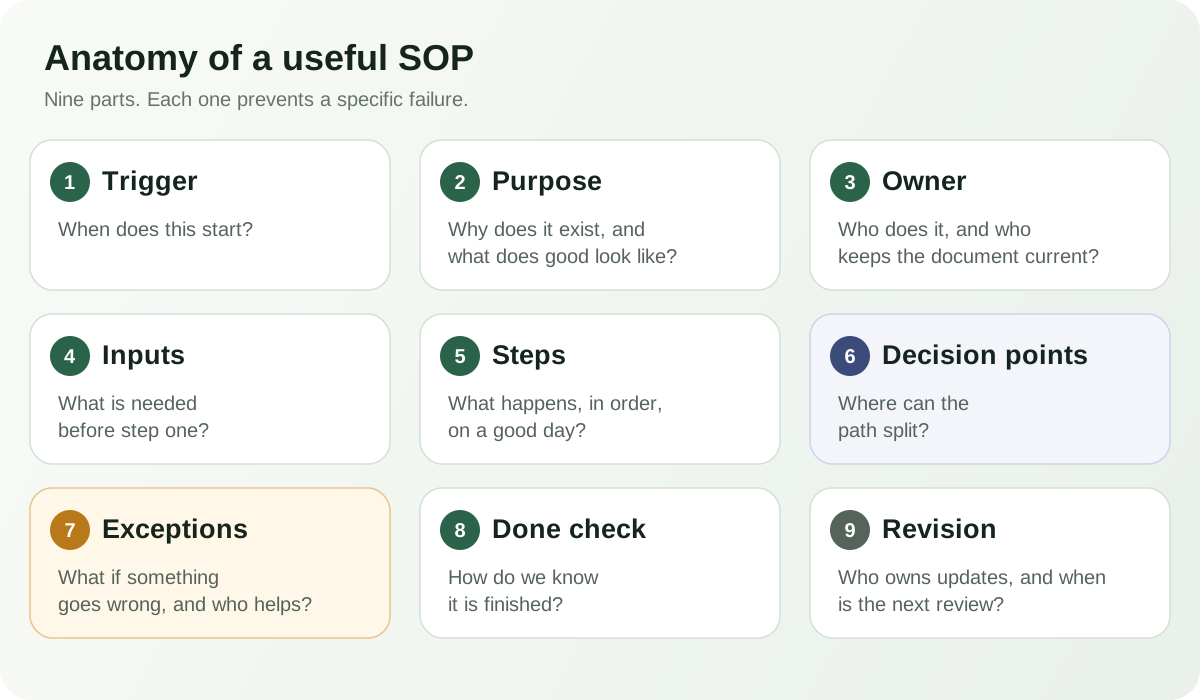
SOP anatomy
These sections answer practical questions. The generator has separate fields for most; Purpose and trigger share one field. Add a review owner to the published document when your process needs one.
01
Name the task and state the result it should produce.
Example: Process an approved customer refund.
02
Say when it applies and what starts it.
Example: A customer sends a refund request for an order the business sold.
03
Name who keeps the instructions current.
Example: Support lead.
04
List what must be ready and which tools the worker needs.
Example: Order record, current policy, and payment dashboard.
05
Put actions in order, one action per step.
Example: Open the order, verify eligibility, record the decision, and notify the customer.
06
Describe when the normal path changes and who decides next.
Example: Send requests outside the approved policy to the policy owner.
07
Give the reader a visible way to confirm the task is complete.
Example: Confirm the transaction record matches the decision.
08
State who should handle a blocker or decision beyond the worker's authority.
Example: Pause an unusual request and contact the support lead.
09
Set a cadence or change trigger and name who updates the copy.
Example: Review after policy changes; the owner updates it.
Worked examples
These are short frameworks, not approved policies. Confirm business rules, timing, safety, access, and legal obligations with the process owner before using an example.
Have a process of your own?
Enter its real steps and turn them into a draft you can review.
Make the draft usable
The best procedure is clear to the person doing the job and specific enough to verify. Keep it short where you can, then test it against the real work.
Treat every generated SOP as a draft. A process owner must verify the steps, policy references, and escalation route. Safety, legal, financial, and regulated procedures need the responsible subject-matter expert's review before anyone relies on them.
Choose the right starting point
Choose based on what you already have and what you need to do next.
Start here when your process is still in rough notes or in someone's head. The form organizes the details into a structured draft that you can check and take with you.
Go to the generatorChoose a reusable layout when you want a formatted document to complete, edit, and maintain with your own revision details.
Open the SOP document templateKeep a procedure beside related documents and use approvals and version history as your process needs more formal maintenance.
Continue in ZuffSuite DocsWant the longer writing guide? Learn how to write an SOP for a small business.
Read the step-by-step SOP guideClear answers
Check how the tool works before you rely on the procedure it creates.
An SOP generator organizes the process details you enter into a standard operating procedure draft, with a title, trigger, owner, steps, exceptions, checks, escalation path, and review schedule.
Yes. The generator is free and requires no account. Create a draft, review it, copy the Markdown, or download the Markdown file.
No account is needed. The tool has no document library or version history, so download drafts you want to keep.
Edit the form and generate again. The result is not editable here; copy Markdown or download the .md file to edit elsewhere. Print opens your browser's print controls.
Required fields are Process or SOP title, Purpose and trigger, and Rough procedure steps. Add Scope, owner, prerequisites, tools, exceptions, checks, escalation path, and review schedule when useful.
Yes. Use it for recurring customer service, onboarding, opening or closing, and handoffs. Have the owner review drafts before training staff.
A checklist confirms required items are done. An SOP explains when work starts, who owns it, which steps to follow, what to do when things change, and how to verify the result. A checklist can be part of an SOP.
No. It arranges your details into sections and numbered steps; it does not invent instructions. Have the owner review the draft.