Docs
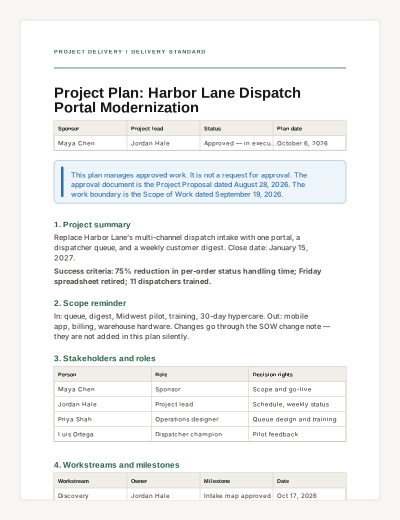
Project Plan
A living plan for approved work: objectives, roles, milestones, risks, cadence, and open decisions.
View templateYour personal productivity workspace
Plan projects. Write documents. Organize data. Track tasks. Brainstorm on a whiteboard. Build the final presentation. Keep each step connected instead of rebuilding the same work across different apps.
Free personal workspace · No credit card required
Project Tracker
Connected to this project · 7 fields
| Work item | Owner | Priority | Due | |
|---|---|---|---|---|
| Outline research questions | You | High | Research | Oct 5 |
| Organize survey responses | You | Medium | Data | Oct 12 |
| Draft project presentation | You | Medium | Present | Oct 14 |
| Review the final story | You | Low | Review | Oct 24 |
Everything connects
Real work changes shape. An idea becomes a plan and tasks, draws on research and data, turns into a document, and ends in something you can share. ZuffSuite keeps those steps connected in one ready-to-use workspace.
Project Overview: City Spaces
A clear place for the question, evidence, milestones, and linked project work.
| Project owner | You Chen | On track |
| Next milestone | Presentation draft · Oct 26 | |
Docs
Documents with templates, versions, and review built in.
One piece of work, carried forward
For example, sketch a short course on a whiteboard, plan the lessons in Today, organize research in a Smart Table, write the guide in Docs, and bring the finished story into a presentation.
A workspace for the work between classes
Research, write, organize classwork, and build the final presentation in one student workspace—with study tools grounded in materials you select.
One project · connected steps
From the assignment to the final share
Try something useful first
Generate a timeline, status report, meeting follow-up, or SOP draft for free. Your immediate job comes first; continue in ZuffSuite when you want a workspace around it.
Browse all free toolsBusiness Kits
When recurring work needs more structure, a Business Kit gives you a connected starting point — a tracker, the documents around it, and the first tasks. You can start with one document or task instead.
Kit preview
Run a small-business project with one shared tracker, a clear overview, meeting notes, and an honest risk log — all pointed at the same project.
What gets created
Kit assembledProject TrackerSmart Table
Shared Smart Table — every project adds rows here
Project OverviewDoc
Project PlanDoc
Meeting NotesDoc
Risk & Issue LogDoc
Starter project tasksTasks
This is ZuffSuite's real Project Management kit. One click assembles the tracker, four documents, and starter tasks — already linked to the same project.
Templates
Browse ready-made Docs, Sheets, Forms, and Presentations with real previews, then customize one in its ZuffSuite workspace when you are ready.
A living plan for approved work: objectives, roles, milestones, risks, cadence, and open decisions.
View template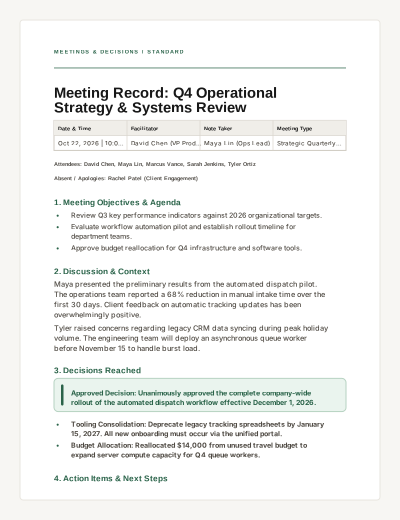
A structured meeting record capturing objectives, discussion points, key decisions, and assigned action items with checkboxes.
View template| Task | Owner | Status | Due date |
|---|---|---|---|
| Confirm project scope | Maya | Complete | 2026-09-18 |
| Draft implementation plan | Jordan | In progress | 2026-09-24 |
| Schedule client review | Taylor | Not started | 2026-09-29 |
Use the status and due-date fields for review; effort and cost formulas remain editable.
Keep tasks, owners, status, due dates, and estimated effort visible in one sheet.
View templateAre you a new customer?
Which service or product did you use?
How satisfied were you overall?
Collect satisfaction ratings, product or service feedback, and improvement suggestions right after a customer interaction.
View templateThe Future of City Streets
How a neighborhood redesign can make room for everyone
FIELD NOTE / 01
Read the crossing before redrawing it

A safer street begins where people already choose to walk.
Three measures to carry forward
01
Safer crossings
02
Reliable access
03
Places to pause
Magazine-style storytelling with decisive type, rules, and spacious evidence slides.
View templateThe Energy Transition
A college project on renewable energy choices
FIELD CONTEXT
Local conditions shape the answer

Match the technology to the site, the demand, and the people it serves.
A balanced evaluation
3
Decision criteria
2
Supply options
1
Local recommendation
Vibrant, credible project storytelling for college classes and research.
View templateReal operational data
Track the work in Smart Tables your whole team can filter and group. When it needs real formulas, a workbook sits right beside it — no exporting, no second system.
Projects, clients, inventory, candidates — structured records with owners and statuses that you can filter, group, and share when useful.
Project Tracker
| Work item | Owner | Status | Due |
|---|---|---|---|
| Outline research questions | You Chen | In review | Oct 5 |
| Organize survey responses | You | In progress | Oct 12 |
| Draft project presentation | You | Not started | Oct 14 |
A formula-capable spreadsheet with a native engine — totals, summaries, and references recalculate like you expect, beside the rest of the work.
| Row | A | B | C | D |
|---|---|---|---|---|
| 1 | ||||
| 2 | Cold brew (L) | 18 | 2 | 36 |
| 3 | Oat milk cases | 24 | 1 | 24 |
| 4 | Pastry trays | 16 | 3 | 48 |
| 5 | 22 | 2 | 44 | |
| 6 | 80 | 152 |
Docs
Start from a research-backed template, draft with a focused editor, and keep every revision, suggestion, and question attached to the document itself.
40 research-backed templates
Proposals, SOPs, plans, resumes — with real previews before you commit.
Version history & restore
Every save is tracked; roll back to any revision without leaving the editor.
Review & suggestions
Leave suggestions and resolve them inline — edits never overwrite silently.
Ask This Document
Question your own document and get answers grounded only in its content.
Project Overview: City Spaces
A clear place for the question, evidence, milestones, and linked project work.
| Project owner | You Chen | On track |
| Next milestone | Presentation draft · Oct 26 | |
Your day
Work items surface on Today with owners and dates already attached. Approvals, reminders, and recurring work stay connected to the record behind them — so nothing lives only in someone’s memory.
Today
3 from the trackerApprovals and reminders find you here — no tab-jumping.
Zuffa inside ZuffSuite
Zuffa is the AI assistant inside ZuffSuite. Ask about workspace information, create a useful starting point, or get help while you are working in a sheet.
Ask about selected workspace information, create a useful starting point, or get help while you work. You stay in control of what Zuffa can use and change.
Ask questions about the information your workspace already contains.
Start freeDescribe the setup you need and start with connected work instead of a blank page.
Start freeGet formula help and workbook guidance grounded in the sheet you are working on.
Start freeOne workspace
Begin with a template or workspace surface that fits today’s work. Bring in other people when a review or handoff calls for it.
Free personal workspace · No credit card required