Standard Operating Procedure
A standard operating procedure (SOP) provides step-by-step instructions for routine operations. It ensures consistency, quality, and compliance across your team.
What's Included
- Document Control & Metadata
- Purpose & Scope
- Roles & Responsibilities
- Step-by-Step Procedure
- Quality Verification Checklist
- Exception Handling & Escalation
Best For
Employee onboarding, client account setups, IT deployment protocols, incident responses, and routine administrative workflows.
Target Audience
Operations managers, team leads, compliance officers, and department heads.
How to Customize
Replace the client onboarding example with your team's specific process. Customize SLAs, roles, and exception triggers to match your operating model.
When to Use
Use an SOP when a workflow must be performed identically regardless of who runs it — client onboarding, software deployments, billing runs, or compliance checks.
Full Document Preview
Standard StylePreview the actual editable ZuffSuite document.
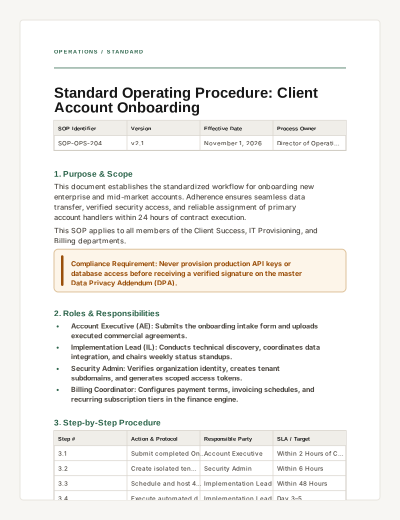
OPERATIONS / STANDARD
Standard Operating Procedure: Client Account Onboarding
SOP Identifier | Version | Effective Date | Process Owner |
|---|---|---|---|
SOP-OPS-204 | v2.1 | November 1, 2026 | Director of Operations |
1. Purpose & Scope
This document establishes the standardized workflow for onboarding new enterprise and mid-market accounts. Adherence ensures seamless data transfer, verified security access, and reliable assignment of primary account handlers within 24 hours of contract execution.
This SOP applies to all members of the Client Success, IT Provisioning, and Billing departments.
Compliance Requirement: Never provision production API keys or database access before receiving a verified signature on the master Data Privacy Addendum (DPA).
2. Roles & Responsibilities
Account Executive (AE): Submits the onboarding intake form and uploads executed commercial agreements.
Implementation Lead (IL): Conducts technical discovery, coordinates data integration, and chairs weekly status standups.
Security Admin: Verifies organization identity, creates tenant subdomains, and generates scoped access tokens.
Billing Coordinator: Configures payment terms, invoicing schedules, and recurring subscription tiers in the finance engine.
3. Step-by-Step Procedure
Step # | Action & Protocol | Responsible Party | SLA / Target |
|---|---|---|---|
3.1 | Submit completed Onboarding Intake Form and verify signed MSA/DPA in CRM repository. | Account Executive | Within 2 Hours of Close |
3.2 | Create isolated tenant instance, configure SAML/SSO domain routing, and verify audit logging. | Security Admin | Within 6 Hours |
3.3 | Schedule and host 45-minute technical kickoff call with client IT and project sponsors. | Implementation Lead | Within 48 Hours |
3.4 | Execute automated data import scripts and perform field-mapping validation check. | Implementation Lead | Day 3–5 |
3.5 | Conduct user acceptance walkthrough, issue production credentials, and formalize handoff to Customer Success. | Implementation Lead | Day 7 |
4. Quality Verification & Audit Checklist
Verify signed master agreements and DPA are archived in compliance drive.
Confirm SSO login authentication succeeds across all provisioned corporate user domains.
Validate test invoice generation matches contracted milestone rate schedule.
Obtain client sponsor sign-off on initial data migration integrity report.
5. Exception Handling & Escalation
If custom legacy data formatting causes automated import failures exceeding 5% error rates, immediately suspend script execution and notify the Lead Data Architect. Do not attempt manual bulk SQL overrides in production environments.
What this document is
A Standard Operating Procedure (SOP) is an authoritative document that outlines exact sequential steps for executing a business process. It defines responsibilities, SLAs, and verification gates.
When to use it
Use an SOP when a workflow must be performed identically regardless of who runs it — client onboarding, software deployments, billing runs, or compliance checks.
How to use this ZuffSuite template
Fill out the document control table at the top. List key roles clearly in section 2. Use the sequential step table for the core workflow, and enforce verification with the task checklist.
Best practices
- Keep steps sequential and assign a single responsible role per step.
- Include measurable SLAs for each phase.
- Highlight non-negotiable compliance requirements with callouts.
- Add interactive task items for verification audits.
Common mistakes
- Writing vague guidelines instead of actionable steps.
- Failing to designate who owns each step.
- Skipping the exception/escalation protocol.
Related documents
SOP vs. Work Instruction
An SOP covers the broad multi-role process across departments. A Work Instruction details granular, single-task execution steps for an individual worker. Work Instruction
SOP vs. Process Guide
An SOP is a formal compliance and operational standard. A Process Guide is an explanatory overview that teaches how a system or department works. Process Guide
Questions people actually ask
- How often should an SOP be reviewed?
- Standard operating procedures should typically be reviewed annually or whenever the underlying tool, regulatory rule, or team workflow changes.
- Can I use this SOP for compliance audits?
- Yes. This template incorporates ISO-aligned document control metadata, role allocations, and verification checklists designed for audit readiness.
Related templates
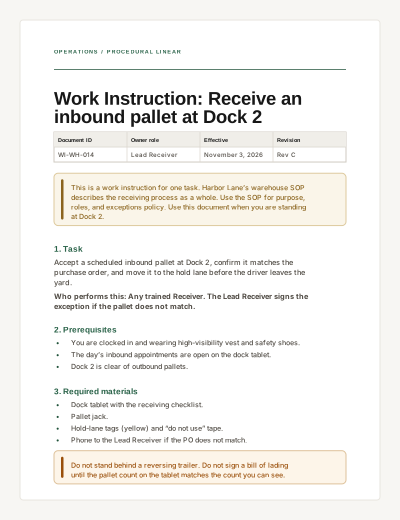
Work Instruction
A task-specific procedure with prerequisites, numbered steps, completion criteria, and troubleshooting.
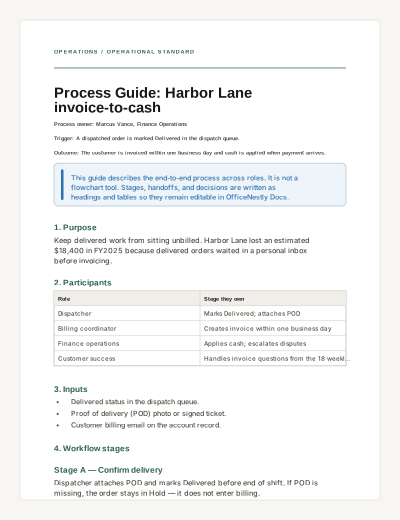
Process Guide
Explain an end-to-end business process: trigger, participants, stages, handoffs, decisions, and metrics.
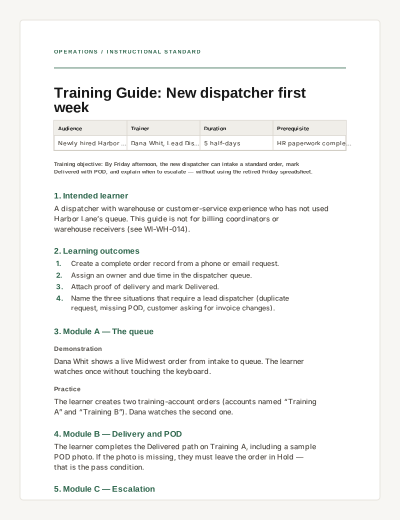
Training Guide
A practical internal learning document with outcomes, modules, practice, and completion criteria — not an interactive quiz.