How-to guide 2026
How to Write an SOP for a Small Business: Template, Examples & Best Practices
A good SOP makes a repeatable process easier to perform correctly, not just easier to describe. Here is a nine-part structure, a full example, and the mistakes to avoid.

Most small businesses have at least one SOP that nobody uses. It was written in a burst of good intentions, saved in a folder, and quietly went out of date. The people doing the work kept doing it the way they had always done it, and the document became something you point to when a new hire asks a question.
The usual causes are not mysterious. The SOP is too long, too vague, or written like a policy. Nobody owns it. It never says when the process starts, and it says nothing about what to do when something goes wrong. This guide takes a different view: an SOP should make a repeatable process easier to perform correctly, not merely document it. That means describing how the work really happens, in a form someone can follow while they are doing it.
What is an SOP?
A standard operating procedure is a set of written instructions for a routine or repetitive activity. The U.S. EPA’s guidance on preparing SOPs describes them in much the same way. Their purpose is consistency: the job is done the same way, to the same standard, whoever does it.
An SOP is not a record of everything you know about a process. It is not a policy, a training course, or a history of why you do things this way. It is the practical answer to one question: what should the person doing this work do, in what order, and how will they know they are finished?
SOP vs. work instruction vs. checklist vs. policy
These terms get used loosely, and businesses define them differently. What follows is a common and useful way to separate them. Adopt whichever labels suit your team, but keep them consistent.
| Document | What it does | Best used for |
|---|---|---|
| Policy | States a rule or expectation and why it exists. | Governing behavior, such as how refunds are decided in principle. |
| Process map | Shows the flow of a process visually, often across roles. | Seeing the whole path and where handoffs happen. |
| SOP | Describes who does what, in what order, for a recurring process. | Multi-step work that repeats, such as handling a refund request. |
| Work instruction | Gives detailed steps for one specific task inside a process. | A task where the exact method matters, such as issuing a refund in the payment system. |
| Checklist | Confirms that required items were done. | Verifying completion, often at the end of an SOP or work instruction. |
Policy
- What it does
- States a rule or expectation and why it exists.
- Best used for
- Governing behavior, such as how refunds are decided in principle.
Process map
- What it does
- Shows the flow of a process visually, often across roles.
- Best used for
- Seeing the whole path and where handoffs happen.
SOP
- What it does
- Describes who does what, in what order, for a recurring process.
- Best used for
- Multi-step work that repeats, such as handling a refund request.
Work instruction
- What it does
- Gives detailed steps for one specific task inside a process.
- Best used for
- A task where the exact method matters, such as issuing a refund in the payment system.
Checklist
- What it does
- Confirms that required items were done.
- Best used for
- Verifying completion, often at the end of an SOP or work instruction.
A simple way to hold this together: the policy says what is allowed, the SOP says how the process runs, the work instruction says how to do one task within it, and the checklist confirms nothing was missed. For a small team, one page that combines an SOP with a short checklist is often enough.
When does a small business need an SOP?
Not every task deserves one. Write an SOP when the work repeats, when mistakes are costly or annoying, when more than one person might do it, or when it crosses hands. Common candidates include:
- Recurring client work and client onboarding.
- Employee onboarding.
- Approvals and purchasing.
- Refunds, returns, and complaints.
- Inventory counts and quality checks.
- Recurring reports.
- Incident handling.
- Handoffs between people or shifts.
If a task happens once a year and only you do it, a few notes may be enough. If it happens weekly and three people touch it, it is worth writing down. Our guide to small business workflow automation offers a scoring filter for deciding which processes to tackle first, and the same logic applies here.
The nine parts of a useful SOP
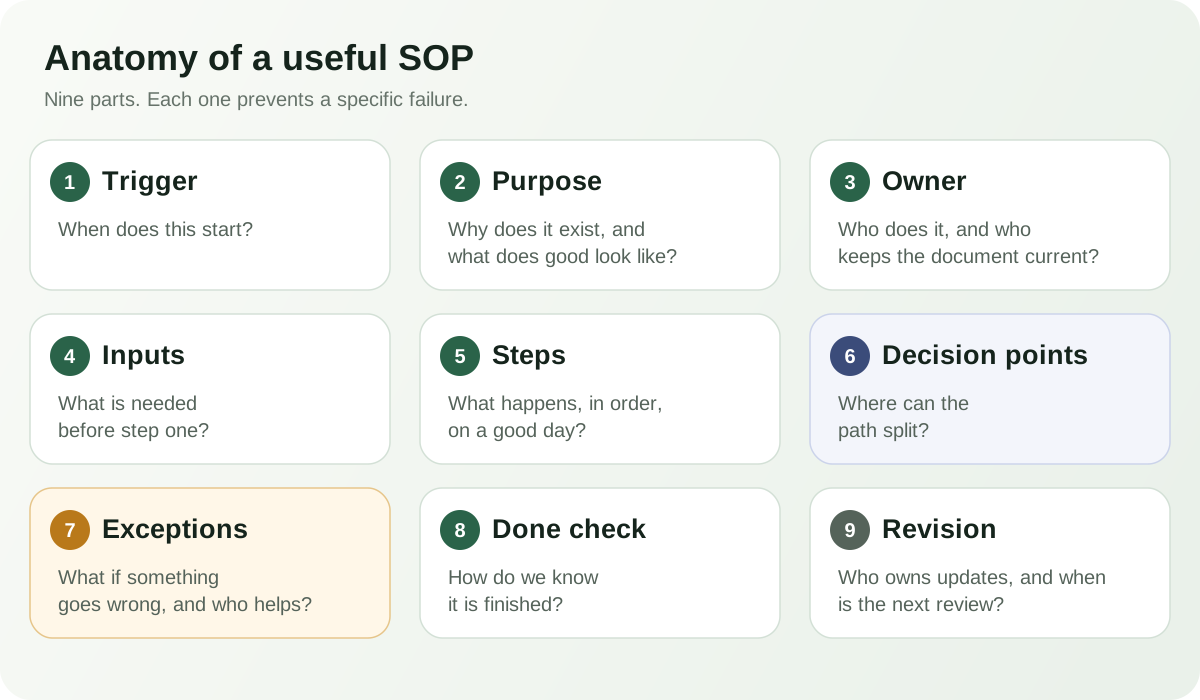
Templates online list many sections. In a small business, nine cover what people actually need, and each one prevents a specific failure.
1. Trigger
The event that starts the process. Without it, people are unsure when to use the SOP. Example: “A customer emails or submits the form asking for a refund.”
2. Purpose
One or two sentences on why the process exists and what good looks like. Keep it short. It helps someone decide what to do when the steps do not quite fit.
3. Owner
The person or role responsible for performing the process, and separately, for keeping the document current. These are often different people, so name both.
4. Inputs
What you need before starting: information, files, access, tools. Listing inputs up front stops people from starting a process they cannot finish.
5. Steps
The normal path, in order, one action per step, starting each with a verb. Write what happens on a good day. Everything else belongs in decisions and exceptions.
6. Decision points
Where the path splits. State the condition and each outcome, for example “If the order was delivered within the last 30 days, continue. If not, go to step 7.” If a decision needs judgment, say who makes it.
7. Exceptions
What to do when the process breaks: missing information, an unusual request, a system that is down. Also say who to contact. This is the part most SOPs omit and the part people miss most.
8. Done check
A short confirmation that the work is complete: what should now be true and where it is recorded. It turns “I think that is finished” into something visible.
9. Revision owner and date
Who maintains the document, when it was last reviewed, and when it is due next. An SOP with no review date is a document that will slowly become wrong.
How to write an SOP, step by step
The writing is the smaller part of the job. Most of the value comes from watching how the work really happens and checking that the document works.
- Observe the real process. Watch or ask the person who does it, not the person who manages it. Note the workarounds.
- Name the owner. Decide who performs it and who maintains the document.
- Define the start and end. Write down the trigger and what “finished” means.
- List the inputs. Capture what has to be in hand before step one.
- Write the normal path. Short steps, one action each, in the order people do them.
- Add the decisions. Mark every point where the path can split.
- Add the exceptions. Ask “what usually goes wrong?” and write the answer.
- Test it with someone else. Have a person unfamiliar with the work follow it exactly as written.
- Publish it where people work, and tell the team it exists.
- Review it when the process changes, and on the date you set.
The test in step eight matters. Penn State Extension’s SOP writing guide recommends having someone unfamiliar with the task follow the procedure as written to find confusing points. It also stresses involving the people who do the work, on the principle that people support what they help create.
A full SOP example
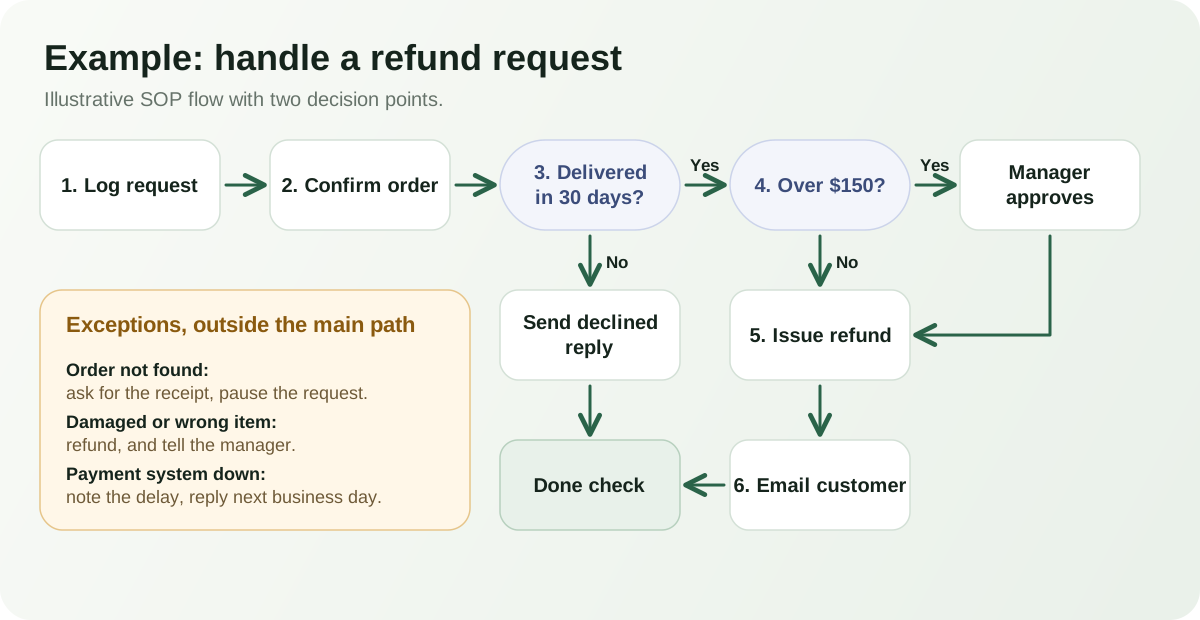
This is an illustrative example for an imaginary small online shop. The refund window, amounts, and names are invented, so adapt them to your own rules.
Illustrative example
SOP: Handle a customer refund request
- Trigger
- A customer emails or submits the form asking for a refund.
- Purpose
- Resolve refund requests fairly and consistently within two business days.
- Owner
- Customer support lead. Revision owner: operations manager.
- Inputs
- Order number, customer email, delivery date, and the reason given.
Steps
- Log the request in the refund tracker with the order number and date received.
- Confirm the order in the store system and note the delivery date.
- Check the refund window (decision point A).
- If eligible, check the amount against the approval limit (decision point B).
- Issue the refund in the payment system.
- Email the customer with the amount and the expected timing.
- Mark the request complete in the tracker.
Decision points
- A: Delivered within 30 days? Yes, continue. No, send the declined-request reply and go to the done check.
- B: Refund over $150? Yes, ask the operations manager to approve before issuing. No, continue.
Exceptions
- Order not found: ask the customer for the order email and receipt, then pause the request.
- Item damaged or wrong: refund without applying the window and tell the operations manager.
- Payment system unavailable: note the delay in the tracker and reply within one business day.
Done check
- The tracker shows the outcome and date, and the customer has received a reply.
Review
- Last reviewed: illustrative. Next review: after any change to the refund policy, or in six months.
Notice what it leaves out. There is no history of the refund policy and no background on the payment system. If issuing a refund in that system takes ten clicks, that detail belongs in a linked work instruction, not in the SOP.
Common SOP mistakes
- Writing what should happen instead of what actually happens.
- Including too much background before the first step.
- Leaving out exceptions, so people improvise when things go wrong.
- Unclear ownership for performing and for maintaining it.
- Screenshots with no context about when to use them.
- Documenting simple tasks that a short note would cover.
- Burying the most important step in a long paragraph.
- Having no review or update process.
How often should SOPs be reviewed?
There is no universal schedule. Set the cadence by how often the process changes, how often it is used, and how costly a mistake would be. A procedure tied to a fast-moving system or a safety concern deserves closer attention than a quiet internal routine.
Two triggers are more useful than the calendar alone. Review an SOP whenever the process, the tools, or the people change, and whenever someone reports that it did not match reality. A yearly date is a reasonable backstop, not a substitute.
How AI can help with SOPs
AI tools can save time at the edges of the work. They are useful for turning rough notes or a spoken explanation into a first draft, restructuring a messy page into the nine parts, pointing out ambiguous wording, and summarizing what changed between versions.
The limits matter as much. An AI tool cannot see what your team actually does, so it may produce tidy steps that are not the real ones. It can invent details. High-risk, legal, safety, or compliance steps need a qualified human review. Treat any AI output as a draft, and have the process owner and a person who does the work confirm it before it is published. For a fuller look at what document AI can and cannot be trusted with, see our guide to AI document assistants for small business.
How ZuffSuite supports SOP work
ZuffSuite offers a set of operations templates for different levels of detail: a standard operating procedure template, a work instruction template, a process guide for the end-to-end flow across roles, and a training guide for when people still need to learn the work. When a problem keeps returning, a root cause review helps you investigate it and end with owned actions. You can browse them together in the operations template collection.
The Operations & SOP Business Kit assembles several of these into one workspace: an SOP register in a Smart Table with owner, area, review frequency, and last and next review dates, plus an Operations Hub, a Standard Operating Procedure document, an Issue & Improvement Log, a Root Cause Review, Operations Review Notes, and starter tasks.
Be clear about what it does not do. Owners shown in the Operations Hub and issue log come from the register and are refreshed by you when they change, and editing a document does not update the register. Nothing creates a review task automatically when a date passes. The kit gives procedures a shared, organized home. The judgment about what belongs in them is still yours.
SOPs also connect to the rest of the operation. A reviewed onboarding procedure feeds the client onboarding process, and our guide to choosing an AI office suite covers how to keep documents, data, and follow-up in one place.
Frequently asked questions
What should an SOP include?
At minimum: what starts the process, its purpose, an owner, the inputs, the steps, any decision points and exceptions, a way to confirm completion, and who reviews it and when. Add a glossary or references only if readers need them.
How long should an SOP be?
As short as it can be while still being followable. For many small-business processes that is a page or two. If it grows long, move detailed task steps into work instructions and link to them.
What is the difference between an SOP and a work instruction?
An SOP describes a process, often with several steps, roles, and decisions. A work instruction describes how to perform one specific task in detail. An SOP can point to several work instructions.
Who should write an SOP?
Ideally the person who does the work drafts it, with the process owner reviewing. Someone who does not usually do the task should then test it. Procedures written only by managers tend to describe how work should go rather than how it does.
How often should SOPs be reviewed?
It depends on how often the process changes and how risky mistakes are. Review whenever the process, tools, or team change, and set a backstop date so nothing goes unchecked indefinitely.
Does a small business need SOPs?
Not for everything. They help most where work repeats, several people are involved, or errors are costly. Start with a few of the processes that cause the most confusion and add more as the need appears.
Can AI write SOPs?
It can help draft and tidy them, but it cannot know how your team really works. Use it for a first pass, then have the owner and someone who does the work verify every step, especially anything involving safety, legal, or financial risk.