Step-by-step tutorial 2026
How to Turn Notes Into a Presentation: From Messy Ideas to Finished Slides
Follow one complete notes-to-slides example, from a messy research page to a focused six-slide story you can confidently present.
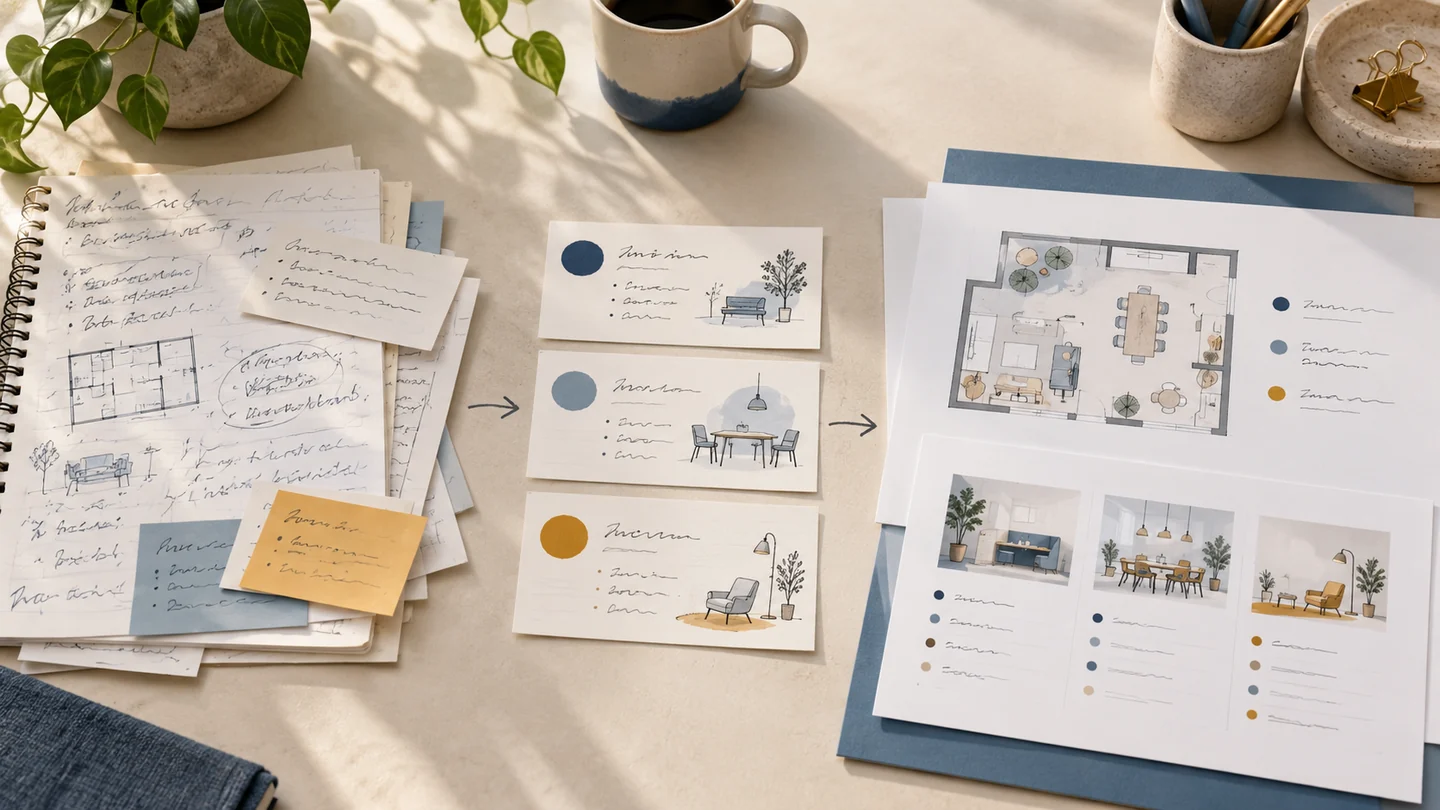
To turn notes into a presentation, group related ideas, decide what the audience should remember, and outline one takeaway per slide. Add evidence and claim-led titles, move extra detail into speaker notes, then rehearse.
The challenge is selecting useful details without losing their sources. The example below shows each step.
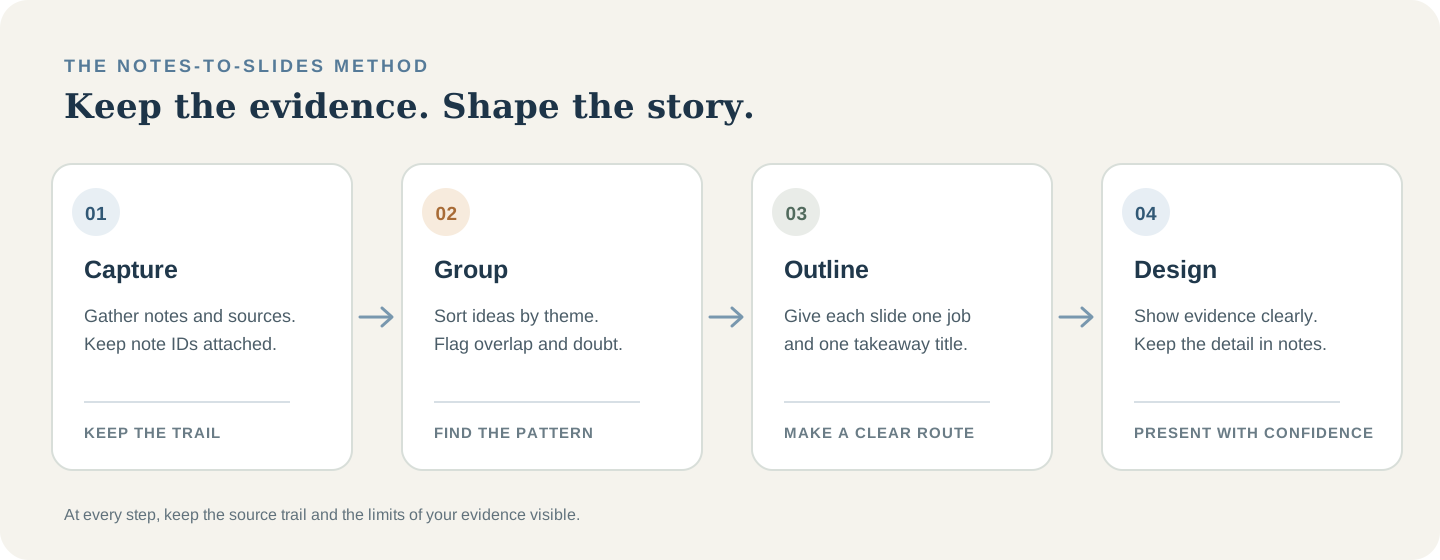
Use this seven-step method before opening the slide editor
- Collect notes and sources in one place.
- Label evidence, questions, ideas, and items to verify.
- Answer the audience's question in one sentence.
- Group related notes into three or four themes.
- Order the story: question, evidence, meaning, recommendation, next step.
- Give each slide a takeaway title and supporting evidence.
- Add citations and notes, verify claims, then rehearse.
This outline-first order keeps a PowerPoint from becoming one page of notes per slide.
One complete example: 15 messy notes become a six-slide story
Riley has five minutes to answer a class question: how could a fictional campus's third-floor study area better support students after 4 p.m.? The 15 notes below mix observations, ideas, questions, and source reminders.
Stage A · raw notes
Third-floor study space, after 4 p.m.
- Talk length
- Five-minute class presentation
- Evidence status
- Invented example notes; do not cite as real findings
Unsorted page from Riley's notebook
- N1 · Question: How could the third floor work better after 4 p.m.?
- N2 · Tue 4:15 p.m.: 11 of 14 seats near the entrance were occupied.
- N3 · Group table is a few steps from the quiet seats.
- N4 · Table voices reached two nearby desks during this walk-through.
- N5 · Check whether the window outlets are usually all in use; only looked once.
- N6 · A student said they need a place to talk through problem sets.
- N7 · Another student said quiet seats help when they are reading closely.
- N8 · Maybe most students need background sound; source unclear.
- N9 · Possible fix: move the conversation table toward the entrance.
- N10 · Possible fix: label the quiet seats and group-work area more clearly.
- N11 · Moving the table and labeling zones are one proposal, not two findings.
- N12 · Source reminder: add the field-note date, location, and method.
- N13 · Source reminder: verify the floor-plan title, page, and link.
- N14 · Library may have opened in 1986; unchecked and likely irrelevant.
- N15 · Verify or remove: most students need six hours to focus.
Stage B: group the notes by meaning
Keep the IDs attached so every slide can be traced to its note. Group what the notes support, not what Riley hopes to prove.
| Theme | Notes | What the group can support |
|---|---|---|
| Layout observed once | N2–N4 | One check found occupied seats near a conversation table; it cannot show a campus-wide pattern. |
| Different study needs | N6–N8 | Two comments show different preferences. N8 is an unsupported generalization. |
| One possible change | N9–N11 | Move the table and label the zones as one proposal. |
| Limits and references | N5, N12–N15 | Repeat checks, complete citations, and verify or remove unsupported claims. |
Layout observed once
- Notes
- N2–N4
- What the group can support
- One check found occupied seats near a conversation table; it cannot show a campus-wide pattern.
Different study needs
- Notes
- N6–N8
- What the group can support
- Two comments show different preferences. N8 is an unsupported generalization.
One possible change
- Notes
- N9–N11
- What the group can support
- Move the table and label the zones as one proposal.
Limits and references
- Notes
- N5, N12–N15
- What the group can support
- Repeat checks, complete citations, and verify or remove unsupported claims.
“Move the table” and “label the zones” are one recommendation. The unsourced six-hour claim and unchecked opening date do not answer Riley's question, so they stay out.
Stage C: outline six slides around one clear takeaway each
Six slides tell the story: pose the question, introduce two study needs, show one limited observation, state the limitation, propose a test, and give the next step.
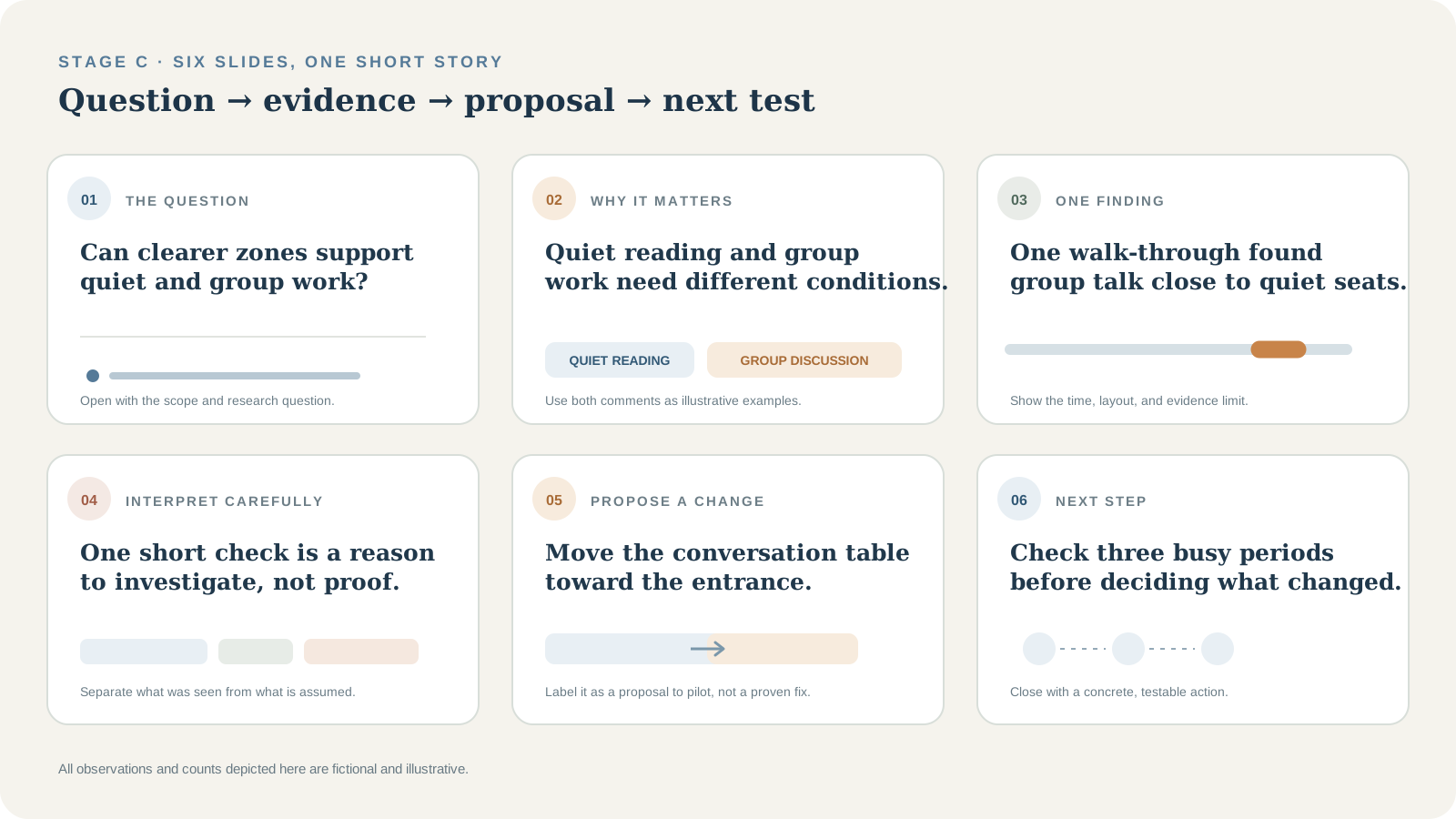
| Slide | Takeaway title | Purpose |
|---|---|---|
| 1 | Can clearer zones support quiet and group work? | Set the question and scope. |
| 2 | Quiet reading and group work need different conditions. | Contrast two comments. |
| 3 | One check found group talk near occupied quiet seats. | Show time, count, and limit. |
| 4 | One check is a reason to investigate, not proof. | Qualify the evidence. |
| 5 | Move the table toward the entrance and mark the zones. | Offer one proposal. |
| 6 | Check three busy periods before judging the change. | Give a testable next step. |
1
- Takeaway title
- Can clearer zones support quiet and group work?
- Purpose
- Set the question and scope.
2
- Takeaway title
- Quiet reading and group work need different conditions.
- Purpose
- Contrast two comments.
3
- Takeaway title
- One check found group talk near occupied quiet seats.
- Purpose
- Show time, count, and limit.
4
- Takeaway title
- One check is a reason to investigate, not proof.
- Purpose
- Qualify the evidence.
5
- Takeaway title
- Move the table toward the entrance and mark the zones.
- Purpose
- Offer one proposal.
6
- Takeaway title
- Check three busy periods before judging the change.
- Purpose
- Give a testable next step.
Stage D: build two finished slides from the outline
Slide 3 makes the observation visible: a simple floor plan shows the table beside quiet seats, with the illustrative 11-of-14 count and 4:15 time. That context prevents one check from sounding like a general rule.
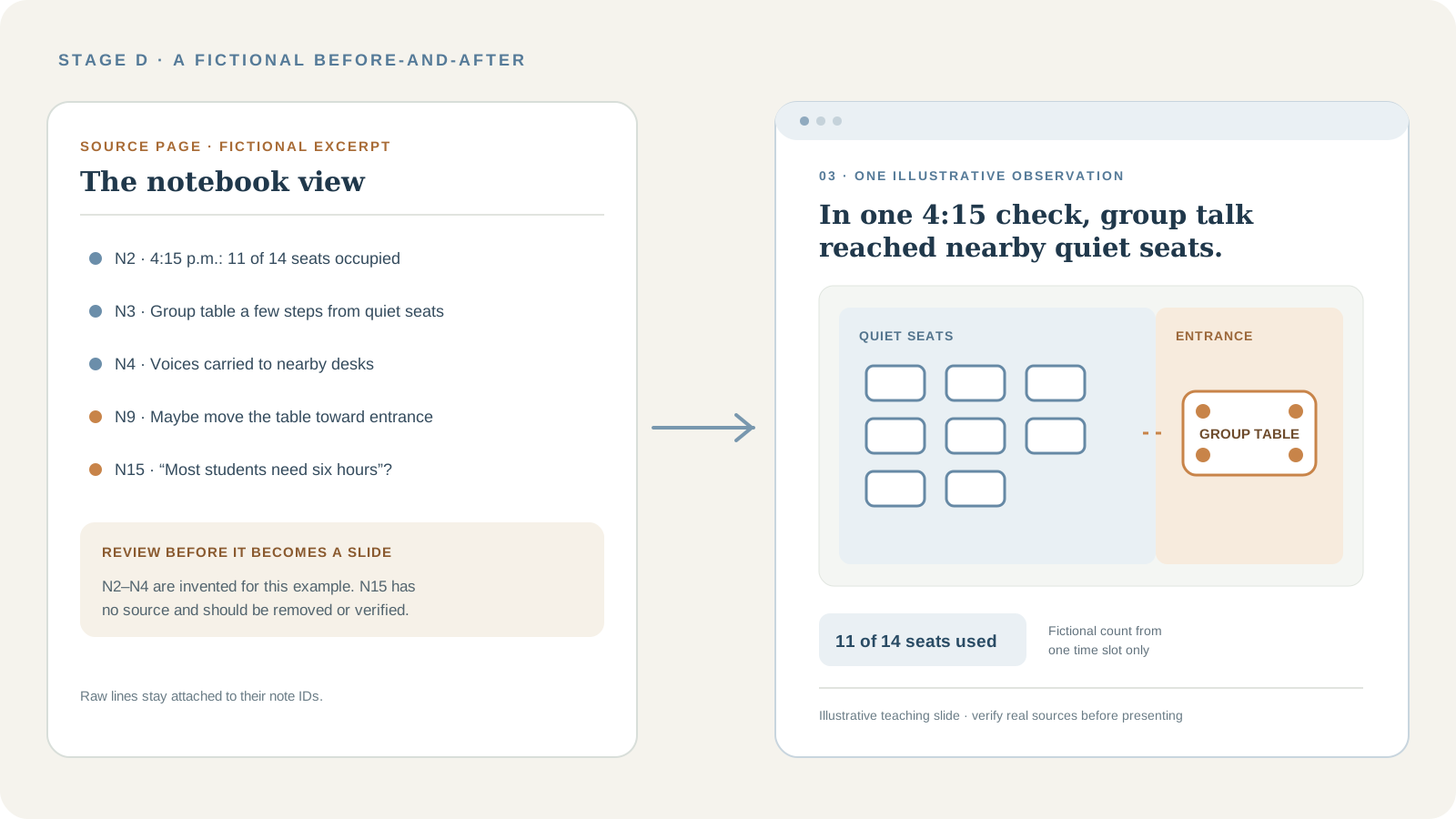
A second slide separates proposal from proof: “Move the conversation table toward the entrance.” Show the proposed zones and label them “pilot and recheck.” Speaker notes should say this change is untested.
| Slide | Source notes | What the audience sees | What belongs in speaker notes |
|---|---|---|---|
| 1 · Question | N1 | Question and five-minute scope. | Why this floor and time? |
| 2 · Needs | N6–N7 | Two contrasting study needs. | Use real, attributed comments. |
| 3 · Observation | N2–N4 | Plan, time, and illustrative count. | One fictional check; do not generalize. |
| 4 · Limit | N5, N8, N15 | Claims still needing a check. | Verify N5; omit N8 and N15 unless sourced. |
| 5 · Proposal | N9–N11 | Proposed two-zone layout. | Untested; compare during a pilot. |
| 6 · Next step | N12–N13 | Three checks and a follow-up question. | Add verified field-note and plan citations. |
1 · Question
- Source notes
- N1
- What the audience sees
- Question and five-minute scope.
- What belongs in speaker notes
- Why this floor and time?
2 · Needs
- Source notes
- N6–N7
- What the audience sees
- Two contrasting study needs.
- What belongs in speaker notes
- Use real, attributed comments.
3 · Observation
- Source notes
- N2–N4
- What the audience sees
- Plan, time, and illustrative count.
- What belongs in speaker notes
- One fictional check; do not generalize.
4 · Limit
- Source notes
- N5, N8, N15
- What the audience sees
- Claims still needing a check.
- What belongs in speaker notes
- Verify N5; omit N8 and N15 unless sourced.
5 · Proposal
- Source notes
- N9–N11
- What the audience sees
- Proposed two-zone layout.
- What belongs in speaker notes
- Untested; compare during a pilot.
6 · Next step
- Source notes
- N12–N13
- What the audience sees
- Three checks and a follow-up question.
- What belongs in speaker notes
- Add verified field-note and plan citations.
Stage E: check the sources and make one meaningful revision
N12 and N13 are reminders, not citations. Riley must add the real field-note and current floor-plan details or remove the unsupported claims.
| Draft wording | Review | Better version |
|---|---|---|
| Most students need six hours to focus. | N15 is unsourced. | Remove unless a credible source is found. |
| The group table makes the floor hard to use. | N2–N4 are one fictional check. | At 4:15, voices reached two nearby desks. |
| Moving the table will solve the problem. | The proposal is untested. | Pilot the move and evaluate it. |
Most students need six hours to focus.
- Review
- N15 is unsourced.
- Better version
- Remove unless a credible source is found.
The group table makes the floor hard to use.
- Review
- N2–N4 are one fictional check.
- Better version
- At 4:15, voices reached two nearby desks.
Moving the table will solve the problem.
- Review
- The proposal is untested.
- Better version
- Pilot the move and evaluate it.
The revision replaces a broad claim with a bounded observation and labels the layout change as a proposal.
How to decide what belongs on a slide
Keep a detail on the slide only if removing it would change the audience's understanding. Put transitions, caveats, and extra explanation in speaker notes.
- Keep evidence that answers the question or changes the recommendation.
- Move context and full citations into notes or a reference slide.
- Mark uncertain claims for checking; do not present them as facts.
- Cut background that does not explain the finding or next step.
Combine overlapping notes; preserve disagreements and show what remains unknown.
Turn notes into a presentation outline
Start with the audience's question and answer it in one sentence. Order evidence to explain what is happening, why it matters, what you recommend, and what should happen next.
Write one takeaway sentence per slide. “Survey results” names a topic; “Quiet reading and group work need different conditions” tells the audience what to learn. Harvard also recommends strong headlines, visual evidence, and source credit.
For another student workflow, the guide to organizing research notes by source and theme helps you prepare the evidence before you outline. If the presentation is a group assignment, the college group presentation guide covers roles, slide ownership, and review.
Shorten slide text without losing meaning
Keep the claim and its evidence; remove repeated setup and filler. Preserve qualifiers such as “in one observation.” Removing one changes the claim's meaning.
Choose bullets, diagrams, comparisons, and images deliberately
- Use bullets for a few parallel points.
- Use a comparison to show differences.
- Use a diagram for a process, layout, or relationship.
- Use credited photos only when they add evidence or context.
Use a chart only for comparable numbers, with labels and sources. Keep text readable, pair color with labels or symbols, and add alt text to shared decks. UC San Diego offers a visual-accessibility checklist.
Keep citations and speaker notes connected to the slide
Give each source an ID (such as N2) and carry it into the outline. Credit claims, quotes, charts, and images on the slide; add a full reference list when required. Keep the full citation in speaker notes so sources remain traceable if slides move.
Use notes for transitions, limitations, examples, and full citations—not a copy of the slide. Microsoft's guide explains how notes and Presenter View support the speaker while the audience sees the slide.
How many slides should a five-minute presentation have?
There is no fixed count. Riley uses six slides for five minutes; rehearse and adjust for your story. If the talk runs long, cut a secondary point before shrinking text.
How to revise a slide that has become too crowded
- Keep one takeaway and remove unrelated material.
- Move explanation and long citations into notes.
- Replace spatial prose with a simple diagram.
- Split only when each slide makes a distinct point.
At presentation size, check that the message is quick to see. Shorten the title or remove an element; keep source text readable and put full references in notes.
Manual and AI-assisted ways to make slides from notes
Manual method: use an ordinary document and slide editor
Write each takeaway as a document heading, with evidence beneath it and source IDs attached. PowerPoint can import a structured Word outline; then choose layouts, add visuals, and put the talk track in Notes.
In Google Docs and Slides, use the same outline-first process and verify each claim against its source.
AI-assisted method: let a model organize and draft, then verify
AI can group notes, suggest an order, and shorten wording. Provide the audience, time limit, source IDs, and uncertainty labels. Review its outline before drafting slides.
Prompt 1 · organize my notes
Organize the notes below for a presentation to [audience] that lasts [time]. Do not add facts, sources, quotations, or statistics. Keep every note ID and source reference attached to the idea it supports. Preserve uncertainty, disagreement, and context instead of resolving them. Group the notes into three to five themes. For each note, label it as evidence, question, proposal, background, duplicate, or verify. End with a list of claims that have no source or need a check. Do not silently discard a note; explain why you recommend moving it out of the presentation.

NOTES:
[paste notes with IDs and source links]
Prompt 2 · create a presentation outline
Using only the organized notes below, propose a slide-by-slide outline for a [length]-minute presentation to [audience]. Give each slide one takeaway title and one job in the story. For every slide, include the supporting note IDs, the evidence to show, a suggested visual type, brief on-slide wording, and optional speaker notes. Keep qualifications and source references attached. Mark anything that needs verification. Do not invent missing facts or citations. List important notes you left out and why.

ORGANIZED NOTES:
[paste the reviewed themes and source IDs]
Prompt 3 · review my draft
Review this slide outline or presentation draft for a [length]-minute talk to [audience]. Check whether the story flows, each title states a clear takeaway, slides repeat one another, text can be understood quickly, visuals support the point, and speaker notes add useful explanation. For each factual claim, check whether a note ID or source is attached; flag unsupported claims without supplying replacement sources. Preserve uncertainty. Return the five highest-priority revisions first, then a slide-by-slide review.

DRAFT:
[paste slide titles, visible text, speaker notes, and source references]
How ZuffSuite fits into a notes-to-slides workflow
In ZuffSuite, choose New presentation → From a document and select a document. The dialog says slides follow its headings, lists, and tables, and the source document remains unchanged.
Depending on role or plan, you can ask Zuffa to condense the story. This is a drafting aid, not source verification: check the order, claims, and citations yourself. Blank decks and presentation templates are also available.
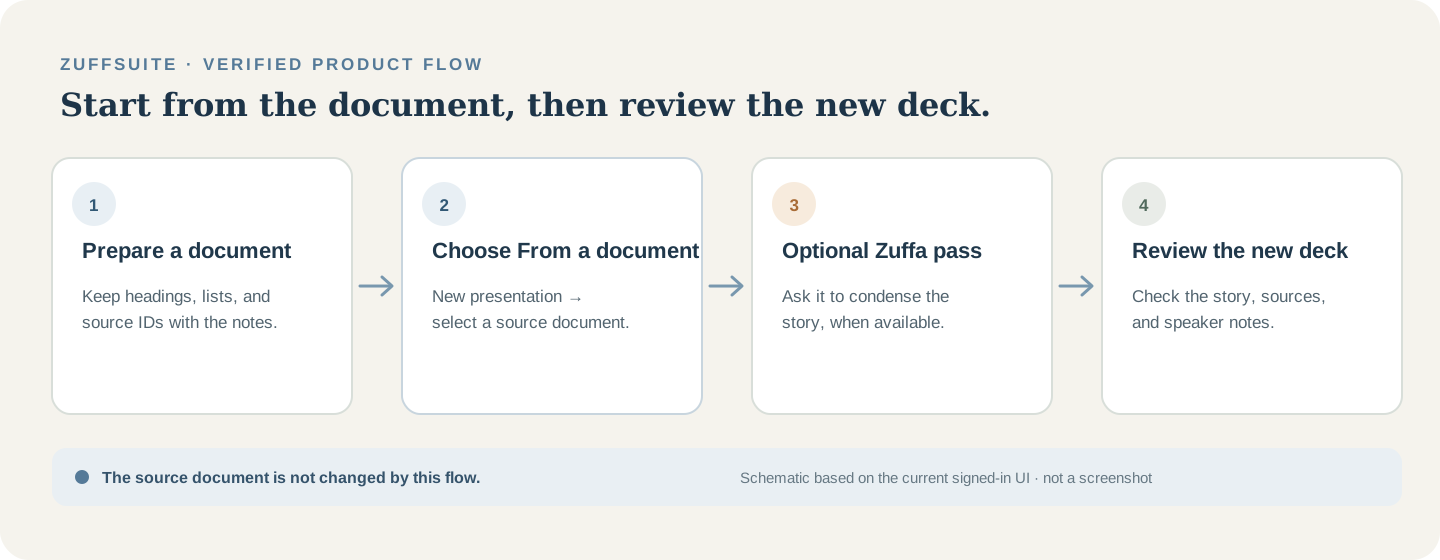
Presentations includes speaker notes and Presenter View. Explore the student workspace overview or browse the template gallery. To build a deck, open Presentations.
Copyable Notes-to-Slides Planning Template
Use one row per slide to connect the takeaway, source, visual, and speaking cue.
| Slide | Main message | Supporting note or source | Visual idea | Speaker notes |
|---|---|---|---|---|
| 1 | Can clearer zones support quiet and group work? | N1 | Question | Set the scope. |
| 2 | Quiet and group work need different conditions. | N6–N7 | Comparison | Use attributed comments. |
| 3 | One check found group talk near occupied seats. | N2–N4 | Plan, time, count | Do not generalize. |
| 4 | One check is a reason to investigate, not proof. | N5, N8, N15 | Limit callout | Verify or omit. |
| 5 | Move the table toward the entrance; mark zones. | N9–N11 | Proposed layout | Pilot the idea. |
| 6 | Check three busy periods before judging the change. | N12–N13 | Follow-up timeline | Add real citations. |
1
- Main message
- Can clearer zones support quiet and group work?
- Supporting note or source
- N1
- Visual idea
- Question
- Speaker notes
- Set the scope.
2
- Main message
- Quiet and group work need different conditions.
- Supporting note or source
- N6–N7
- Visual idea
- Comparison
- Speaker notes
- Use attributed comments.
3
- Main message
- One check found group talk near occupied seats.
- Supporting note or source
- N2–N4
- Visual idea
- Plan, time, count
- Speaker notes
- Do not generalize.
4
- Main message
- One check is a reason to investigate, not proof.
- Supporting note or source
- N5, N8, N15
- Visual idea
- Limit callout
- Speaker notes
- Verify or omit.
5
- Main message
- Move the table toward the entrance; mark zones.
- Supporting note or source
- N9–N11
- Visual idea
- Proposed layout
- Speaker notes
- Pilot the idea.
6
- Main message
- Check three busy periods before judging the change.
- Supporting note or source
- N12–N13
- Visual idea
- Follow-up timeline
- Speaker notes
- Add real citations.
Blank template · copy and fill in one row per slide
Slide	Main message	Supporting note/source	Visual idea	Speaker notes
1
2
3
4
5
6
Adjust the rows to your story and follow any required slide count or citation style.
Common questions about turning notes into slides
Can AI turn notes into a presentation?
Yes. AI can group notes and draft titles. Give it source IDs, review its outline, and verify each claim and citation against your material.
How do I make a PowerPoint from my notes?
Write one takeaway per slide, order the story, then add evidence and speaker notes. PowerPoint can also import a structured Word outline.
How do I turn a Word document into presentation slides?
Turn its main sections into slide titles and condense long passages first. Import the outline, then move details and full references into notes or a sources slide.
What is the fastest way to make slides from notes?
Group notes into themes, write one takeaway title per slide, and use a template. AI can help draft, but still check sources.
How do I convert research notes into a presentation?
Keep findings linked to sources, select relevant evidence, and order slides around the question. Cite visuals and claims; put limitations and context in notes.
How much text should be on each slide?
Use only the words needed to explain the takeaway and evidence. Try a clear title, one visual, and a short supporting line; test readability instead of following a word quota.
Should I put all my notes on presentation slides?
No. Keep the main claim and evidence visible; put explanation, transitions, limitations, and full citations in notes or a reference slide.
How do I make a presentation from handwritten notes?
Transcribe useful lines with their IDs and sources. Mark unclear words rather than guessing, group notes by theme, then outline before designing.
Useful presentation references
- Microsoft: Create a PowerPoint presentation from an outline — a documented manual route from a structured Word outline.
- Microsoft: Add speaker notes to your slides — how presenter notes are added and shown during a talk.
- Harvard: Slides for science communication — guidance on slide headlines, visual evidence, and source credit.
- UC San Diego: Evidence-based presentation design — practical advice on readable, accessible visual material.
Keep exploring
More guides for your work
Step-by-step tutorial Oct 3, 2026
How to Organize Research Notes for Papers and Presentations
Keep evidence connected to sources, compare ideas by theme, and turn organized notes into a useful outline.
Read the guide
Planning guide Oct 3, 2026
How to Plan a Student Research Project: Timeline and Checklist
A four-week example and copyable checklist for moving from an assignment question to a reviewed submission.
Read the guide
Student field guide Oct 13, 2026
How to Organize a College Group Presentation: Roles, Slides, Deadlines & Checklist
Divide the work fairly, build one clear slide story, and finish with time to rehearse. Includes a three-student example and a free planning kit.
Read the guideA workspace for what comes next
Bring your research and next steps together.
Organize notes, shape a document, work through your data, and prepare to present it from one student workspace.