Personal workspace guide 2026
Microsoft 365 Alternative for One Person: A Simpler Way to Work in 2026
Compare office tools for one person: ZuffSuite, Microsoft 365, Google editors, and LibreOffice. See current pricing, practical workflows, and compatibility checks.
A Microsoft 365 alternative for one person should fit the work you actually do: write a proposal, calculate a budget, track a deadline, and explain an idea. ZuffSuite offers these work surfaces in a personal browser workspace. Google Docs, Sheets, and Slides are another familiar option; LibreOffice is useful for desktop work without a subscription. Microsoft itself offers free web versions, so leaving a paid plan does not necessarily mean leaving Microsoft.
Quick verdict: keep Microsoft 365 if desktop Office, complex Excel files, Outlook, or dependable compatibility with a client workflow are essential. Consider a smaller browser workspace when routine documents, workbooks, tasks, and presentations cover your needs. Test one representative project before moving important work.
ZuffSuite publishes this guide and is one of the compared products. The project below is illustrative; it is not a measured product trial. Official product pages and current US pricing were checked on October 11, 2026. Availability, taxes, regional pricing, and account eligibility can differ.
How much office software does one person need?
Start with your last three finished assignments rather than a feature wishlist. What files did you create? Who opened them? Where did feedback arrive? What required a desktop application? A freelance copywriter preparing proposals has different requirements from an analyst maintaining a macro-heavy forecasting workbook, even though both work alone.
Write a short must-have list. It might say: editable documents, basic workbook formulas, a client-ready presentation, due dates, and a place for supporting files. Then write the exceptions: offline travel days, an existing Excel model, a required Word template, or a client who will only review a particular file format. Those exceptions often decide the tool.
Working alone also does not mean never collaborating. You may need a client to comment, an accountant to review a workbook, or a partner to edit a page. Compare actual permission rules rather than counting every invited person as a paid teammate. Confirm whether the plan supports the specific sharing action you intend to use.
Four approaches to everyday office work
| Approach | Routine documents, budgets, and slides | Important boundary |
|---|---|---|
| Microsoft 365 | Free web editors; Personal adds desktop Office, Outlook, and 1 TB of cloud storage. | Web and desktop capabilities differ; check advanced workbook requirements. |
| Google Docs / Sheets / Slides | Browser creation and collaborative review with a Google account. | Some capabilities require paid plans; offline use needs setup. |
| LibreOffice | Writer, Calc, and Impress desktop applications without a software subscription. | Cloud hosting and browser collaboration are separate considerations. |
| ZuffSuite | Docs, Sheets, Presentations, tasks, and optional visual planning in a personal workspace. | Do not assume Office feature parity, an Outlook replacement, or identical file rendering. |
Microsoft 365
- Routine documents, budgets, and slides
- Free web editors; Personal adds desktop Office, Outlook, and 1 TB of cloud storage.
- Important boundary
- Web and desktop capabilities differ; check advanced workbook requirements.
Google Docs / Sheets / Slides
- Routine documents, budgets, and slides
- Browser creation and collaborative review with a Google account.
- Important boundary
- Some capabilities require paid plans; offline use needs setup.
LibreOffice
- Routine documents, budgets, and slides
- Writer, Calc, and Impress desktop applications without a software subscription.
- Important boundary
- Cloud hosting and browser collaboration are separate considerations.
ZuffSuite
- Routine documents, budgets, and slides
- Docs, Sheets, Presentations, tasks, and optional visual planning in a personal workspace.
- Important boundary
- Do not assume Office feature parity, an Outlook replacement, or identical file rendering.
Microsoft’s free web-app offering is worth trying if your needs are basic. A free web editor is not the same package as paid desktop Office. That distinction matters more than an article declaring that Microsoft always requires a subscription.
Google’s Docs product page describes the writing and review surface; Sheets and Slides cover calculations and presentations. It can be a practical fit when clients already review files there. Check account storage and any paid features you rely on before comparing it with a business subscription.
The LibreOffice project offers a desktop suite with Writer, Calc, and Impress. It deserves a place on the shortlist if offline creation is important. Compatibility still needs testing: opening a file successfully is only the beginning if fonts, formulas, or page breaks matter to the final output.
A real-work example: prepare a workshop proposal
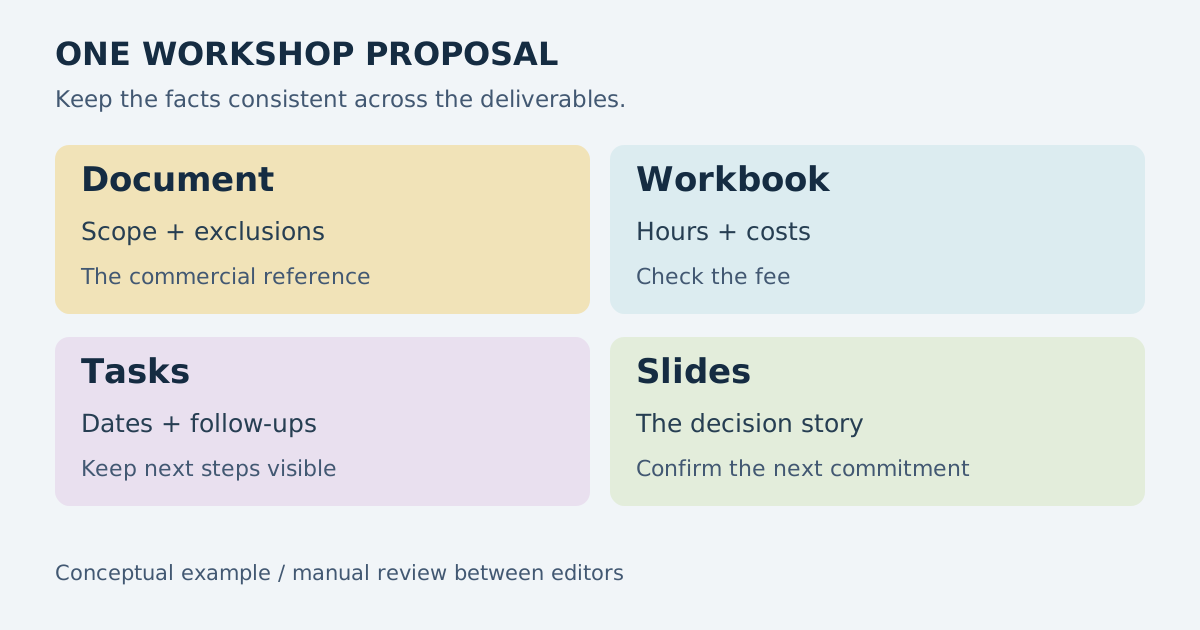
Imagine Sam, an independent trainer proposing a half-day workshop to a local organization. He needs a scope document, a cost estimate, a handful of follow-ups, and six slides for the decision meeting. The useful question is whether he can deliver these clearly and revise them after feedback. He does not need company-wide administration to finish the assignment.
Write the offer in Docs
Sam begins with the freelance project brief structure to record audience, objectives, exclusions, delivery date, and acceptance criteria. He writes the proposal in Docs and keeps uncertain details visible. For example, the room capacity is not yet confirmed, so the draft does not promise a group size as if it were settled.
A focused document gives the client one clear thing to review. Sam separates the fee, what is included, and any optional work. If AI helps with a draft, he reviews facts, commitments, and tone before sharing. Generated wording cannot decide his commercial terms or verify information the client has not supplied.
Check the numbers in a workbook
Sam lists preparation hours, delivery time, materials, and travel. He uses quantities and unit costs to calculate totals, and distinguishes an estimate from a final invoice. Our business expense spreadsheet guide explains useful tracking fields. The example can work in ZuffSuite Sheets, Excel, Google Sheets, or Calc; the formulas and output should be checked in the chosen editor.
A useful workbook answers a decision: is the proposed fee sufficient for the work and costs? Sam does not need an elaborate financial system for this calculation. If an existing spreadsheet includes specialized functions, macros, or external connections, he tests those separately rather than assuming that a simple budget proves complete compatibility.
Track actions and build the presentation
Sam adds dated tasks to confirm the venue, finalize the proposal, and prepare the decision meeting. He uses a whiteboard only if he needs to compare workshop formats visually. The slide deck then summarizes the audience need, learning outcomes, session plan, costs, and next decision. The brief remains the reference for scope.
These items can sit in one ZuffSuite workspace, but Sam still reviews handoffs between them. A fee changed in the workbook should be checked in the proposal and slides. The example does not claim automatic synchronization between editors. Naming the reference file and adding links is often enough to keep a small project understandable.
Pricing: compare the billing period and the package
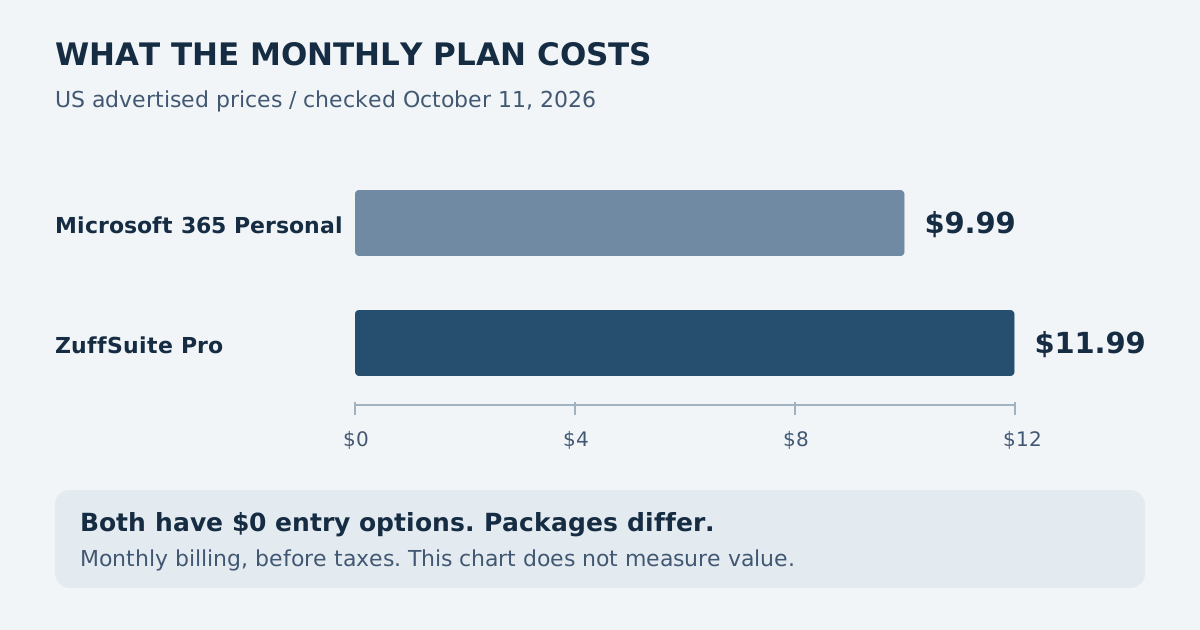
For the US monthly-billing comparison, ZuffSuite Pro is $11.99 for one person and Microsoft 365 Personal is $9.99 for one person. Microsoft also lists Personal at $99.99 per year, paid annually. The annual offer has a different commitment; do not silently turn it into a monthly price. ZuffSuite currently does not advertise annual billing.
Microsoft’s official Personal pricing and inclusions cover desktop Word, Excel, PowerPoint, Outlook, and other services, including 1 TB of storage. ZuffSuite Pro emphasizes a personal workspace, AI features with usage controls, and Pro sharing. These packages are not equivalent. ZuffSuite is not the cheaper paid choice in this monthly example.
| Option | Software price / billing | What this comparison excludes |
|---|---|---|
| ZuffSuite Free | $0; one-person workspace | No promise of unlimited capacity, AI, or unrestricted guest editing. |
| ZuffSuite Pro | $11.99/month; one person | AI usage controls apply; Pro sharing includes up to 3 guest editors per item. |
| Microsoft free web apps | $0 with a Microsoft account | Paid desktop-app and storage benefits are a different package. |
| Microsoft 365 Personal | $9.99/month or $99.99/year in the US | One-person subscription with desktop apps and services; regional terms vary. |
| Google personal editors | $0 entry with a Google account | Paid storage, business administration, and some advanced features differ. |
| LibreOffice | $0 software download | Separate storage, backup, support, or hosting can have costs. |
ZuffSuite Free
- Software price / billing
- $0; one-person workspace
- What this comparison excludes
- No promise of unlimited capacity, AI, or unrestricted guest editing.
ZuffSuite Pro
- Software price / billing
- $11.99/month; one person
- What this comparison excludes
- AI usage controls apply; Pro sharing includes up to 3 guest editors per item.
Microsoft free web apps
- Software price / billing
- $0 with a Microsoft account
- What this comparison excludes
- Paid desktop-app and storage benefits are a different package.
Microsoft 365 Personal
- Software price / billing
- $9.99/month or $99.99/year in the US
- What this comparison excludes
- One-person subscription with desktop apps and services; regional terms vary.
Google personal editors
- Software price / billing
- $0 entry with a Google account
- What this comparison excludes
- Paid storage, business administration, and some advanced features differ.
LibreOffice
- Software price / billing
- $0 software download
- What this comparison excludes
- Separate storage, backup, support, or hosting can have costs.
ZuffSuite’s live plan details also list Business at $19.99 per paid user per month. That is a shared-workspace choice, not the default requirement for someone working alone. Student is not currently offered as a separate public pricing tier. For Free, the public page names the included core tools but does not publish numeric storage or AI quotas; this guide therefore does not invent them.
A decision framework before you switch
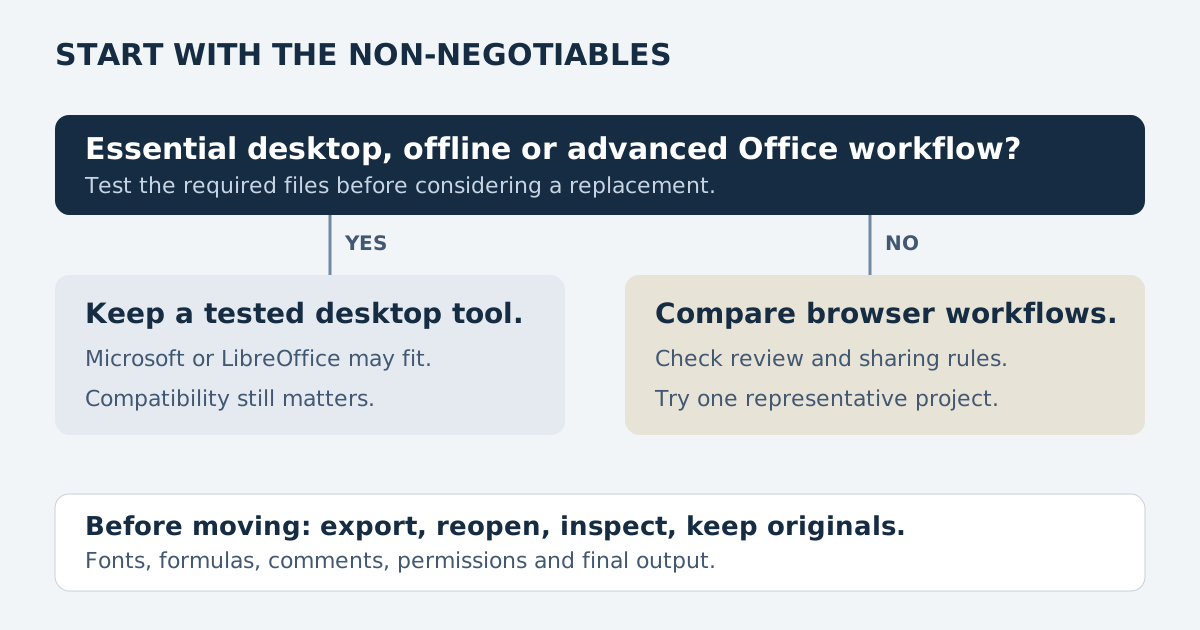
First check compatibility. Ask a client for a representative file, duplicate it, and test the parts that matter: formulas, tables, fonts, comments, charts, layout, and export. Then open the exported copy in the application the recipient will use. Your work is only portable if it remains usable at the other end.
Next check working conditions. If you spend long stretches without reliable internet, prioritize a proven offline workflow. If the browser is your normal work environment, compare navigation and review steps. Finally, check the services around the files: email, calendars, cloud storage, account administration, and integrations. A document editor does not automatically replace those services.
If the main issue is maintaining a custom project system, the Notion simplicity guide focuses on reducing setup. If you are comparing prompt-built workflows with familiar editors, the
Taskade comparison for solo users examines that separate choice. These are different requirements, and combining them into one giant feature ranking would hide the tradeoffs.
When staying with Microsoft is sensible
Keep a working Microsoft setup when a client depends on exact Office behavior, your workbook uses advanced capabilities that another editor does not support, or Outlook and OneDrive are central to your routine. One paid subscription can be good value even if you do not use every included application. Avoid a migration that saves little but makes every handoff harder.
ZuffSuite is worth trying when the personal project is the organizing unit and you want several familiar work surfaces together. It does not claim to replace all of Microsoft’s desktop capabilities, mail services, integrations, or file-format behavior. Start alongside your current tools and move only the work that passes your checks.
Frequently asked questions
Can one person use Microsoft Office for free?
Microsoft provides free web versions of Word, Excel, and PowerPoint with a Microsoft account. Paid Microsoft 365 Personal includes a broader package, including desktop applications and storage. Check the feature you need in the actual web editor before assuming the free and paid versions behave identically.
Which option is useful for offline work?
LibreOffice is a desktop option, and paid Microsoft 365 Personal includes desktop Office. Google offline workflows require preparation. This guide does not promise fully offline ZuffSuite editing. Test the exact workflow under the conditions in which you will use it.
Do I need to migrate every file to try ZuffSuite?
No. Choose one upcoming project and keep the originals available. Compare the proposal, workbook, tasks, and slides you actually need. Check exported files and reviewer permissions. Explore templates if useful, but avoid rebuilding your entire archive before confirming that the workflow fits.
You can preview starting points in the template gallery or prepare a draft schedule with the free tools linked from the homepage. A small, completed trial is more useful than a feature checklist that never touches your real work.
Sources and editorial method
Sources include Microsoft’s free web-app and Personal plan pages above, Google Sheets and
Google Slides product pages, LibreOffice, and ZuffSuite’s live pricing and product pages. The chart compares advertised subscription amounts, not measured productivity or savings. The walkthrough and decision framework are original editorial examples. No keyword volume, ranking position, import fidelity, or performance measurement is claimed.
Keep exploring
More guides for your work
Personal workspace guide Oct 11, 2026
A Simpler Notion Alternative for Personal Projects (Without Building Databases)
Choose a simpler personal project workflow. Compare ZuffSuite, Notion, Obsidian, and Google Docs, with a practical guide from brief to finished deliverable.
Read the guide
Practical guide Oct 3, 2026
Free Business Expense Spreadsheet: What to Track and How to Set One Up When You Work Solo
If you work for yourself, your expenses are probably spread across card statements, email receipts, a few paper slips and a handful of subscriptions you half remember signing up for. Nothing is wrong yet.
Read the guide
Software comparison Oct 8, 2026
Best Taskade Alternative for Solo Users in 2026? ZuffSuite vs Taskade
Build AI-powered apps, or get straight to documents, spreadsheets and slides? A balanced, real-workflow comparison for solo users.
Read the guide
Freelance template Oct 7, 2026
Freelance Project Brief Template: Scope, Deliverables, and Open Questions
Copy a practical one-page freelance project brief, see it filled in, and learn how to clarify scope, client inputs, approvals, and open questions before you begin.
Read the guideA workspace for what comes next
Bring your everyday work into one workspace.
Plan a project, shape your ideas, write, and build a presentation in one place. Start on your own and share when you need to.