Personal workspace guide 2026
A Simpler Notion Alternative for Personal Projects (Without Building Databases)
Choose a simpler personal project workflow. Compare ZuffSuite, Notion, Obsidian, and Google Docs, with a practical guide from brief to finished deliverable.
If you want a Notion alternative without databases, start by asking what your next project actually produces. A document, a small task list, source notes, and a finished presentation often need less structure than a connected collection of records. ZuffSuite is one option for those familiar work surfaces in a personal workspace. Google Docs can be enough for a writing project; Obsidian suits a lasting collection of local notes. There is also a simpler option inside Notion itself: ordinary pages and checklists.
The useful distinction is starting work without designing a system first. Notion does not require you to use databases, and ZuffSuite has optional Smart Tables. Neither fact decides which tool fits you. The question is whether the structure helps you finish your project and whether you can maintain it when you are busy.
This guide is published by ZuffSuite, one of the products compared. The walkthrough is an invented but reproducible project example, not a timed product test or customer testimonial. Product documentation and public pages were checked on October 11, 2026.
When organizing becomes another project
Imagine opening your workspace to draft a proposal and spending the session choosing properties, arranging a dashboard, and connecting a new task view. That can be enjoyable. It can also leave the proposal untouched. A warning sign is repeatedly improving the system without making the next decision or producing the next useful page.
In a community discussion about overcomplicating Notion people debate whether elaborate dashboards save time or simply become more work. These are individual experiences, not a representative survey. They suggest a question to test in your own routine: which fields and views do you actually consult?
Try removing a layer before replacing an app. If a plain project page and five checkboxes solve the problem, keep them. Switching is more compelling when the deliverable itself needs another surface: a budget with formulas, a visual brainstorm, or an editable deck. A simpler workspace should reduce decisions about where work belongs, not merely have fewer buttons.
One project: turn local research into a short guide
Consider Elena, who wants to create a neighborhood walking guide for a community event. She has four weeks, a modest printing budget, and an eight-page PDF to deliver. She needs to gather reliable information, choose a route, draft descriptions, and explain the proposal to an organizer. She does not need a lifetime system for every place she has ever visited.
Begin with a one-page brief
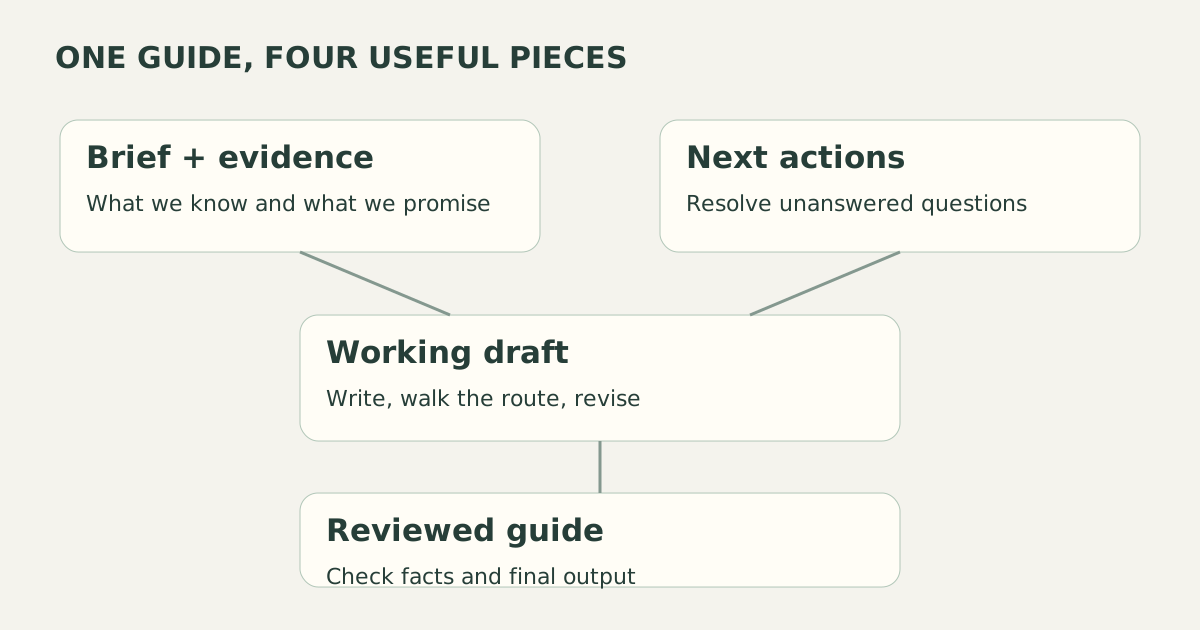
Elena starts with the structure in our project brief guide and writes the audience, promised output, deadline, and boundaries. Her completion rule is concrete: a reviewed eight-page guide with verified opening times, an accessible route description, and approved print costs. She excludes a website and ticketing system from this first version.
In ZuffSuite she can write this in Docs. In Notion it could be one ordinary page. In Google Docs it could be a file in a clearly named folder. The important step is recording the decision. A template helps when its sections answer the real questions; deleting irrelevant sections is part of using it well.
Gather notes that retain their sources
For each location, Elena records the source URL, the date checked, the useful fact, and an unanswered question. Our research-note organization guide explains how to separate evidence from interpretation. She groups notes under route stops rather than building a large classification system. If many stops later need the same fields, a small table becomes reasonable.
Her notes say what is known and what still needs verification. A venue website might confirm hours but leave step-free access unclear. That becomes a task to call the venue, not a polished claim in the draft. The workspace is useful because it preserves this difference, regardless of which application holds the notes.
Keep only actionable next steps
Elena adds tasks such as confirm Saturday hours, walk the proposed route, draft stop descriptions, and send the review copy. Each has a date when timing matters. Read about local history is too broad; find a reliable source for the station opening date is an action she can finish. Completed tasks should stop competing for attention.
Today/tasks can hold those steps in ZuffSuite while the brief stays in Docs. This is a proposed routine, not a claim that writing a sentence automatically creates or updates a task. Elena reviews the list herself. She only adds a tracker when the number of moving pieces makes it worthwhile.
Draft, review, and produce the deliverable
After walking the route, Elena sketches the sequence on a whiteboard and drafts each stop in Docs. She keeps a workbook only because printing costs need arithmetic. If the guide were entirely digital, she could skip that tool. She uses slides for the organizer discussion because the organizer wants to compare route options visually.
At review time, Elena sends a clear request: check factual accuracy and route suitability by Thursday. She incorporates approved corrections, verifies the final output, and keeps a dated copy. Sharing depends on the chosen plan and item permissions. A workspace containing several tools does not mean every tool must appear in every project.
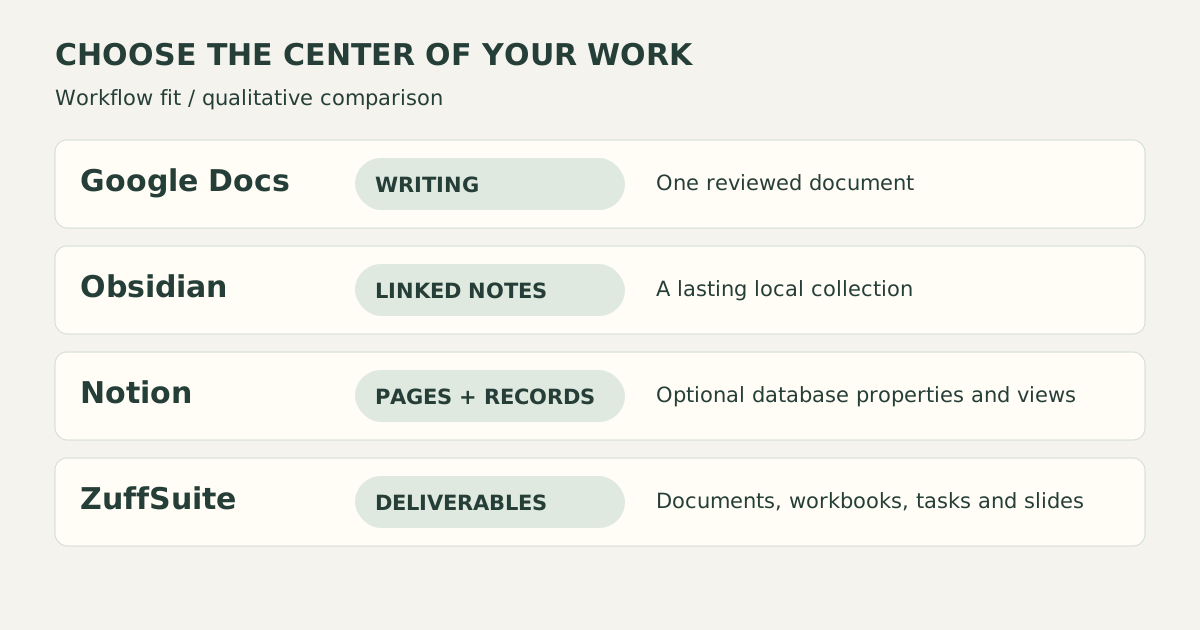
Choose by the work surface you need
| Tool | A useful starting point | Where to be careful |
|---|---|---|
| ZuffSuite | Docs, tasks, and optional workbooks, whiteboards, and slides in a personal workspace. | Separate surfaces require deliberate handoffs; do not assume a complete Notion import. |
| Notion | Ordinary pages and checklists, plus database properties and views when useful. | A large custom setup adds maintenance; keep only fields you use. |
| Obsidian | Local Markdown notes, links, and a durable research collection. | Sync is a separate service; workbooks and slide deliverables may require other tools. |
| Google Docs | A shared writing file with comments and a familiar document workflow. | Project tasks and visual planning may live elsewhere; manage folder and sharing rules. |
ZuffSuite
- A useful starting point
- Docs, tasks, and optional workbooks, whiteboards, and slides in a personal workspace.
- Where to be careful
- Separate surfaces require deliberate handoffs; do not assume a complete Notion import.
Notion
- A useful starting point
- Ordinary pages and checklists, plus database properties and views when useful.
- Where to be careful
- A large custom setup adds maintenance; keep only fields you use.
Obsidian
- A useful starting point
- Local Markdown notes, links, and a durable research collection.
- Where to be careful
- Sync is a separate service; workbooks and slide deliverables may require other tools.
Google Docs
- A useful starting point
- A shared writing file with comments and a familiar document workflow.
- Where to be careful
- Project tasks and visual planning may live elsewhere; manage folder and sharing rules.
Notion describes databases as collections of pages with configurable properties and views in its database introduction. That model earns its place when you repeatedly need to filter the same records, see several views, or connect related information. A calendar of twenty events is different from a single guide with a handful of deadlines.
For a notes-first approach, Obsidian keeps the emphasis on local files and linked thinking. It is attractive if the research collection will outlive this project. Resist turning plugins into another elaborate setup. If the immediate job is a reviewed manuscript, a straightforward document editor may be the better starting point.
A small starting workflow you can reproduce
Name the project and write its finish condition. Create one brief, one place for evidence, and one list of next actions. Add a budget only if you need calculations. Add a visual board only if arranging ideas spatially helps. At the end of each session, record the next action and any decision you do not want to reconsider tomorrow.
If dates are the problem, use the free project timeline generator to draft a schedule, then check its assumptions. If tracking is the problem, the
freelance project tracker example shows a compact overview you can adapt. The test is whether you consult the overview when deciding what to do, not whether it contains every possible field.
Once a week, review three things: what is finished, what is blocked, and what deserves the next session. Archive material that no longer changes a decision. Keep recurring facts in one authoritative place, and link to them instead of maintaining several conflicting copies. This routine gives even a basic folder of documents a useful structure.
Before leaving your current workspace
Migrate one active project first. Keep the original workspace available while you check notes, links, attachments, and outputs. Exported content may not preserve database relations, permissions, comments, formulas, or the exact appearance of embedded content. Do not delete the source because a few paragraphs copied correctly. Verify the particular information you depend on.
ZuffSuite is not a promised replacement for every Notion database, automation, integration, or wiki. It is also not presented here as a local-first or fully offline application. If those requirements define your workflow, keep them at the top of your shortlist. A simpler interface does not compensate for a missing essential capability.
If your project also needs workbooks and presentations, our office-suite guide for one person examines compatibility and subscription tradeoffs. You can also explore the
public template gallery before opening a new workspace. Choose a starting shape because it matches the deliverable, then adapt it to your project.
Questions to ask before choosing
Can I use Notion without databases?
Yes. You can work with ordinary pages, headings, notes, and checklists. Try that smaller setup before migrating. Databases become useful when repeated records need properties, filtering, or different views; they are not a prerequisite for drafting a project plan.
Is ZuffSuite free for personal projects?
The current pricing page lists a $0 Free personal workspace with the core office surfaces and task tracking. Pro is $11.99 per month for one person and adds the advertised AI features and Pro sharing. AI has usage controls. Check current permissions before inviting a reviewer; do not assume that free means unlimited capacity or unrestricted collaboration.
Which alternative is simplest for a single writing project?
A document and a short checklist may be sufficient. Google Docs, a plain Notion page, or ZuffSuite Docs can serve that purpose. Compare the review process, file output, and whether you need other tools for the same assignment. There is no universal winner independent of those requirements.
Sources and comparison method
This comparison uses public product descriptions, official documentation, and one community discussion for problem discovery. Examples and workflow-fit judgments are editorial analysis. No speed benchmarks, user survey, keyword-volume estimate, or ranking claim is implied. See Google Docs product information alongside the Notion, Obsidian, and ZuffSuite sources linked above. Pricing and features can change; check the live pages before committing to a plan.
Keep exploring
More guides for your work
Personal workspace guide Oct 11, 2026
Microsoft 365 Alternative for One Person: A Simpler Way to Work in 2026
Compare office tools for one person: ZuffSuite, Microsoft 365, Google editors, and LibreOffice. See current pricing, practical workflows, and compatibility checks.
Read the guide
Step-by-step tutorial Oct 3, 2026
How to Organize Research Notes for Papers and Presentations
Keep evidence connected to sources, compare ideas by theme, and turn organized notes into a useful outline.
Read the guide
Freelance template Oct 7, 2026
Freelance Project Brief Template: Scope, Deliverables, and Open Questions
Copy a practical one-page freelance project brief, see it filled in, and learn how to clarify scope, client inputs, approvals, and open questions before you begin.
Read the guide
Software comparison Oct 8, 2026
Best Taskade Alternative for Solo Users in 2026? ZuffSuite vs Taskade
Build AI-powered apps, or get straight to documents, spreadsheets and slides? A balanced, real-workflow comparison for solo users.
Read the guideA workspace for what comes next
Bring your everyday work into one workspace.
Plan a project, shape your ideas, write, and build a presentation in one place. Start on your own and share when you need to.