Software comparison 2026
Best Taskade Alternative for Solo Users in 2026? ZuffSuite vs Taskade
Build AI-powered apps, or get straight to documents, spreadsheets and slides? A balanced, real-workflow comparison for solo users.
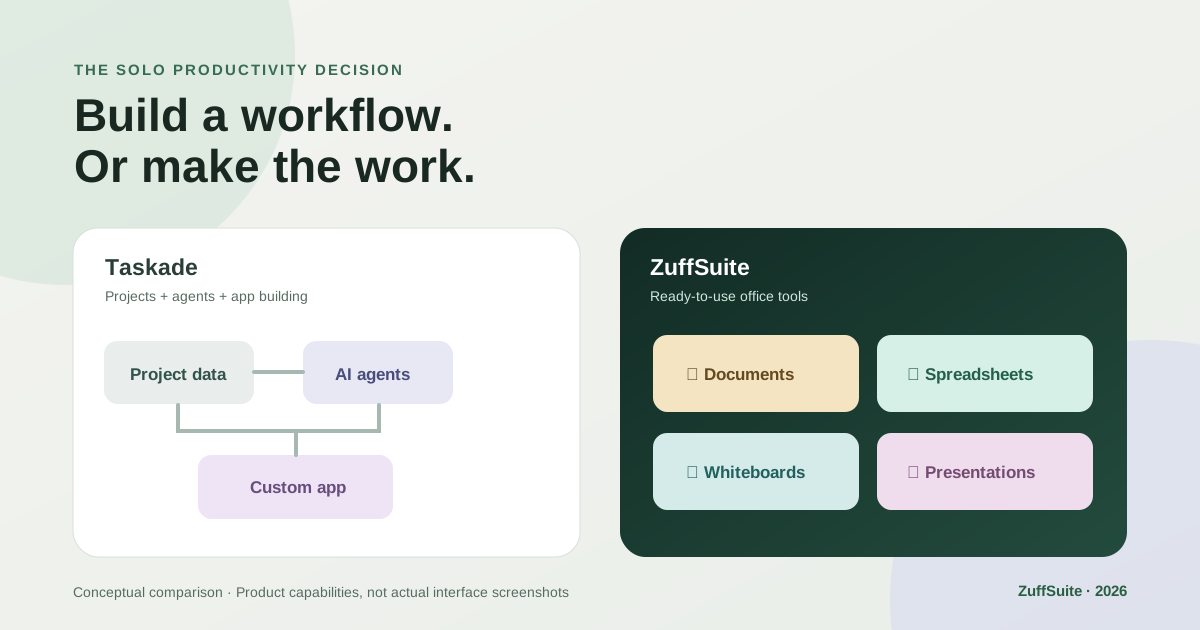
Taskade and ZuffSuite both promise to help you work in fewer places. But they begin from different assumptions. Taskade connects project data, AI agents, automations, and apps you can build from prompts. ZuffSuite starts with familiar tools: documents, spreadsheet workbooks, presentations, whiteboards, forms, files, and day-to-day tasks.
If you're searching for a Taskade alternative for solo users, the useful question is not which has the longest feature list. It's what you need to produce this week—and how much setup you're willing to do before you can produce it.
The quick verdict
Choose Taskade if your work revolves around structured project records, shared task views, custom AI agents, external integrations, or turning a prompt into a working app. Its list, board, table, calendar, and mind-map views are meaningful capabilities, not legacy leftovers.
Choose ZuffSuite if you routinely write proposals, calculate budgets, sketch ideas, collect form responses, and build slides—and prefer opening a purpose-built tool rather than creating a custom app for each need. ZuffSuite is particularly appealing for independent client work and study projects.
Why people look for Taskade alternatives
Taskade's direction has changed noticeably. Its current home experience emphasizes Genesis, an AI app builder. Taskade's own updated interface guide explains its shift toward apps backed by projects, agents, and automations. That can be a genuine upgrade for a business owner who wants a customized intake portal or automated operations dashboard.
Some existing users want a different balance. In a January 2026 Taskade discussion, one commenter said the app-building direction felt useful but wished traditional task management remained more prominent. A December 2025 comment similarly described routine project navigation becoming cumbersome. These are individual experiences, not evidence that all customers are dissatisfied.
A simpler question helps cut through the debate: do you need to build a system that performs work automatically, or do you need a comfortable place to complete the work yourself? Both jobs matter. They simply call for different interfaces.
Taskade vs ZuffSuite: feature-by-feature
These are product-model differences, not universal winners. A Taskade project can be viewed as a document, table, list, or mind map; that does not make it identical to a dedicated spreadsheet workbook or slide-editing application. Likewise, ZuffSuite's task features should not be mistaken for Taskade's agent and automation platform.
| Your job | ZuffSuite | Taskade |
|---|---|---|
| Documents | Native document editor, templates and AI assistance | Outlines and a Docs view (beta) inside projects |
| Spreadsheets | Native Sheets/workbooks for tabular work and calculations | Table and Actionsheet project views; data-first rather than standalone workbook |
| Presentations | Native slide authoring, template gallery and exports | AI-generated presentation content; not the same offering as a dedicated slide editor |
| Whiteboards | Freeform whiteboard canvas and visual templates | Native mind-map and org-chart project views |
| Forms | Native Forms for collecting responses | Forms can be built as Taskade Genesis apps |
| Tasks and projects | Today/task tracking and workspace organization | Multiple mature project views, fields, dates and task workflows |
| AI assistance | Ask Zuffa across supported ZuffSuite workflows; plan limits apply | Custom agents, AI chat, app generation and automation |
| Automation | Rules functionality on Business plan; narrower scope | Dedicated workflow engine with 100+ integrations |
| Getting started | Open an existing Docs, Sheets, Slides, Forms or Whiteboard tool | Start with a project view or prompt an app into existence |
| Collaboration | Free is individual; shared use on paid plans | Real-time collaboration and project sharing |
| Free plan | Free individual workspace; feature and usage restrictions apply | Free tier includes projects and limited apps, agents and AI credits |
Documents
- ZuffSuite
- Native document editor, templates and AI assistance
- Taskade
- Outlines and a Docs view (beta) inside projects
Spreadsheets
- ZuffSuite
- Native Sheets/workbooks for tabular work and calculations
- Taskade
- Table and Actionsheet project views; data-first rather than standalone workbook
Presentations
- ZuffSuite
- Native slide authoring, template gallery and exports
- Taskade
- AI-generated presentation content; not the same offering as a dedicated slide editor
Whiteboards
- ZuffSuite
- Freeform whiteboard canvas and visual templates
- Taskade
- Native mind-map and org-chart project views
Forms
- ZuffSuite
- Native Forms for collecting responses
- Taskade
- Forms can be built as Taskade Genesis apps
Tasks and projects
- ZuffSuite
- Today/task tracking and workspace organization
- Taskade
- Multiple mature project views, fields, dates and task workflows
AI assistance
- ZuffSuite
- Ask Zuffa across supported ZuffSuite workflows; plan limits apply
- Taskade
- Custom agents, AI chat, app generation and automation
Automation
- ZuffSuite
- Rules functionality on Business plan; narrower scope
- Taskade
- Dedicated workflow engine with 100+ integrations
Getting started
- ZuffSuite
- Open an existing Docs, Sheets, Slides, Forms or Whiteboard tool
- Taskade
- Start with a project view or prompt an app into existence
Collaboration
- ZuffSuite
- Free is individual; shared use on paid plans
- Taskade
- Real-time collaboration and project sharing
Free plan
- ZuffSuite
- Free individual workspace; feature and usage restrictions apply
- Taskade
- Free tier includes projects and limited apps, agents and AI credits
For the underlying product details, see Taskade's project-view documentation and AI app-builder overview. On ZuffSuite, explore the Documents overview, Sheets overview, and public template gallery before deciding what you would actually use.
A freelancer workflow: one client, five deliverables
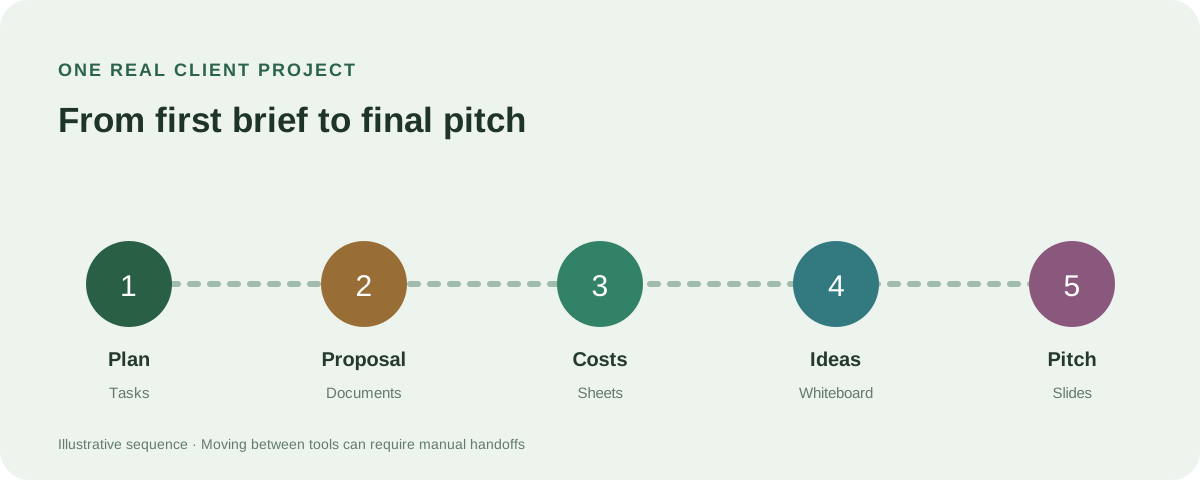
Imagine Maya, a freelance designer hired to refresh a local café's brand. The brief includes a small budget, a few design directions, a client presentation, and an approval round. She wants a clear plan without introducing her client to five different apps.
- Plan the engagement. In ZuffSuite, Maya notes deliverables and due dates using Today/tasks, with a supporting project brief in Documents. In Taskade, she might start with a project template and switch among list, board, or calendar views.
- Draft the proposal. ZuffSuite Documents gives her a dedicated writing space to refine scope, fees, and revisions. Taskade can draft and organize the same information through its outliner or Docs view.
- Track the costs. ZuffSuite Sheets holds project expenses, quantities, and calculations. Taskade's Table view is useful for structured records and custom fields; Maya should test her particular formulas before treating it as a spreadsheet replacement.
- Brainstorm visually. Maya sketches logo directions and client feedback on a ZuffSuite Whiteboard. Taskade's Mind Map view offers a structured, task-connected way to branch and revisit ideas.
- Present the recommendation. Maya creates an editable slide deck in ZuffSuite Presentations. In Taskade, she could generate a presentation outline or create a custom client-facing app; the deliverable format and editing experience differ.
Neither approach automatically moves every piece of information from one step to the next. This is a workflow illustration, not a promise that a document, sheet, board, and deck synchronize their content without manual review. For a copyable companion method, see our freelance project tracker.
The real distinction: built-in tools or build-your-own apps?
Taskade treats a project as structured data that can power different views, agents, and custom applications. It can be unusually capable when you need a lead-intake workflow, a recurring notification, or an internal tool built for one business process. Its strongest advantage is composability.
ZuffSuite instead gives distinct work surfaces recognizable to someone who has used an office suite. A proposal is a document, a budget is a workbook, a brainstorm is a whiteboard, and a pitch is a presentation. That clarity has value when your job is delivering client-ready artifacts, not maintaining infrastructure.
There is a tradeoff: Taskade's multiple views can keep the same project records in sync, while ZuffSuite's separate editors are not substitutes for an automated relational database. For deep cross-app automations or complex agent orchestration, Taskade is a more direct fit today.
Pricing and the free plans
Both offer a free entry point. ZuffSuite's pricing page lists Free at $0 for one person, Student at $3.99/month for eligible higher-education students, Pro at $19.99/month for up to five users, and Business at $59.99/month for up to 15. These are monthly charges; ZuffSuite says it does not offer annual billing. Paid AI allowances are limited.
Taskade's live pricing page shows a $0 Free plan with initial one-time AI credits and a Pro price displayed as $10/month beside an annual/monthly toggle. However, its March 2026 billing FAQ quotes different rates and plan names. Because these public sources disagree, confirm the billing period, current offer, seats, and AI credits in the actual checkout before comparing totals.
An apples-to-apples subscription price is not enough: compare your required deliverables, paid-plan entitlements, AI-credit consumption, and any additional specialist apps you would still use. Taskade could be better value for someone actually using its automations. ZuffSuite could be better value for someone who would otherwise purchase separate office tools.
Who should choose each platform?
Taskade is the stronger starting point for a solo operator who wants custom automations, shareable AI agents, interconnected project views, and application-building from prompts. It is also worth considering if your current projects already rely on its data structures and switching would mean re-creating working processes.
ZuffSuite makes more sense for a freelancer preparing client proposals and decks, a student balancing research with presentations, a creator developing visual concepts, or a small-business owner using forms and spreadsheets every week. It may be less appealing if the heart of your workflow is powerful third-party automation.
The practical test: pick one real assignment. Create a brief, log its costs, develop an idea, and prepare the final deliverable. Notice which product lets you complete that sequence with the fewest compromises. There is no need to migrate every project before that answer is clear.
Frequently asked questions
What is the best Taskade alternative for solo users?
For someone who wants ready-to-use documents, spreadsheets, slides, forms, and a whiteboard, ZuffSuite is one option worth testing. For automation-heavy project workflows, compare dedicated task managers and keep Taskade on the shortlist.
Does Taskade have spreadsheets and presentations?
Taskade has a Table project view with structured fields and can generate presentation content. Those features should not be assumed identical to a native, formula-focused workbook editor or a full slide-authoring tool. Check your actual file and export requirements.
Is ZuffSuite free to use?
Yes. ZuffSuite advertises a $0 Free plan for one person, including core office surfaces subject to its plan limits. Paid plans expand capacity, collaboration, and certain capabilities. Review the current plan details before starting work.
Is Taskade better for AI automation?
Taskade publishes extensive agent and automation capabilities, including third-party integrations and prompt-generated apps. ZuffSuite offers AI assistance, but its current public feature set does not claim comparable general-purpose orchestration.
Can ZuffSuite replace multiple productivity apps?
Potentially, for routine documents, budgets, forms, visual planning, and presentations. Replacement depends on your formula requirements, file compatibility, collaboration needs, and integrations; test critical tasks rather than assuming perfect equivalence.
Sources and editorial notes
Product information: Taskade project views, Taskade Genesis, Taskade pricing, ZuffSuite pricing. First-person feedback: Taskade workflow discussion. Competitor perspectives consulted: Breeze, Codegen, Fluidwave, and The Business Dive. Opinions and examples are identified as such; no measured speed or conversion claims are implied.
Keep exploring
More guides for your work
Step-by-step tutorial Oct 3, 2026
How to Organize Research Notes for Papers and Presentations
Keep evidence connected to sources, compare ideas by theme, and turn organized notes into a useful outline.
Read the guide
Planning guide Oct 3, 2026
How to Plan a Student Research Project: Timeline and Checklist
A four-week example and copyable checklist for moving from an assignment question to a reviewed submission.
Read the guide
Evaluation guide Sep 27, 2026
AI Document Assistant for Small Business: What It Can Do and What to Look For
A practical look at document-aware and workspace-aware AI: what it can do, where it needs human review, and what to test before a small team relies on it.
Read the guideA workspace for what comes next
Bring your everyday work into one workspace.
Plan a project, shape your ideas, write, and build a presentation in one place. Start on your own and share when you need to.