Practical checklist 2026
How to Manage Client Feedback and Revisions Without Losing Track
A practical review checklist, a revision log, and three messages for clarifying comments and closing the loop.
To manage client feedback and revisions, collect comments for a named version of the work, clarify anything ambiguous, and turn agreed changes into a revision log. Track each item until it has been checked and returned for review. Record the client's final decision so you can tell the difference between a draft awaiting comments and a deliverable that is finished.
This is a practical checklist for freelancers who receive feedback through email, messages, calls, and document comments. It works even if you keep those communication channels. The important step is consolidating the decisions you need to act on, rather than treating every incoming comment as a separate instruction with an implied deadline.
The examples use a fictional presentation project. They illustrate a process you can adapt to writing, design, consulting, or other client work. They are not a recommended contract or a rule about what every freelancer must charge. Use the terms you and the client have actually agreed.
Before review: name what the client is reviewing
Start with a clear deliverable and version. “Harbor presentation, draft one” gives both people a reference point. If a client is reviewing an old attachment while you are changing another copy, the resulting feedback can become difficult to interpret. Send the relevant file or link and identify the version in your message.
Explain the kind of review you need. Early feedback might focus on the outline and audience. Later feedback might focus on wording, visuals, or factual corrections. Asking for everything at once can lead to detailed polish on sections that still need a structural decision.
Where several people can comment, ask who will consolidate the final instructions. This does not require a large team process. It simply helps you avoid implementing two incompatible preferences as if both were approved. Record the agreed reviewer or contact in your project notes.
Give a reasonable response date when the schedule depends on feedback. Explain the next step after comments arrive. A client who understands the review sequence can make a more informed decision about timing than a client who receives a file with no context.
Checklist 1: gather one usable feedback batch
Bring the comments together before making extensive changes. Copy or summarize them into a working log, preserving enough context to find the original instruction. If the feedback was verbal, send a short written recap and ask the client to correct anything you misunderstood.
- Confirm which version the comments describe.
- Identify the affected page, slide, paragraph, or other location.
- Separate factual corrections from preferences and questions.
- Flag comments that conflict with each other.
- Identify missing examples or information needed to act.
- Confirm which changes should be included in the next version.
Do not mistake consolidation for rewriting the client's intention. Your summary should preserve the meaning of the request. If “make it more professional” could mean several things, keep it as a question until you understand the desired change.
For requests that create an additional deliverable, use the freelance project intake process. That gives the new work its own outcome and timing, instead of hiding it inside an existing revision round.
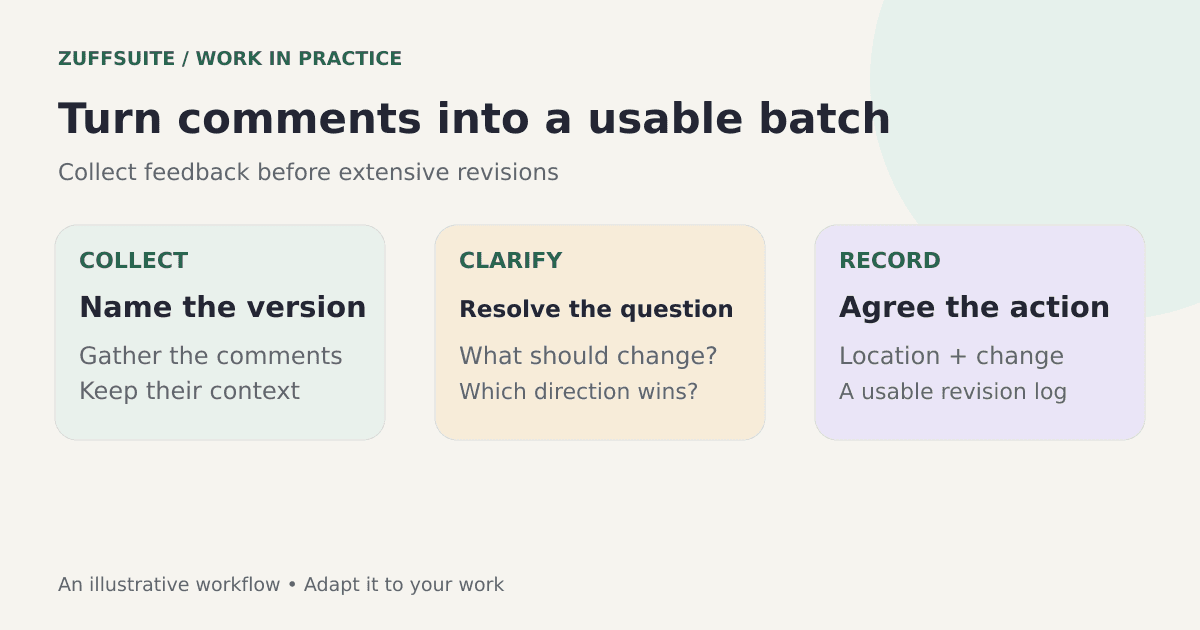
Checklist 2: turn vague comments into specific actions
A revision item should tell you what needs to change and where. “Make the introduction clearer” identifies a concern but not necessarily an action. Ask which audience should understand it, what feels confusing, or whether the client can point to an example of the desired approach.
Use questions that narrow the decision. “Should the opening explain the product for first-time users, or assume the audience already knows it?” gives the client a concrete choice. You can then revise the introduction against that decision and evaluate whether the result answers it.
When comments conflict, surface the conflict before editing. For example, one reviewer wants a shorter presentation while another asks for several additional sections. Explain the tradeoff and ask which outcome takes priority. Quietly attempting both can produce a version that satisfies neither request.
Keep the clarification brief. You do not need a long defense of the original work. State what you understood, what remains unclear, and the answer you need to proceed. This helps the conversation move toward an actionable decision.
Copyable revision log
Use one row per agreed change. Keep the original comment concise, then write the next action in your own working language. A log can sit in a spreadsheet, a table, or a document. The structure matters more than the software.
| Item | Version and location | Requested change | Next action | Status |
|---|---|---|---|---|
| R01 | Draft 1, opening slide | Explain the audience benefit | Confirm audience, then rewrite opening | Waiting for clarification |
| R02 | Draft 1, slide 4 | Replace an outdated figure | Check approved source and update figure | In progress |
| R03 | Draft 1, cover | Use approved photograph | Replace image and inspect layout | Ready to review |
R01
- Version and location
- Draft 1, opening slide
- Requested change
- Explain the audience benefit
- Next action
- Confirm audience, then rewrite opening
- Status
- Waiting for clarification
R02
- Version and location
- Draft 1, slide 4
- Requested change
- Replace an outdated figure
- Next action
- Check approved source and update figure
- Status
- In progress
R03
- Version and location
- Draft 1, cover
- Requested change
- Use approved photograph
- Next action
- Replace image and inspect layout
- Status
- Ready to review
These are fictional examples. Use the freelance project tracker template for the larger deliverable overview, and keep this revision log for individual changes. Combining every revision with every project in one crowded table can make both views harder to read.
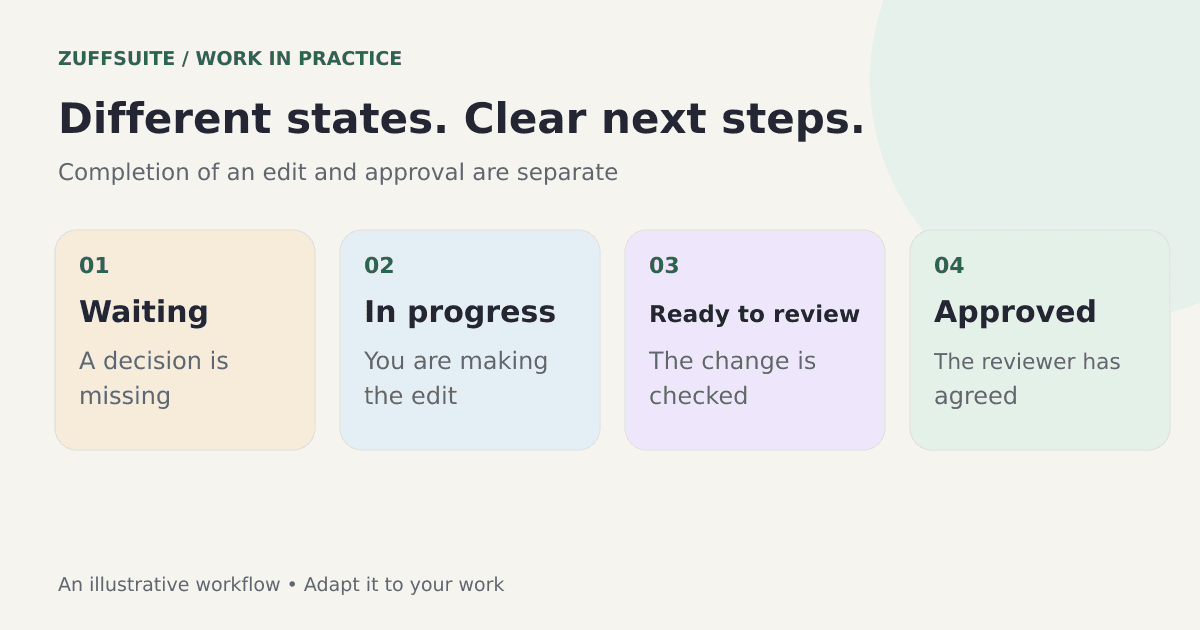
Choose status labels that support decisions. “Waiting for clarification” explains why work has paused. “Ready to review” means you have made and checked the change. “Approved” means the relevant reviewer has accepted it. Do not treat those states as interchangeable.
Checklist 3: decide what belongs in the current round
Compare the requested changes with the agreed brief. Some comments correct an error, some refine the existing direction, and some introduce a different outcome. Labeling them helps you have a clear conversation, but the labels should reflect the actual agreement rather than an invented universal rule.
If the client requests a change of direction, explain what it affects. It may require a new outline, more research, additional assets, or a different delivery date. Give the client enough information to choose whether to proceed. Record the agreed decision before making a substantial change.
An implementation mistake also needs honest treatment. If your draft omitted a requirement already in the brief, address that omission directly. A revision process should help both parties understand the work; it should not turn every correction into a dispute about labels.
Keep your original project brief available. Our client onboarding guide covers gathering expectations at the beginning of an engagement. Clear starting information makes later comparisons easier, though it will not prevent every change of mind.
Checklist 4: apply, inspect, and mark each change
Work through the agreed items in a sensible order. Structural changes often come before visual polish because moving sections can affect headings, spacing, or cross-references. Update the log as the work changes rather than relying on a final memory check.
Inspect the revised output in the form the client will receive. A change that looks correct inside an editor may need another check in an exported file. Verify affected links, wording, images, and page or slide order. If a factual statement changed, return to the approved source.
Check neighboring material too. Rewriting an opening can create repetition later in the presentation. Replacing an image can affect a caption or attribution. A good revision review looks at the consequence of the change, not only whether the original comment has been ticked off.
Leave uncertain items visibly open. If you still need a source or a client decision, say so. A list of unresolved questions is more useful than a log that makes the project appear finished while important checks remain.
Three messages you can adapt
When a comment is unclear
“For the opening, should I focus on first-time users or existing customers? Once you confirm, I can revise that section and include it in the next version.” This names the decision and describes what happens after the answer. Adjust the wording to the actual project rather than sending a template that does not fit.
When instructions conflict
“I have a request to shorten the presentation and another to add two detailed examples. I can keep the main deck short and place supporting detail at the end, or include the examples in the main sequence. Which would you prefer?” This makes the tradeoff visible without blaming either reviewer.
When returning the revision
“Draft two is ready for review. I updated the opening, replaced the figure on slide four, and used the approved cover photograph. The source for the additional example is still awaiting confirmation. Please review the three completed changes and let me know whether they meet the agreed direction.” This gives the client a usable summary and preserves the open issue.
Checklist 5: close the review deliberately
When you return the updated version, identify what changed and what still needs a decision. Keep the summary short enough to read. A client should not have to compare two entire files to discover whether the changes they requested were made.
Ask for a clear final response when approval is the next step. Record that response alongside the deliverable, including which version it applies to. An old approval should not accidentally become approval for later changes. If more work is requested after closure, capture it as a new decision.
Archive the final version and the relevant notes when the deliverable is complete. You can retain the revision history without keeping every intermediate file in the active overview. This makes future follow-up easier while allowing your day-to-day tracker to stay focused.
For managing that closure alongside other commitments, use the multiple freelance client projects guide. It explains how to keep waiting reviews visible without allowing them to obscure the work you can do today.
Organize the process in ZuffSuite
Documents can hold the brief, review instructions, and communication notes. Sheets can hold a revision log with the fields shown here. Forms can collect structured feedback when you choose to use a questionnaire. You can also enter feedback manually from the communication channels you already use.
Start with one small project and check whether the structure helps you find the current version and next action. Avoid adding a field simply because a template has it. If you need a shared review arrangement, check the current ZuffSuite plans and choose the access appropriate for your work.
The CheckFlow revision-process checklist is another relevant example of process-based feedback organization. This guide adapts the problem to a personal workflow that you can maintain as an individual.
Questions about client revisions
Do clients need to use my tracker?
No. You can maintain your own working log and communicate a clear summary through the channel the client uses. If you invite a client into a shared tool, make that a deliberate part of the review arrangement rather than a prerequisite for staying organized.
What if feedback arrives in several messages?
Collect it, identify the version, and confirm the batch you will act on. If a later message changes an earlier instruction, record that change. Consolidation is especially useful when a conversation contains alternatives that were discussed but never approved.
How do I know a revision is complete?
A completed edit has been made and checked. A completed review also has the required response from the client. Keep those milestones separate in your log so you can see whether the next action belongs to you or to the reviewer.
You can create a ZuffSuite workspace and reproduce this checklist with your next project. Start with the brief, the current version, and a handful of revision items. A process becomes useful when it makes the next decision clearer.
About this guide: ZuffSuite used AI-assisted drafting to prepare this article. The diagrams and worked examples illustrate the method; they are not customer case studies. Linked references provide background, and the worksheets are available for you to adapt.
Keep exploring
More guides for your work
Workflow playbook Oct 3, 2026
A Simple Project Intake Process for Freelancers, With a Form Template
Turn an incoming request into a clear decision, a usable brief, and a manageable project plan.
Read the guide
Field guide Oct 3, 2026
How to Manage Multiple Freelance Client Projects Without Losing Track
A worked three-client week, a small project overview, and a repeatable review to keep commitments clear.
Read the guide
Step-by-step guide Sep 27, 2026
Client Onboarding Process for Small Business: A Step-by-Step Guide
A good onboarding process makes the next step obvious to both the client and your team. Here is a seven-stage process, a worked example, and a checklist you can use.
Read the guideA workspace for what comes next
Give your next project one clear home.
Keep notes, documents, tasks, and presentation work together in a personal workspace. Share something when you choose.