Field guide 2026
How to Manage Multiple Freelance Client Projects Without Losing Track
A worked three-client week, a small project overview, and a repeatable review to keep commitments clear.
Managing multiple freelance client projects starts with one overview of your active deliverables. Record the client, promised delivery date, next action, and anything you are waiting for. Keep the detailed work in its own project notes, then review the overview before you promise more work. That small separation makes a busy week easier to understand.
The difficult part is often remembering commitments between work sessions. A designer may know exactly how to finish a brochure yet forget that the client still owes photographs. A writer may have three drafts underway while a short approval email quietly blocks the fourth. Those details need a visible home that you can trust when you return tomorrow.
This field guide walks through an illustrative week for one freelancer with three clients. The names, projects, and dates are fictional. You can use the method in a spreadsheet, a notebook, or a workspace such as ZuffSuite. The aim is a system you can maintain yourself, without asking every client to join your software.
Start with deliverables, not a giant task list
Make a short list of the outcomes you owe. “Brochure proof for Juniper Café” is more useful than “Juniper project,” because it describes the next thing the client will receive. A large engagement can have several deliverables, each with its own date. Keep those rows separate when their timing or approval requirements differ.
A task list tells you what you could do. A deliverable overview tells you what you have committed to finish. You need both, but they answer different questions. When you add a task, connect it to an outcome so small requests do not become an unexplained collection of work.
For each deliverable, write a next action small enough to begin. “Work on presentation” leaves a decision for later. “Confirm the audience before outlining the presentation” identifies both the action and the missing information. If you cannot name a useful next action, spend a few minutes clarifying the project before scheduling a long work session.
| Client | Deliverable | Promised date | Status | Next action |
|---|---|---|---|---|
| Cedar Studio | Landing page draft | October 16 | In progress | Finish the page structure |
| Juniper Café | Brochure proof | October 15 | Waiting for assets | Request final photographs |
| Harbor Learning | Presentation outline | October 19 | Planned | Confirm the audience |
Cedar Studio
- Deliverable
- Landing page draft
- Promised date
- October 16
- Status
- In progress
- Next action
- Finish the page structure
Juniper Café
- Deliverable
- Brochure proof
- Promised date
- October 15
- Status
- Waiting for assets
- Next action
- Request final photographs
Harbor Learning
- Deliverable
- Presentation outline
- Promised date
- October 19
- Status
- Planned
- Next action
- Confirm the audience
The freelance project tracker template explains a copyable version of this overview. Begin with the fields you use to make decisions. Add extra columns only when they answer a recurring question.
Separate your work dates from client deadlines
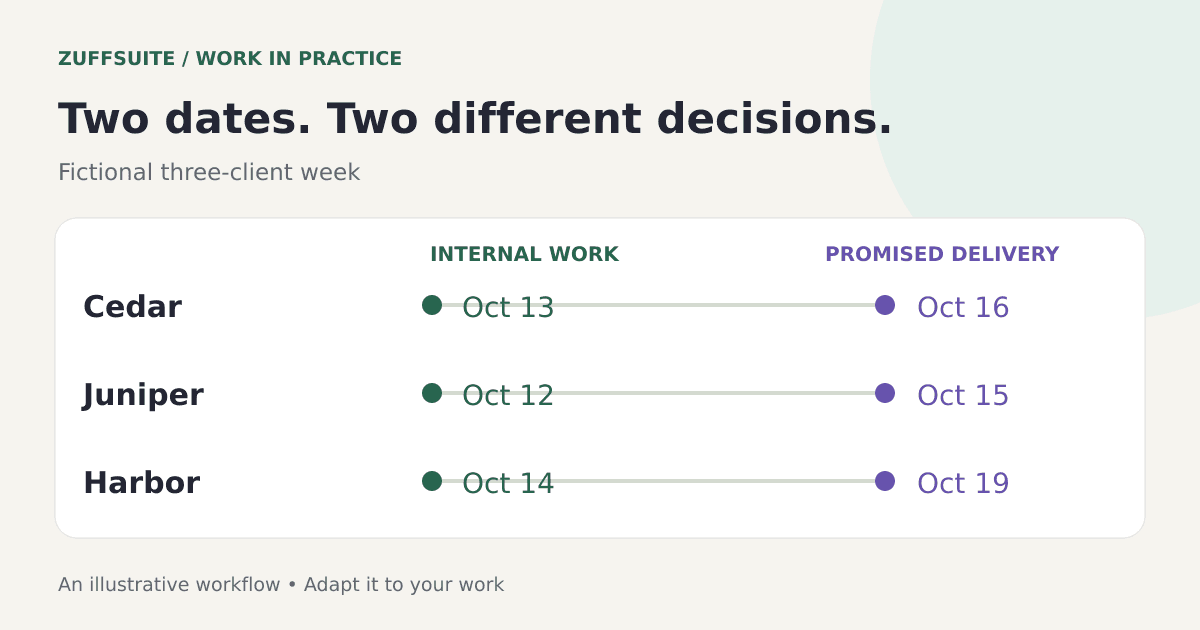
A promised date is the date the client expects a deliverable. An internal work date is when you intend to do the work needed to meet that promise. If you only record the promised date, a calendar can look empty until several projects become urgent together.
Work backward from delivery. Leave room to review your own output, address missing information, and prepare the version you will send. A draft due Friday might need focused writing on Tuesday and a review on Thursday. The exact spacing depends on the assignment, your availability, and how much uncertainty remains.
Record dependencies explicitly. The brochure cannot move to final layout until the photographs arrive. That does not automatically make the whole project inactive: you might still check text, confirm dimensions, or prepare the structure. Choose an action that advances the deliverable without pretending the dependency has disappeared.
Do not silently move a promised date when your internal schedule slips. First assess the impact. If the commitment is now at risk, contact the client with a clear update and a proposed next step. Your tracker should reflect the agreement after that conversation, rather than creating a private version of a deadline the client never accepted.
Give each project a small, useful home
An overview should link or point to the information needed to act. Keep a short brief, relevant files, important decisions, and working notes together for each project. You should be able to reopen the project and understand its current state without rereading a month of messages.
Use names that describe the work. “Cedar landing page — draft review” is easier to recognize than “New document 7.” Include version information where it matters, especially when the client is reviewing a particular file. Distinguish an approved brief from a working draft so old instructions do not accidentally become current requirements.
After a call, record decisions rather than a transcript of everything said. Note what changed, who needs to respond, and whether the change affects scope or delivery. A short decision note can prevent a longer misunderstanding. If a comment requires work, add the next action to your task list while the conversation is still fresh.
For a broader planning framework, read our project management workflow guide. Here, keep the setup deliberately small: one overview for commitments and enough project detail to resume work accurately.
Plan the week around capacity and uncertainty
Start with the time you actually have. Include meetings, routine administration, and commitments outside client work. Then choose the deliverables that need attention this week. A schedule based on every available hour being productive leaves little room for a review request or a task that takes longer than expected.
In the fictional example, Monday begins with the brochure waiting for photographs. The freelancer sends the request, checks the brochure text, and uses the remaining focused session for Cedar's page structure. That advances two commitments while preserving the dependency as a visible issue.
On Tuesday, Harbor confirms the presentation audience. The freelancer can now outline the presentation with a meaningful objective. It is a better use of time than designing slides against an assumption that might change. The next action on the overview changes from “confirm audience” to “draft the opening and three main points.”
If the café photographs arrive late, assess whether the proof still fits. You might adjust internal work sessions, reduce unnecessary polishing, or propose a revised delivery arrangement. Choose consciously. Do not rely on working late as the automatic answer to every collision between commitments.
Keep waiting work visible
“Waiting” is a useful status only if it has enough context. Record what is missing, who can supply it, and when you will follow up. Otherwise, the label becomes a place where projects disappear. Waiting for photographs and waiting for a final approval are different situations with different next steps.
Review waiting items alongside upcoming deadlines. A project due next month may need a follow-up today because the missing material takes time to produce. Conversely, a short delay may have no effect on the final date. Your decision should depend on the relationship between the missing input and the remaining work.
Keep follow-ups specific and easy to answer. “Could you send the three approved photographs by Wednesday so I can prepare the proof?” gives the client a concrete request and explains the timing. Avoid sending a vague “Any update?” when you can name exactly what would move the project forward.
Handle new requests before adding them to your week
When a client asks for an extra deliverable, capture the request first. Clarify the outcome, required inputs, expected timing, and whether it changes the existing agreement. A request that sounds small may still require research, review, or a new file format.
Use a simple decision: accept it within the current plan, schedule it separately, ask for clarification, or decline it. The freelance project intake process gives you a practical questionnaire for gathering that information. Intake is useful for existing clients as well as new ones.
For changes to work already in review, follow a client feedback and revision process. Record the version affected and the next agreed action. This keeps a new comment from becoming an invisible deadline in your inbox.
Run a weekly review you can repeat
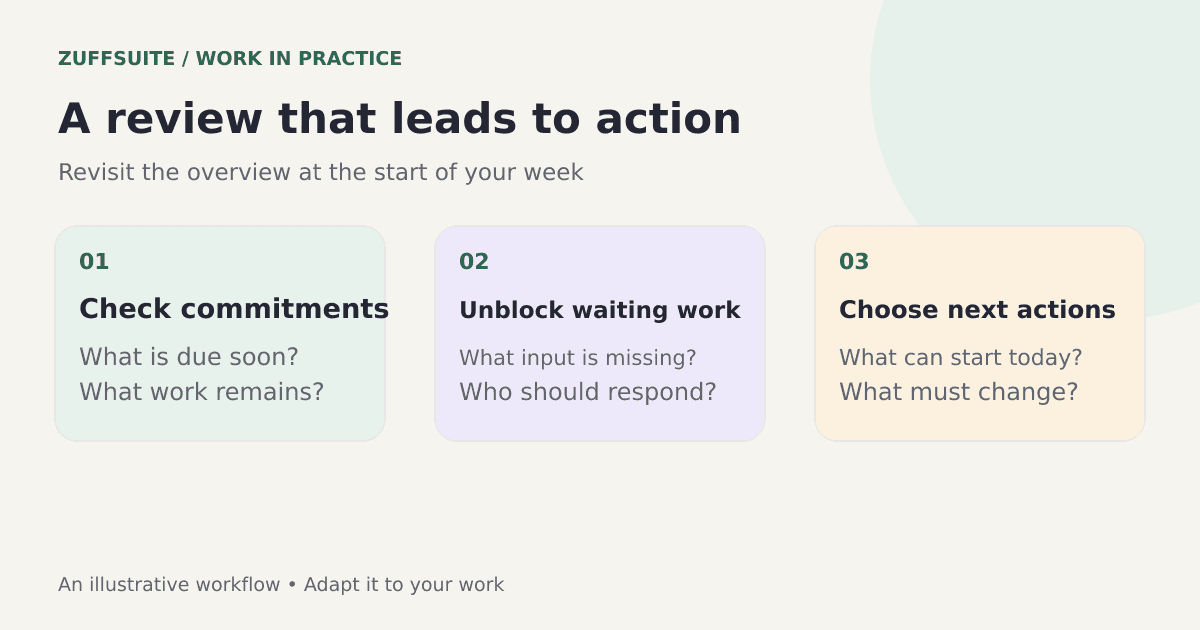
Set aside a short recurring appointment with your project overview. The purpose is to make decisions, not to decorate a dashboard. Check each active deliverable and ask whether its date, status, next action, and supporting information still describe reality.
- Look at commitments due soon and the work sessions they require.
- Check waiting items and identify the follow-ups that would unblock work.
- Replace vague next actions with specific actions you can start.
- Record changes agreed with clients and update the supporting project notes.
- Decide whether new work fits before giving an additional delivery promise.
- Close completed deliverables so your active overview stays useful.
After the review, pick the most useful starting point for the next workday. This reduces the chance that your morning begins with choosing between several equally vague priorities. Leave a note about the first file to open or question to resolve.
Use a workspace without creating more administration
In ZuffSuite, you can organize written project notes in Documents and structured project information in Sheets. Keep the example fields modest, and enter updates deliberately as decisions change. This guide does not depend on automatic task creation or an integration with your clients' tools.
You can also keep your existing client communication channel. Copy the important decision into your project notes and record the resulting action. The value comes from knowing where your own work stands; clients do not need to participate in every part of your personal organization system.
Browse the ZuffSuite template collection for starting points, or create your workspace and rebuild the small overview above. Choose the structure after you understand the workflow, rather than letting a large template dictate how every project must operate.
Questions freelancers ask
Should I organize projects by client or by deliverable?
Use a client label to keep related work recognizable, but track deliverables separately when their dates or approval steps differ. One client can have a presentation awaiting review and a document still being drafted. Combining them into one status hides information you need for scheduling.
What if every client says their request is urgent?
Ask for the actual required date and what depends on it. Compare the request with existing commitments, then explain what you can realistically offer. Capture any agreed change in writing. Urgency should lead to a scheduling decision, not an unrecorded promise that overrides the rest of your week.
How much time should the tracker take?
It should take less effort than repeatedly reconstructing project status from messages and memory. Update it when the state of work changes. If a field never affects your decisions, remove it. If you repeatedly ask the same missing question, add a field or note that answers it.
Is a simple spreadsheet enough?
A spreadsheet can be enough when it gives you a reliable overview and you can find the supporting work. Move to a richer workspace when you need a better home for notes, drafts, or presentations. Start with the same small system and expand it only when a real need appears.
For another perspective on the underlying topic, Upwork's guide to managing multiple clients covers planning, communication, and boundaries. The practical test for your own system is straightforward: can you see the next commitment, the missing input, and the next action without hunting through several places?
About this guide: ZuffSuite used AI-assisted drafting to prepare this article. The diagrams and worked examples illustrate the method; they are not customer case studies. Linked references provide background, and the worksheets are available for you to adapt.
Keep exploring
More guides for your work
Template walkthrough Oct 3, 2026
Freelance Project Tracker Template: Clients, Tasks, and Deadlines
Copy the blank tracker, learn each field, and build a small overview you can maintain yourself.
Read the guide
Practical checklist Oct 3, 2026
How to Manage Client Feedback and Revisions Without Losing Track
A practical review checklist, a revision log, and three messages for clarifying comments and closing the loop.
Read the guide
Workflow playbook Oct 3, 2026
A Simple Project Intake Process for Freelancers, With a Form Template
Turn an incoming request into a clear decision, a usable brief, and a manageable project plan.
Read the guideA workspace for what comes next
Give your next project one clear home.
Keep notes, documents, tasks, and presentation work together in a personal workspace. Share something when you choose.