Student field guide 2026
How to Divide Group Project Work Fairly (With a Simple Plan)
An equal split is not always a fair split. Use this four-step workload check, a three-person example, and a copyable plan to share the work clearly.
To divide group project work fairly, list every deliverable, estimate its effort, compare the assignments with each person's available time, and give each task a clear owner and reviewer. Count coordination, editing, citations, and submission too. Recheck the split at a milestone so the group can adjust before a deadline becomes an emergency.
This guide focuses on the workload decision behind a shared assignment. For slide-specific help, see our college group presentation guide, which covers roles, a timeline, slide planning, and rehearsal.
A group can appear balanced on paper while one student quietly finds sources, schedules meetings, fixes everyone's citations, combines drafts, and uploads the final file. A fair split makes that invisible work visible before people start—not after one teammate is exhausted.
What a fair group project split actually means
Fair does not have to mean that everyone spends exactly the same number of minutes or completes the same kind of task. A research-heavy section may take longer than formatting a reference list. A student with a job or family commitments may have fewer available hours than a teammate. The group needs a clear, agreed way to compare the work and make changes when the assignment or people's availability shifts.
A practical definition is: each person has a meaningful contribution, their responsibilities are specific, the overall load is visible, and the group knows how to revisit the plan. Check the rubric and course instructions first. If the instructor sets individual responsibilities, peer evaluation, or a required process, follow those rules.
That approach matches guidance from UHasselt's study-coaching guide, which recommends clear tasks, smaller subtasks, deadlines, and a fair workload. OpenStax's guide to working in groups also advises groups to discuss roles and responsibilities in light of members' strengths and interests.
How to divide group project work fairly in four steps
Use the same four-part method for a paper, presentation, lab report, design project, or case study. The point is not to turn classmates into managers; it is to give everyone enough clarity to get started and a simple way to spot an uneven workload.
1 · Break the assignment into deliverables
- Read the prompt and rubric together.
- List the outputs: research, analysis, draft, design, citations, and submission.
You can point to what “done” means.
2 · Estimate the effort
- Use one shared scale, such as light, medium, and heavy.
- Check each estimate against everyone's actual availability.
Estimates start a conversation; they are not grades.
3 · Name an owner and reviewer
- Give each deliverable one primary owner.
- Ask a second person to review it before handoff.
No task is left with a vague “everyone.”
4 · Recheck at a milestone
- Compare the plan after research or a first draft.
- Swap, reduce, or clarify work while there is time.
The group can adjust before a deadline slips.
1. List deliverables, not just roles
Start with the final product and work backward. “Write the report” is too large to assign clearly. It may contain a source search, an outline, a method, analysis, a draft, citations, editing, and a final upload. Name each output the next person can open, read, or review.
- Separate the assignment into pieces that can be finished and checked, such as a source log, data summary, or slide outline.
- Mark dependencies. For example, the group should agree on the research question before members draft separate sections.
- Add shared tasks such as kickoff, decisions, proofreading, accessibility checks, and submission. Those tasks still take time.
2. Estimate effort before assigning tasks
Before anyone claims a task, give it a rough estimate. A simple scale might be 1 for light, 2 for moderate, and 3 for heavy. Another group may prefer approximate hours. Use whichever scale everyone can understand; there is no universal workload formula for every course.
Ask what makes a task heavier: unfamiliar research, a large dataset, a difficult source, a lot of integration, or several rounds of revision. Then check the estimate against real availability. Someone may have more experience with data analysis and still have less time this week. The estimate is a planning prompt, not a score of how valuable each person is.
3. Give each task an owner and reviewer
The owner is responsible for producing the deliverable and flagging a blocker. The reviewer checks the work against the group's agreed criteria. This does not mean that two people must complete the same task. It gives the owner a useful second set of eyes and makes the handoff clear.
Share leadership tasks where possible. One person can schedule the first meeting while another runs the next checkpoint. If someone owns final assembly, citations, or the upload, count that work when you assign their other tasks. Cornell's guide to longer-term team projects recommends breaking complex work into parts and checking progress at milestones.
4. Check the split again before the final week
Set at least one internal checkpoint well before the deadline. Compare planned effort with what each person has actually completed and what remains. A source search that looked small may turn into a larger evidence review; a section may be removed; the person combining separate files may discover that the work needs a careful edit.
Make the check-in a normal part of the plan, not a meeting called only when someone is upset. Ask each person: What is done? What is still open? What is blocked? Does the remaining work still fit the time each person has? If the answer is no, make a specific change and write down who owns the next step.
A three-person example of a balanced workload
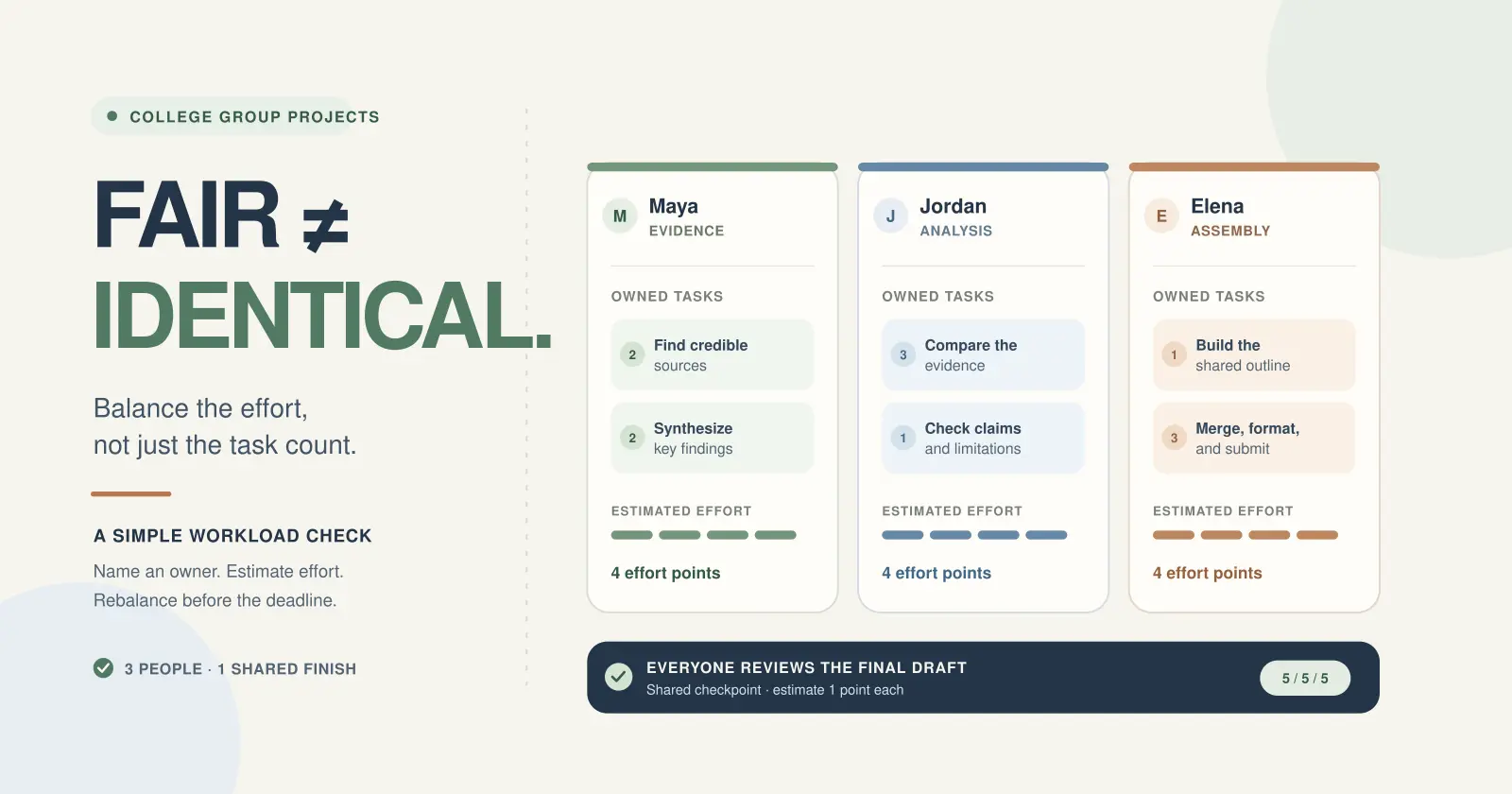
Imagine a three-person team preparing a short research report and class presentation. The numbers below are illustrative effort points, agreed by the fictional team. They help the students compare assignments; they do not measure academic quality, dictate grades, or claim that every research project takes the same amount of work.
Maya · Evidence
- Find and log credible sources · 2
- Synthesize the key findings · 2
4 effort points before review
Jordan · Analysis
- Compare evidence against the question · 3
- Check claims and limitations · 1
4 effort points before review
Elena · Assembly
- Build the shared outline · 1
- Merge, format, and submit · 3
4 effort points before review
Everyone · Final check
- Read the complete draft against the rubric · 1 each
5 / 5 / 5 estimated points in this example
This is a starting plan, not a required pattern. Maya, Jordan, and Elena contribute in different ways, and each owns a clear output. The group also recognizes that merging and submitting the work is a substantial task. If Elena has less time that week, the group could move some formatting or file checks to a reviewer instead of pretending the assembly work takes no effort.
Count the task rows
Everyone gets three items in the checklist.
- Research and copyediting appear equal.
- Final assembly disappears.
- A long task can hide inside one line.
Look at effort and ownership
Each deliverable has an owner, estimate, reviewer, and due date.
- Heavy work is visible.
- Coordination is included.
- The group can rebalance before the deadline.
Count coordination and final assembly
Students often split the visible academic content and forget the work around it. The organizer may be tracking replies, setting meeting times, recording decisions, and reminding people about internal deadlines. The person who assembles the final draft may need to make the tone consistent, repair references, check file permissions, and confirm that the correct version was submitted.
- Scheduling, agenda, meeting notes, and following up on decisions.
- Combining separate sections and making the final paper, deck, or poster read as one piece.
- Checking citations, captions, formatting, image permissions, or the rubric.
- Exporting, testing links, uploading the right file, and confirming the submission.
- Rehearsing, presenting, or answering questions when the assignment requires it.
These may be shared or assigned, depending on the project. What matters is that they are named. A student should not become the default editor and emergency backup simply because they are organized. If one member takes on a coordination or integration task, lower another part of that person's workload or assign a partner.
What to do when the workload changes
A fair split can change after the group learns more. When it does, describe the task and the effect rather than accusing a teammate. For example: “The source comparison is taking longer than we estimated, and the draft is due Friday. Can we move two sources to another person or narrow the comparison together?” A specific request is easier to answer than “This is unfair.”
Decide what will change: reduce the scope, pair up on a difficult task, move a deliverable, set a new internal due date, or ask the instructor how to proceed. Record the new owner and next checkpoint. If the group cannot agree, a classmate repeatedly misses commitments, or the course has rules about individual contributions, ask the instructor for guidance before the final deadline.
Try not to solve every imbalance by quietly doing someone else's work. It can hide the problem until there is no time to respond, and it makes the next project harder to plan. Keep the conversation factual, leave room for genuine blockers, and make the next step small and clear.
A copyable group project workload plan
Agree on the basics in one shared place. The free College Group Project Agreement & Responsibility Kit can help your team record communication expectations, roles, deadlines, and peer feedback. You can also copy this short workload plan into a shared document or group chat.
Copyable group-work plan
PROJECT:
Final deliverable and rubric:
Final deadline (include time):

TASK | OWNER | EFFORT (1–3) | DUE | REVIEWER
[deliverable] | [name] | [estimate] | [date] | [name]
[deliverable] | [name] | [estimate] | [date] | [name]
[deliverable] | [name] | [estimate] | [date] | [name]

Group checkpoint:
How we will flag a blocker:
Who confirms the final submission:
Ask every teammate to check that their name, deadline, and task are accurate before work begins. If someone cannot meet a date, the group can discuss a change while the task is still manageable.
Common questions about dividing group work
Should a group project be divided equally?
Aim for a workload everyone considers reasonable, but do not rely on equal task counts or slide counts. Compare the effort, timing, and less-visible responsibilities, then agree on the plan together. If your instructor's rubric requires a particular division or individual work, use that as the starting point.
How do you divide a group project among four people?
Use the same steps with four names: break the assignment into deliverables, estimate the work, assign one owner and a reviewer, and set a checkpoint. You might have two people research separate questions, one analyze the results, and one coordinate the report, but estimate integration and review work instead of giving one person a coordinator title with no clear boundaries. Everyone should understand the final argument.
What if a teammate misses an internal deadline?
Check in promptly and ask what is blocking the deliverable. Restate what is needed and set a realistic next update. If the task affects other people, tell the group and adjust the plan together. Keep the conversation and record factual, and contact the instructor if the issue continues or course policy requires escalation.
Keep exploring
More guides for your work

Practical file system Oct 28, 2026
Project Folder Structure: A Simple, Copyable Template
Copy a practical folder tree for client, school, or team work. See what belongs in each folder, how to name files, and how to hand off the right version.
Read the guide
Step-by-step tutorial Oct 19, 2026
How to Make Flashcards From Notes (Step-by-Step + Free Template)
Go from messy notes to focused question-and-answer cards with a worked biology example, a review routine, and a free printable template.
Read the guide
Software comparison Oct 16, 2026
ZuffSuite vs xTiles: Which Fits Students and Solo Projects in 2026?
xTiles gives ideas and tasks a visual home. ZuffSuite brings documents, spreadsheets, forms, files, whiteboards, and presentations together. The right fit depends on the work you need to finish.
Read the guideA workspace for what comes next
Bring your everyday work into one workspace.
Plan a project, shape your ideas, write, and build a presentation in one place. Start on your own and share when you need to.