Software comparison 2026
ZuffSuite vs xTiles: Which Fits Students and Solo Projects in 2026?
xTiles gives ideas and tasks a visual home. ZuffSuite brings documents, spreadsheets, forms, files, whiteboards, and presentations together. The right fit depends on the work you need to finish.
xTiles and ZuffSuite can both help one person keep a project together, but they start from different places. xTiles is built around a visual canvas of projects, pages, tiles, and tasks. ZuffSuite groups familiar work surfaces—Docs, Sheets, Forms, Files, Whiteboards, and Presentations—with personal task tracking. The practical question is whether your project needs a visual home first or a set of finished work products close at hand.
This guide compares the products for a student assignment and an independent work project. It uses each company’s current product and pricing pages, checked October 16, 2026. The examples are illustrative, not customer case studies, and this is not a measured speed test.
The difference in one minute
xTiles treats the project space as the organizing surface. A page is a canvas where you can arrange tiles, notes, media, and task lists; project pages can be exported as PDF, image, or Markdown. That flexibility suits planning, collecting, visual outlining, and keeping task context beside ideas. See xTiles’ official spaces, projects, pages, and export guide.
ZuffSuite treats the work product as the organizing surface. You can move between a document, workbook, form, file, whiteboard, or presentation, while Today and task tracking keep personal next steps nearby. That is useful when a project repeatedly produces recognizable deliverables rather than only a living planning board. ZuffSuite’s student workflow shows how those surfaces can connect across an assignment.
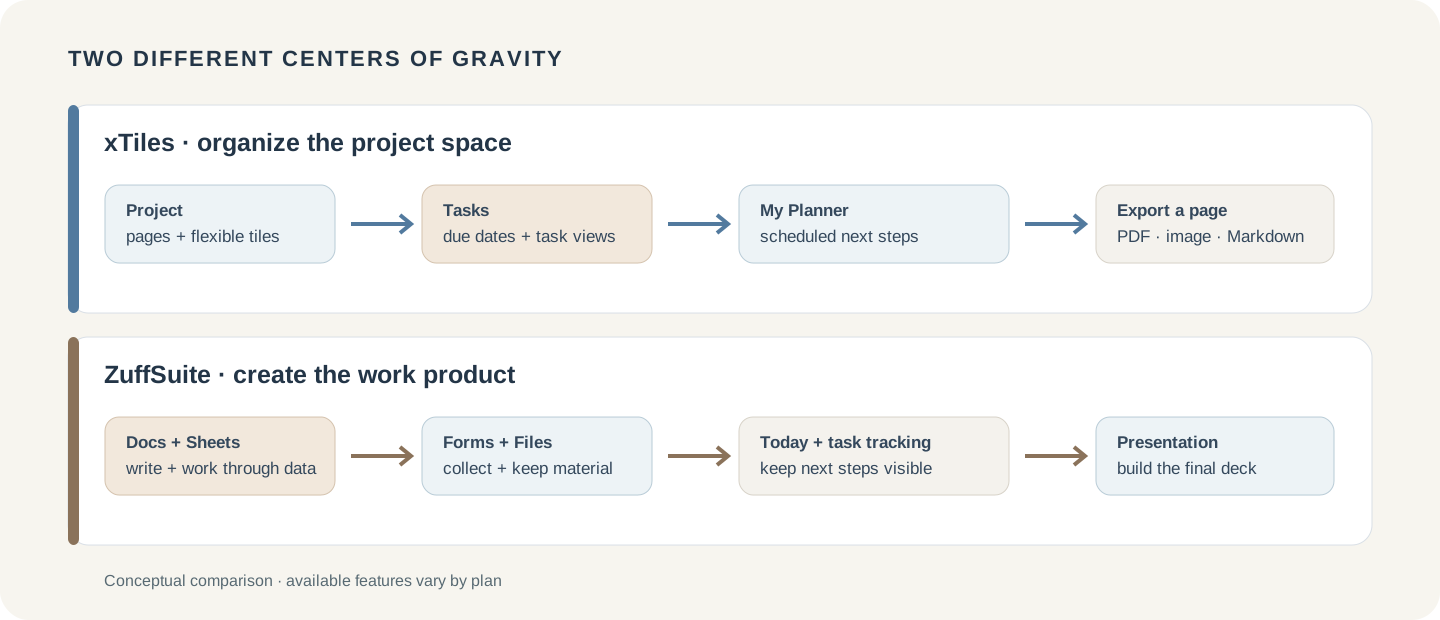
xTiles vs ZuffSuite: feature comparison
The products overlap on planning and organization, but the overlap does not make every feature a one-to-one substitute. xTiles centers on its flexible canvas and project structure; ZuffSuite’s personal workspace centers on several dedicated work surfaces. The table summarizes the distinction to check against your own workflow.
| Need | xTiles | ZuffSuite |
|---|---|---|
| Start a project | Create a project with pages and arrange flexible tiles on a canvas. | Choose a document, workbook, form, file, whiteboard, presentation, or task list. |
| Organize visually | Canvas pages, movable tiles, collections, templates, and linked pages. | Whiteboards plus structured Docs, Sheets, Presentations, and Files. |
| Plan tasks | Tasks can live in project tiles and appear in task views, My Planner, and the calendar. | Today and task tracking support personal next actions alongside workspace tools. |
| Produce a presentation | Organize and export a project page; use a dedicated slide editor if your assignment requires a presentation file. | Create slides in the Presentations workspace, with related research and data in other tools. |
| Connect AI | AI assistant and supported AI integrations can work with xTiles content; capability varies by plan. | Pro and Business include AI features subject to usage controls; Free does not include the paid AI set. |
| Share work | Project and workspace collaboration options depend on the plan; My Planner is personal. | Pro adds links, comments, and up to three guest editors per item; Business adds shared workspaces and member controls. |
Start a project
- xTiles
- Create a project with pages and arrange flexible tiles on a canvas.
- ZuffSuite
- Choose a document, workbook, form, file, whiteboard, presentation, or task list.
Organize visually
- xTiles
- Canvas pages, movable tiles, collections, templates, and linked pages.
- ZuffSuite
- Whiteboards plus structured Docs, Sheets, Presentations, and Files.
Plan tasks
- xTiles
- Tasks can live in project tiles and appear in task views, My Planner, and the calendar.
- ZuffSuite
- Today and task tracking support personal next actions alongside workspace tools.
Produce a presentation
- xTiles
- Organize and export a project page; use a dedicated slide editor if your assignment requires a presentation file.
- ZuffSuite
- Create slides in the Presentations workspace, with related research and data in other tools.
Connect AI
- xTiles
- AI assistant and supported AI integrations can work with xTiles content; capability varies by plan.
- ZuffSuite
- Pro and Business include AI features subject to usage controls; Free does not include the paid AI set.
Share work
- xTiles
- Project and workspace collaboration options depend on the plan; My Planner is personal.
- ZuffSuite
- Pro adds links, comments, and up to three guest editors per item; Business adds shared workspaces and member controls.
A student project: the same assignment, two ways to organize it
Imagine three classmates have two weeks to research whether a campus should add more quiet study space. This is an illustrative scenario, not survey data or a claim about how every student group works. They need to agree on a question, keep source notes traceable, divide tasks, review a draft, and submit a short slide presentation.
In xTiles, the group could begin with a project page and arrange research links, note tiles, questions, and a task collection around the assignment. Due-dated tasks can appear in My Planner and the task calendar, while a visual layout makes it easy to see how sources and ideas relate. The group can export a page as PDF, image, or Markdown. If the course requires a presentation deck, the students should confirm whether that export fits the requirement or prepare the slides in a separate presentation tool. xTiles documents its task scheduling in the task calendar and My Planner guide.
In ZuffSuite, the group could divide the same work across a document for the question and draft, a workbook for a source or evidence table, tasks for the next checkpoints, and Presentations for the final deck. Files and forms may help if the assignment also involves collecting materials or responses. This keeps each deliverable in a tool shaped for that format, though students still need to agree on file names, ownership, sources, and review steps.
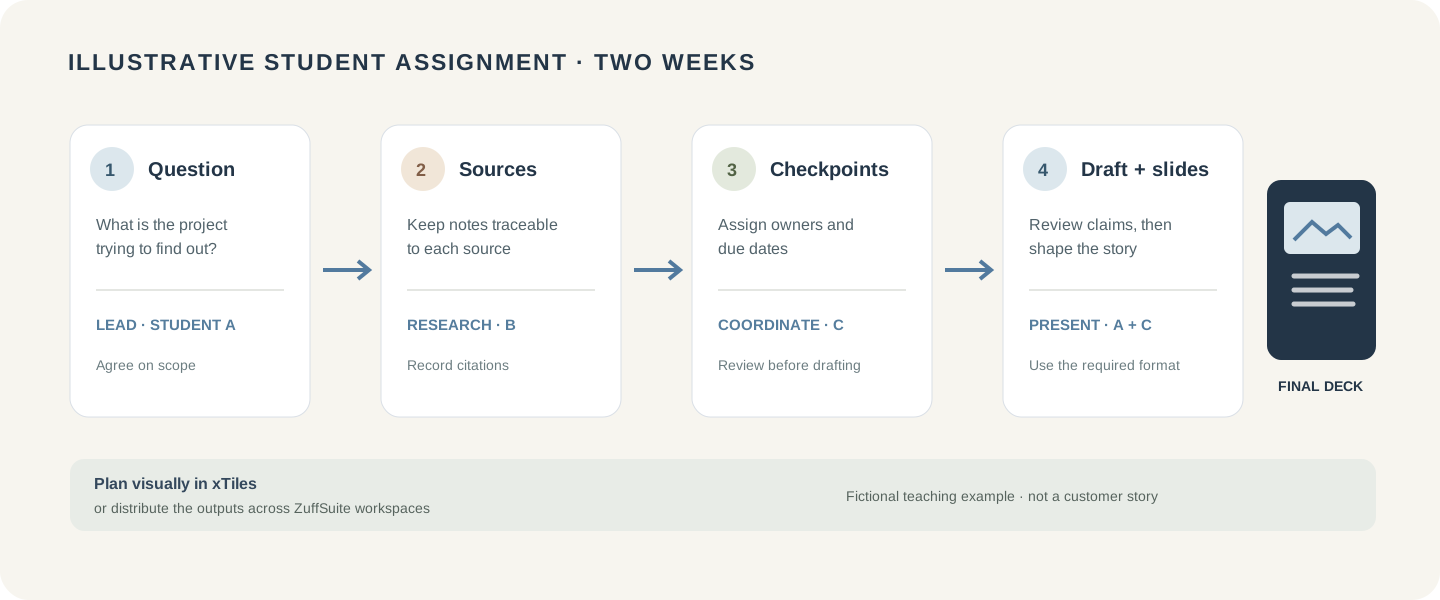
Either approach can work. A group that enjoys arranging material visually may find the xTiles canvas a natural shared starting point. A group that already knows it must submit a written draft and a slide deck may prefer having dedicated document and presentation spaces close together. In both cases, the team must check sharing permissions, preserve source details, and follow the instructor’s requirements. Our college group presentation guide covers task ownership, deadlines, and rehearsal planning.
A solo or freelance project: plan the work or build the deliverable
Consider a freelancer preparing a small client proposal. There may be a short intake, a brief, a budget, a few visual directions, a proposal, and follow-up actions. In xTiles, the freelancer could place references and ideas on a project canvas, turn tasks into dated next steps, and use calendar connections to see upcoming work. The flexible page is useful when the project is still taking shape or the main challenge is keeping related material visible.
In ZuffSuite, the same freelancer could collect requirements in a form, draft the proposal in Docs, estimate costs in Sheets, sketch directions on a Whiteboard, then prepare a client-ready presentation. The tools do not automatically turn a project list into a finished proposal; the user still makes decisions and carries the brief into the right workspace. The benefit is having purpose-built places for common business outputs within the same product.
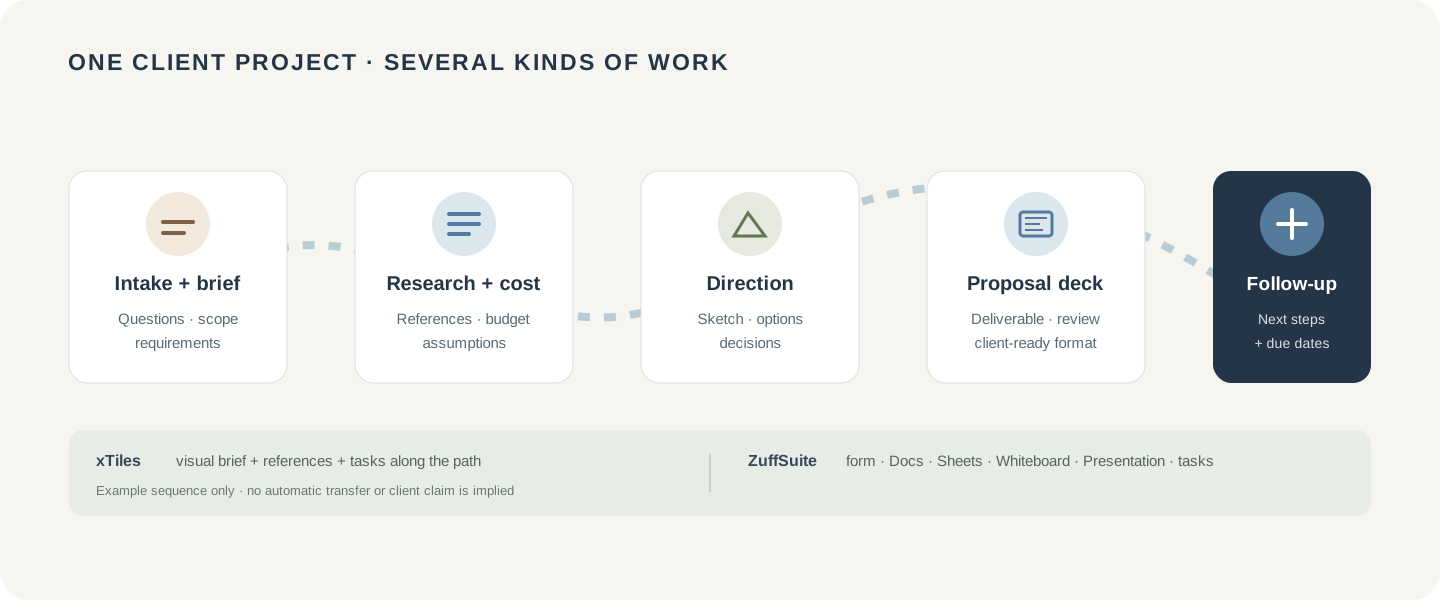
If your freelance work revolves around databases, custom workflows, or AI agents that transform project information, compare those needs directly before choosing. Our Taskade vs ZuffSuite guide for solo users looks at that kind of workflow from another angle.
Pricing in 2026: compare the billing, not just the headline
These are U.S. list prices shown on the vendors’ official pages on October 16, 2026. They are not equivalent feature tiers: compare the limits and collaboration you will actually use, and confirm the current offer before subscribing.
| Plan | xTiles | ZuffSuite |
|---|---|---|
| Free | $0. Includes a free tier with basic AI and planning features; limits apply. | $0 for one person, with Docs, Sheets, Forms, Files, Whiteboards, Presentations, Today, and task tracking. |
| Individual paid plan | Plus: $19 per month, or $12.42 per month equivalent when billed annually ($149/year). | Pro: $11.99 per month for one person. Annual billing is not currently available. |
| Higher team plan | Pro: $35 per month, or $24.92 per month equivalent when billed annually ($299/year). | Business: $19.99 per paid user per month, with five paid users minimum ($99.95/month). |
Free
- xTiles
- $0. Includes a free tier with basic AI and planning features; limits apply.
- ZuffSuite
- $0 for one person, with Docs, Sheets, Forms, Files, Whiteboards, Presentations, Today, and task tracking.
Individual paid plan
- xTiles
- Plus: $19 per month, or $12.42 per month equivalent when billed annually ($149/year).
- ZuffSuite
- Pro: $11.99 per month for one person. Annual billing is not currently available.
Higher team plan
- xTiles
- Pro: $35 per month, or $24.92 per month equivalent when billed annually ($299/year).
- ZuffSuite
- Business: $19.99 per paid user per month, with five paid users minimum ($99.95/month).
xTiles lists a 50% discount on Plus for eligible students for one year, with application routes on its pricing page. This is a student offer, not just an educator discount; eligibility and terms should be checked before you count it in a budget. ZuffSuite says students use the same Free, Pro, and Business plans as everyone else. Its Business plan also has a five-paid-user minimum, so it is not the comparable choice for a solo student.
For a solo person comparing the entry paid plans, ZuffSuite Pro is lower than xTiles Plus at the month-to-month list price; the annual xTiles Plus equivalent is close to that monthly amount, but requires annual billing and has a different feature bundle. Do not choose on price alone: a useful visual canvas or a presentation editor may be worth more to you than the lowest monthly figure. Recheck xTiles’ pricing and student offer and ZuffSuite’s current plans before deciding.
When xTiles is likely the better fit
- You want to arrange mixed material spatially and think best with a flexible canvas.
- Your project is still exploratory, and seeing notes, references, images, and tasks together helps you make sense of it.
- You use due dates, My Planner, task views, or calendar connections as part of your regular routine.
- AI integrations that interact with project content are a priority, and the plan’s current capabilities match your needs.
- You value an eligible student discount and are comfortable with xTiles’ plan limits and billing options.
When ZuffSuite is likely the better fit
- Your recurring work produces documents, spreadsheets, forms, files, whiteboards, and presentations.
- You want a free one-person workspace that already includes those work surfaces.
- You prefer a dedicated presentation tool for a class deck or client proposal instead of exporting a project page.
- You need AI features on an individual plan and can work within stated usage controls.
- You share individual items with a small number of collaborators on Pro, or need Business workspaces and can meet its five-user minimum.
A simple decision checklist
Before you sign up, write down the last project you completed and list what you made: notes, tasks, a budget, a form, a deck, a published page, or something else. Then ask:
- Where do I need to do most of my organizing: on one flexible canvas or across several dedicated tools?
- Which final format must I deliver, and can this product create it in the form I need?
- Will I work alone, share specific items, or need a true shared workspace?
- Which free-plan limit or paid feature would change my decision?
- Does the price match how I plan to pay—monthly, annually, or for multiple members?
If a course rubric or client brief specifies a file type, let that requirement guide the choice. If the work is uncertain and visual, try the planning model first. If the output is clear and recurring, start with the tool that can create it. Our guides to organizing research notes and turning notes into a presentation can help with those steps whichever product you choose.
Frequently asked questions
Is ZuffSuite an alternative to xTiles?
It can be, especially if your work needs documents, spreadsheets, forms, files, whiteboards, presentations, and task tracking together. xTiles may be a better match when its flexible visual canvas and planning model are central to how you work. Compare the actual outputs you need, not only the category labels.
Is xTiles good for students?
It can suit students who like visual project pages, task planning, and collecting material in a flexible layout. Check assignment requirements, export needs, collaboration permissions, and the current plan limits. xTiles also advertises a 50% Plus discount for eligible students for one year; confirm its application terms.
Does ZuffSuite have a separate student plan?
No separate student tier is listed on ZuffSuite’s current pricing page. Students use the same Free, Pro, and Business plans as other users. The Free plan is for one person; Pro adds AI features and sharing, subject to usage controls and plan terms.
Can xTiles create a presentation?
xTiles pages can be arranged visually and exported as PDF, image, or Markdown. That can suit a presentation-style page or a handout. If your assignment requires an editable slide deck in a specific format, check the current export options and decide whether to use a dedicated presentation editor as well.
Which is cheaper for one person?
At the listed U.S. monthly prices checked October 16, 2026, ZuffSuite Pro is $11.99 per month and xTiles Plus is $19 per month; xTiles Plus is $12.42 per month equivalent when billed annually. Their bundles differ, and eligible students may qualify for an xTiles discount. Confirm current terms before buying.
Can I use either product for free?
Yes. Both list a free plan. ZuffSuite Free includes a one-person workspace with its core work surfaces and task tracking. xTiles Free includes visual pages and planning features with plan limits. Check each vendor’s live plan page for storage, sharing, AI, and history limits.
Which one should a freelancer choose?
Choose based on the part of the client workflow you need most. xTiles suits visual planning and tasks around evolving work. ZuffSuite suits creating client documents, budgets, forms, visual ideas, and presentations. A freelancer who needs both may test one real, low-risk project in each free plan before moving active client material.
How this comparison was prepared
ZuffSuite prepared this editorial comparison using the products’ public feature, help, and pricing pages reviewed October 16, 2026. We describe product capabilities from those sources and give both products a clear best-fit case. We did not run a controlled feature or speed test, and the student and freelancer scenarios are illustrative. Plans change; use the linked official pages to check current prices, limits, and eligibility before making a purchase decision.
Keep exploring
More guides for your work

Template guide Oct 15, 2026
Meeting Notes Template: 7 Free Examples That Turn Meetings Into Action Items (2026)
Copy a meeting notes template, compare seven realistic examples, and use a simple method to turn discussion into recorded decisions and owned follow-up.
Read the guide
Step-by-step tutorial Oct 13, 2026
How to Turn Notes Into a Presentation: From Messy Ideas to Finished Slides
Follow one complete notes-to-slides example, from a messy research page to a focused six-slide story you can confidently present.
Read the guide
Personal productivity guide Oct 13, 2026
Too Many Productivity Apps? How to Simplify Your Workflow Without Losing Your Work
A practical way to reduce app switching, protect the work you already have, and build a simple system around the projects you need to finish.
Read the guideA workspace for what comes next
Bring your everyday work into one workspace.
Plan a project, shape your ideas, write, and build a presentation in one place. Start on your own and share when you need to.