Workflow guide 2026
Project Management Workflow for Small Business: From Brief to Handoff
Projects go wrong at the handoffs between stages, not inside them. A seven-stage workflow from brief to close, the handoff at each step, and a worked example.

A small team rarely lacks project management tools. It lacks agreement on how a project actually moves. The brief lives in an email, the scope in a proposal, the plan in someone’s head, the tasks in a spreadsheet, and the status in a Friday message. Each piece is fine. The trouble is what gets lost when work passes from one to the next.
This guide describes a simple seven-stage workflow: brief, scope, plan, assign, execute, report, and hand off. It focuses on the handoffs between stages, because that is where small projects tend to slip. It is deliberately about how the work flows, not about which software to buy.
What is a project management workflow?
A project management workflow is the repeatable path a project follows from the first request to the final handoff. Wrike’s guide to project management workflows describes it as a structured series of repeatable steps a team follows to plan, execute, and complete a project. That is a fair description. The important word is repeatable.
A workflow is different from a plan. A plan describes one project. A workflow describes how every project of that kind should move, so the next one starts from something better than a blank page. It is close kin to a procedure, and our guide on how to write an SOP for a small business covers how to write one down.
Why projects get messy in small teams
Small teams work close together, so they skip formality. That is usually a strength until a project grows past what one person can hold in mind. The same failures then appear:
- The goal was understood differently by the client and the team.
- Scope grew without anyone deciding it should.
- Tasks exist but nobody clearly owns them.
- Progress is reported from memory, so problems surface late.
- The project ends without a clear handoff, and the next person starts from scratch.
Most of these are not failures of effort. They are missing handoffs. Nobody passed the goal, the scope, or the status on in a form the next person could use.
The seven-stage project workflow
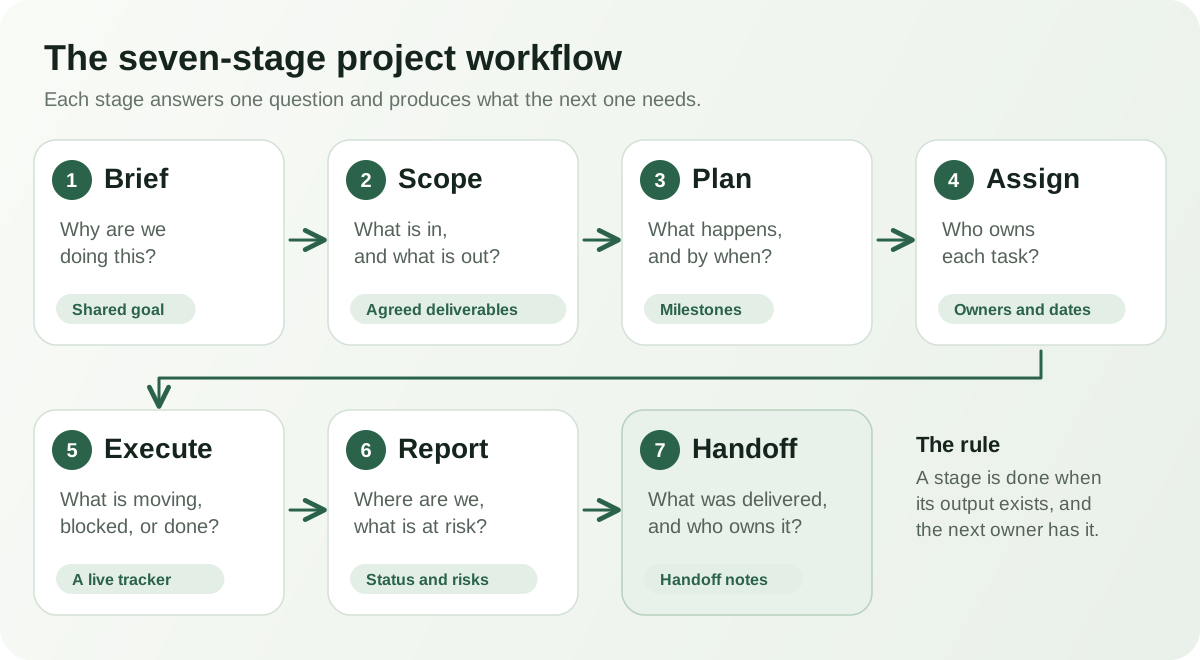
Each stage answers one question and produces something the next stage depends on. If a stage does not produce its output, the next one starts on shaky ground.
Stage 1: Brief
The brief captures why the project exists, who it is for, what success looks like, and the known constraints such as budget and deadline. It can be one page. The test of a good brief is that two people reading it would describe the project the same way.
When the project is for a client, the brief often grows out of a proposal. A project proposal is one way to settle the goal and terms before work starts.
Stage 2: Scope
Scope turns the brief into what will and will not be delivered. Write down the deliverables, the boundaries, the assumptions, and how changes will be handled. Undefined scope is the most common source of quiet conflict in small projects. A scope of work gives everyone something specific to point back to.
Stage 3: Plan
The plan breaks the scope into milestones, tasks, and dependencies, with a rough timeline. Keep it as simple as the project allows. A short list of milestones with dates is often better than a detailed schedule nobody maintains. A project plan and a project overview give the team a one-page picture of what is happening and why.
Stage 4: Assign
Every task needs one owner and one date. Shared ownership usually means no ownership. This is also where the kickoff belongs: a short meeting to confirm goals, roles, and how you will communicate. A kickoff agenda keeps it focused. Our guide to the client onboarding process covers the client side of the same handoff.
Stage 5: Execute
The team does the work. The workflow’s job here is to keep a single, current list of what is in progress, blocked, and done. A shared project tracker does this well when it has owners, statuses, and due dates. Record risks as they appear in a risk log rather than holding them in memory.
Stage 6: Report
Reporting answers three questions: where are we against the plan, what is at risk, and what do we need from someone. A short, regular project status report beats an occasional long one. Consistency matters more than detail. It is also the stage where scope changes surface, and where you decide whether to accept them.
Stage 7: Handoff and close
Closing is the stage most guides treat lightly and most small teams skip. It should confirm what was delivered, who owns it now, how it is maintained, and what you learned. Handoff notes capture that in one place. A short review of what worked and what did not is what makes the next project better than this one.
Where the handoffs happen
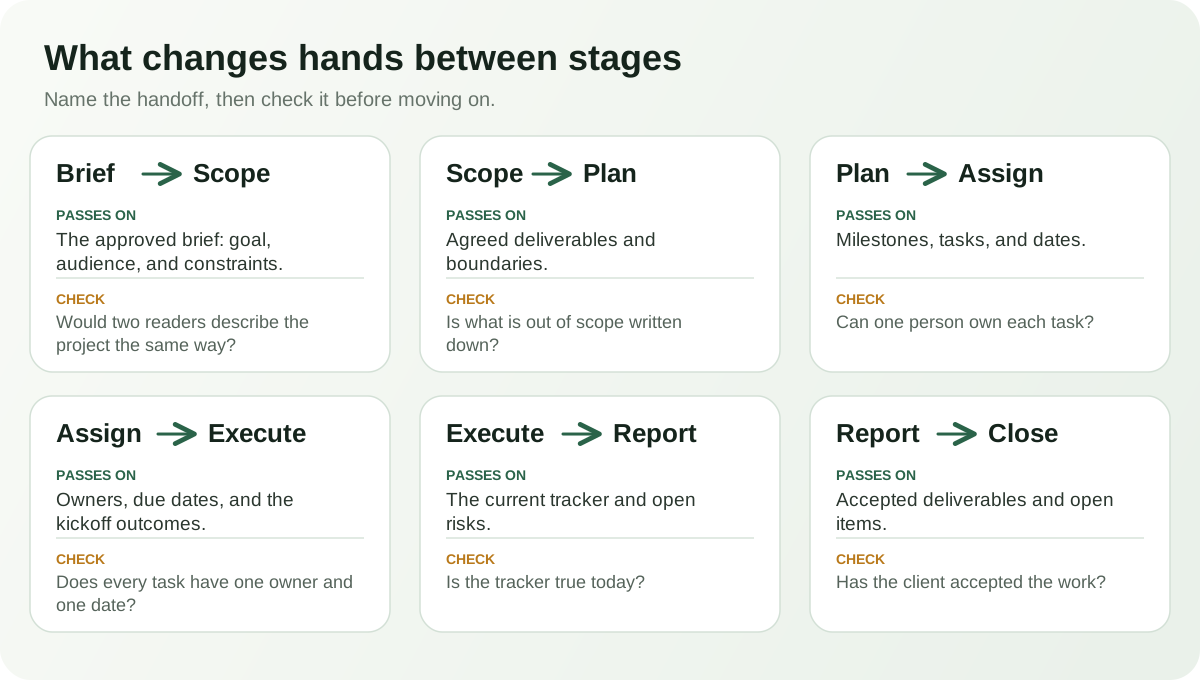
Between each pair of stages, something has to change hands. Naming it turns a vague transition into a checkable one.
A worked example
This is an illustrative scenario, not a real project. Imagine a three-person events company planning a customer open house for a local garden center.
- Brief: The garden center wants a spring open house for existing customers. Success means a full guest list and no surprises on the day.
- Scope: The company will handle invitations, vendors, and the run of show. Décor changes and catering upgrades are listed as extras.
- Plan: Four milestones, from venue confirmed to post-event thank-you, each with a date.
- Assign: One person owns invitations, one owns vendors, one owns the schedule. A twenty-minute kickoff confirms it.
- Execute: Tasks live in one tracker. A vendor delay is logged as a risk on the day it appears.
- Report: A short update goes to the client each Friday. The client asks for an extra vendor, and it is priced as an extra rather than absorbed.
- Handoff and close: Vendor contacts and lessons go into handoff notes. The next open house starts from them.
Nothing here is complicated. The value is in the handoffs: the extra vendor was handled because the scope existed, and the delay was caught because risks had a home.
Common project workflow mistakes
- Starting the plan before the scope is agreed.
- Building a detailed schedule the team will not maintain.
- Tasks with no owner, or with a whole team as owner.
- Status reports written from memory the night before.
- Treating every scope change as a favor rather than a decision.
- Keeping information in three places with no single source.
- Skipping the close, so lessons and access details disappear.
- Adding process for its own sake instead of removing a specific problem.
What to standardize and what to keep flexible
A workflow should remove repeated decisions, not remove judgment. A useful split:
| Standardize | Keep flexible |
|---|---|
| The stages and what each one must produce. | How much detail each stage needs for a small or large project. |
| Where the brief, scope, plan, and tracker live. | The exact tools individuals use for their own tasks. |
| One owner and one date per task. | How the work is done within a task. |
| A regular reporting rhythm and format. | The content of a report when something unusual happens. |
| A close-out with handoff notes. | How long the close-out takes. |
The stages and what each one must produce.
- Keep flexible
- How much detail each stage needs for a small or large project.
Where the brief, scope, plan, and tracker live.
- Keep flexible
- The exact tools individuals use for their own tasks.
One owner and one date per task.
- Keep flexible
- How the work is done within a task.
A regular reporting rhythm and format.
- Keep flexible
- The content of a report when something unusual happens.
A close-out with handoff notes.
- Keep flexible
- How long the close-out takes.
This connects to what to automate. Routine steps such as creating tasks or sending reminders are good candidates. Decisions about scope, priority, and risk are not. Our guide to small business workflow automation goes into the difference.
Project workflow vs. project management software
Software records and displays a workflow. It does not create one. A team with unclear scope and no owners will have unclear scope and no owners in any tool, only with more columns. Decide the stages, the outputs, and the handoffs first, then pick tools that fit them.
Dedicated project management software becomes worthwhile when you need features such as complex dependencies, resource planning, or time tracking across many concurrent projects. For a small team running a handful of projects, a shared tracker, a few documents, and clear ownership often go a long way. See our guide to choosing an AI office suite for how to weigh a connected workspace against separate tools.
How ZuffSuite supports project work
ZuffSuite provides the documents and trackers in this workflow as templates, so each stage has a starting point: the proposal, scope of work, project plan, overview, tracker, risk log, status report, kickoff agenda, and handoff notes linked above.
The Project Management Business Kit assembles several of them into one workspace: a Project Tracker in a Smart Table, a Project Overview, a Project Plan, Meeting Notes, a Risk & Issue Log, and starter project tasks. It is designed around a shared tracker, so a second project adds its own rows rather than creating a second tracker.
Here is what it does not do. Project details in the overview and risk log come from the tracker, and you refresh them when they change. Editing a document does not update the tracker, and completing a task does not update a document. Action items in meeting notes can be turned into tasks, but only when you choose to. The kit gives the workflow a shared home. The stages, the owners, and the decisions are still your team’s.
If you plan to use AI to summarize updates or check documents, our guide to AI document assistants covers what to test first.
Frequently asked questions
What are the stages of a project management workflow?
Different sources name them differently. A practical version for small teams is brief, scope, plan, assign, execute, report, and hand off. Traditional frameworks group similar work as initiating, planning, executing, monitoring, and closing.
How detailed should a small-business project plan be?
As detailed as your team will keep current. For many projects that means milestones with dates and a task list with owners. Add detail only where a delay would be costly.
Who should own a project?
One named person, even if several people do the work. That person keeps the tracker current, runs the status rhythm, and is the client’s single contact.
How often should I report project status?
Pick a rhythm that fits the project’s pace and stick to it. Weekly works for many small projects. Consistency and a clear format matter more than the interval.
Do I need project management software?
Not necessarily. Clear stages, owners, and a shared tracker can be enough for a small team. Consider dedicated software when you outgrow that with complex dependencies or many concurrent projects.
What should a project handoff include?
What was delivered, who owns it now, where the files and access details are, how it is maintained, open items, and what the team learned. Write it while the details are still fresh.