Practical guide 2026
How to Track Marketing Campaigns in a Spreadsheet (Free Template + Step-by-Step Guide)
A simple campaign tracker puts the goal, budget, activity, results, and next decision in one place. Use this step-by-step guide and free workbook to compare campaigns without mistaking a spreadsheet for perfect attribution.

To track marketing campaigns in a spreadsheet, give each campaign one row, set a clear goal and reporting period, then record its budget, actual spend, activity, results, and the next action. A few formulas can calculate click-through rate, cost per result, and budget variance. The tracker helps you compare work consistently; it does not collect data from your analytics or ad accounts automatically.
This guide includes a tested Excel workbook, a realistic three-channel example, and formulas you can use in Excel, Google Sheets, or a similar spreadsheet. The free file downloads directly with no email or account required.
What Is a Marketing Campaign Tracking Spreadsheet?
A marketing campaign tracking spreadsheet logs what you planned, spent, achieved, and learned. It suits freelancers, creators, and small teams comparing work across channels. Use one row for a campaign and a defined reporting period.
Keep three jobs distinct. A marketing plan sets audience, objectives, channels, and budget. A content calendar schedules individual posts, emails, or articles. A campaign tracker measures spend, activity, outcomes, and lessons. A social media calendar manages individual posts; the tracker records the broader campaign result.
What to Track in a Campaign Spreadsheet
Start with the fields that let you identify the campaign and compare its result with its goal. Add detailed measures only when they help you make a decision.
| Field | What to enter | Why it helps |
|---|---|---|
| Campaign name | Short initiative name. | Identifies the effort. |
| Channel | Email, social, paid search, referral, or another source. | Shows where it ran. |
| Objective | Awareness, traffic, leads, sales, or retention. | Defines success. |
| Start and end dates | Dates in the reporting period. | Keeps periods comparable. |
| Planned budget | Approved or planned amount. | Sets a spending target. |
| Actual spend | Direct cost incurred in the period. | Shows the real outlay. |
| Impressions or reach | The channel’s defined exposure measure. | Adds context to clicks. |
| Clicks | Visits or link clicks, consistently defined. | Measures response. |
| Leads or conversions | One result type, such as qualified leads. | Connects activity to the goal. |
| Attributed revenue | Revenue credited by a stated method, if available. | Keeps attribution limits visible. |
| Status | Planned, active, paused, or complete. | Shows current state. |
| Results and lessons | Observation and next action. | Guides the next test. |
Campaign name
- What to enter
- Short initiative name.
- Why it helps
- Identifies the effort.
Channel
- What to enter
- Email, social, paid search, referral, or another source.
- Why it helps
- Shows where it ran.
Objective
- What to enter
- Awareness, traffic, leads, sales, or retention.
- Why it helps
- Defines success.
Start and end dates
- What to enter
- Dates in the reporting period.
- Why it helps
- Keeps periods comparable.
Planned budget
- What to enter
- Approved or planned amount.
- Why it helps
- Sets a spending target.
Actual spend
- What to enter
- Direct cost incurred in the period.
- Why it helps
- Shows the real outlay.
Impressions or reach
- What to enter
- The channel’s defined exposure measure.
- Why it helps
- Adds context to clicks.
Clicks
- What to enter
- Visits or link clicks, consistently defined.
- Why it helps
- Measures response.
Leads or conversions
- What to enter
- One result type, such as qualified leads.
- Why it helps
- Connects activity to the goal.
Attributed revenue
- What to enter
- Revenue credited by a stated method, if available.
- Why it helps
- Keeps attribution limits visible.
Status
- What to enter
- Planned, active, paused, or complete.
- Why it helps
- Shows current state.
Results and lessons
- What to enter
- Observation and next action.
- Why it helps
- Guides the next test.
Start with name, channel, objective, period, budget, spend, result, and status. Add measures only when you can define them consistently. Notes can explain a change that the numbers do not.
How to Track Marketing Campaigns Step by Step
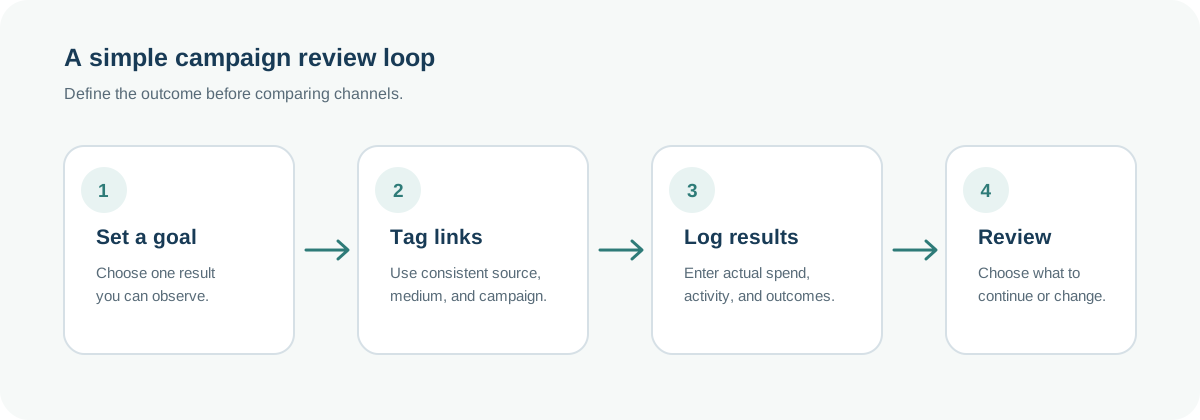
- Choose one outcome. Define the intended result—qualified leads, sales, registrations, or customer reach—and write it in Objective.
- Pick a few measures. A lead campaign might track clicks, leads, cost per lead, and spend; an awareness effort may use reach and engagement.
- Create one row for the campaign and period. Add its name, channel, dates, and planned budget. For longer efforts, repeat the same weekly or monthly period.
- Tag website links. Use consistent UTM names for source, medium, and campaign, then keep the final tagged URL with the row.
- Record activity and actual spend. Copy counts and costs from each channel. Separate paid media spend from other direct costs for ROAS.
- Add the result and its definition. Enter leads, purchases, registrations, or another outcome that matches the objective. Note the source and attribution window used; do not silently mix a platform's attributed conversions with your CRM's closed sales.
- Review formulas and notes. Check click rate, conversion rate, cost per result, and budget variance. Leave measures blank when they do not apply or have not arrived.
- Choose a next action. Continue, adjust, pause, or test one change. Record the reason, decision, and owner.
The free workbook below follows this flow. Yellow cells are inputs, blue cells calculate from those inputs, and the summary sheet reads from the blank Campaign Tracker. The Completed Example sheet shows the same formulas with fictional values.
Marketing Campaign Tracking Spreadsheet Example
Suppose a small service business promotes a new consultation offer for two weeks through email, organic social, and paid search. The figures below are fictional and illustrative. “Conversions” means consultation leads in this example; it does not mean every lead became a paying customer.
| Channel | Planned budget | Actual spend | Clicks | Leads | Attributed revenue |
|---|---|---|---|---|---|
| Email newsletter | $250 | $120 | 160 | 16 | $1,280 |
| Organic social | $300 | $90 | 170 | 9 | $720 |
| Paid search | $800 | $760 | 600 | 30 | $4,500 |
Email newsletter
- Planned budget
- $250
- Actual spend
- $120
- Clicks
- 160
- Leads
- 16
- Attributed revenue
- $1,280
Organic social
- Planned budget
- $300
- Actual spend
- $90
- Clicks
- 170
- Leads
- 9
- Attributed revenue
- $720
Paid search
- Planned budget
- $800
- Actual spend
- $760
- Clicks
- 600
- Leads
- 30
- Attributed revenue
- $4,500
Planned budget totals $1,350 and actual spend $970. Paid search has the most leads, with a $25.33 cost per lead; email is $7.50 and social is $10. These figures can guide a test, but they do not prove which channel caused each sale. Lead quality and attribution rules matter.
Being under budget does not make email or social better; objectives and audiences differ. Check lead quality and the revenue window before keeping the same mix. This table supports comparison, not causal conclusions.

For a closer look, open the full-width workbook screenshot.

Spreadsheet Formulas for Campaign Tracking
Row 8 is the first campaign row: F:L hold budget, spend, ad spend, reach, clicks, results, and attributed revenue. M:R calculate the measures below. Fill each formula down; missing inputs and zero denominators return blank.
| Metric | Formula for row 8 | Example |
|---|---|---|
| Click-through rate (CTR) | =IF(OR(I8="",I8=0,J8=""),"",J8/I8) | Clicks ÷ impressions or reach. |
| Conversion rate | =IF(OR(J8="",J8=0,K8=""),"",K8/J8) | Leads ÷ clicks. |
| Cost per click (CPC) | =IF(OR(H8="",H8=0,J8="",J8=0),"",H8/J8) | Paid ad spend ÷ clicks. |
| Cost per result | =IF(OR(G8="",K8="",K8=0),"",G8/K8) | Actual campaign spend ÷ results. |
| Budget variance | =IF(OR(F8="",G8=""),"",G8-F8) | Actual spend − planned budget; positive is over. |
| Return on ad spend (ROAS) | =IF(OR(L8="",H8="",H8=0),"",L8/H8) | Attributed revenue ÷ paid ad spend. |
Click-through rate (CTR)
- Formula for row 8
- =IF(OR(I8="",I8=0,J8=""),"",J8/I8)
- Example
- Clicks ÷ impressions or reach.
Conversion rate
- Formula for row 8
- =IF(OR(J8="",J8=0,K8=""),"",K8/J8)
- Example
- Leads ÷ clicks.
Cost per click (CPC)
- Formula for row 8
- =IF(OR(H8="",H8=0,J8="",J8=0),"",H8/J8)
- Example
- Paid ad spend ÷ clicks.
Cost per result
- Formula for row 8
- =IF(OR(G8="",K8="",K8=0),"",G8/K8)
- Example
- Actual campaign spend ÷ results.
Budget variance
- Formula for row 8
- =IF(OR(F8="",G8=""),"",G8-F8)
- Example
- Actual spend − planned budget; positive is over.
Return on ad spend (ROAS)
- Formula for row 8
- =IF(OR(L8="",H8="",H8=0),"",L8/H8)
- Example
- Attributed revenue ÷ paid ad spend.
Email returns 4% CTR, 10% conversion, and $7.50 per lead. Paid search returns $1.17 CPC, $25.33 per lead, −$40 variance, and 6.43x ROAS ($4,500 ÷ $700). Email and social CPC and ROAS are blank because they have no ad spend.
Download the Free Marketing Campaign Tracker
Download the blank workbook to try the steps with your own campaign data. It is a direct .xlsx file with no email form or account gate. Open it in Excel, or upload the file to Google Sheets and save a working copy.
Free Excel workbook
A ready-to-use campaign tracker for Excel
Plan campaigns, record actual spend and outcomes, and review a compact performance summary. The blank tracker is ready for your own records; a separate sheet demonstrates how the formulas work.
- Four sheets: Start Here, Campaign Tracker, Completed Example, and Performance Summary
- 200 campaign rows with dropdowns for channel, objective, and status
- Formulas for CTR, conversion rate, CPC, cost per result, budget variance, and ROAS
- Blank-safe formulas, readable input and calculation colors, and no macros or external links
Free .xlsx file · No email required · Excel and Google Sheets
Prefer an editable workbook inside your account? ZuffSuite Marketing Campaign Tracker
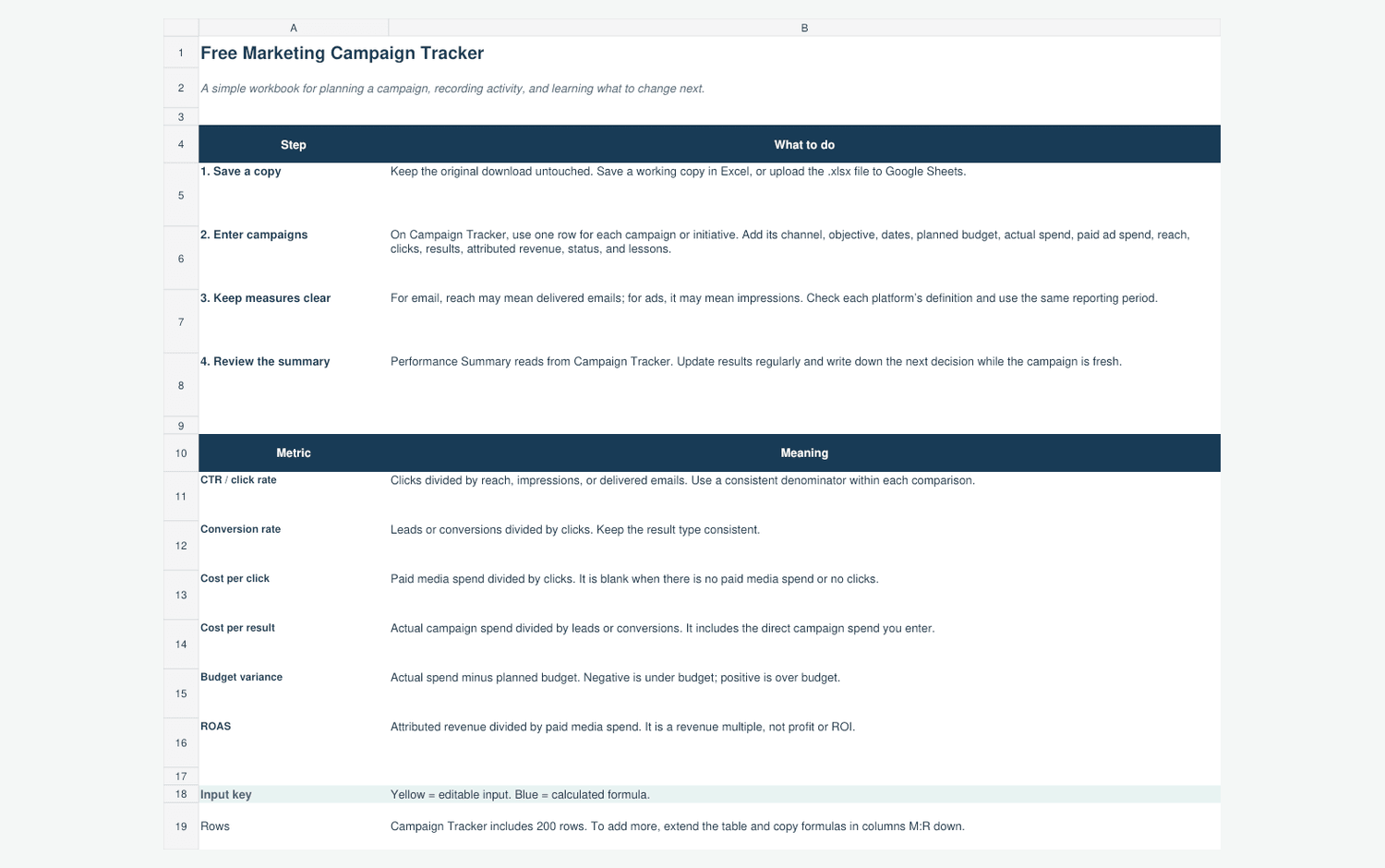
Start on Start Here, then enter your own information in the yellow cells on Campaign Tracker. Use one currency and a consistent reporting period. Keep the Completed Example as a reference, and review Performance Summary after you add rows. To extend beyond 200 campaigns, expand the table and copy the formulas in columns M:R.
How to Track Campaigns Using ZuffSuite
The ZuffSuite Marketing Campaign Tracker template covers dates, owner, budget, spend, leads or results, status, and notes. Its public page shows a ten-column preview and three sample rows. Open in Sheets starts an editable workbook after sign-in. The workbook has formula totals; the preview shows those formulas as authored.
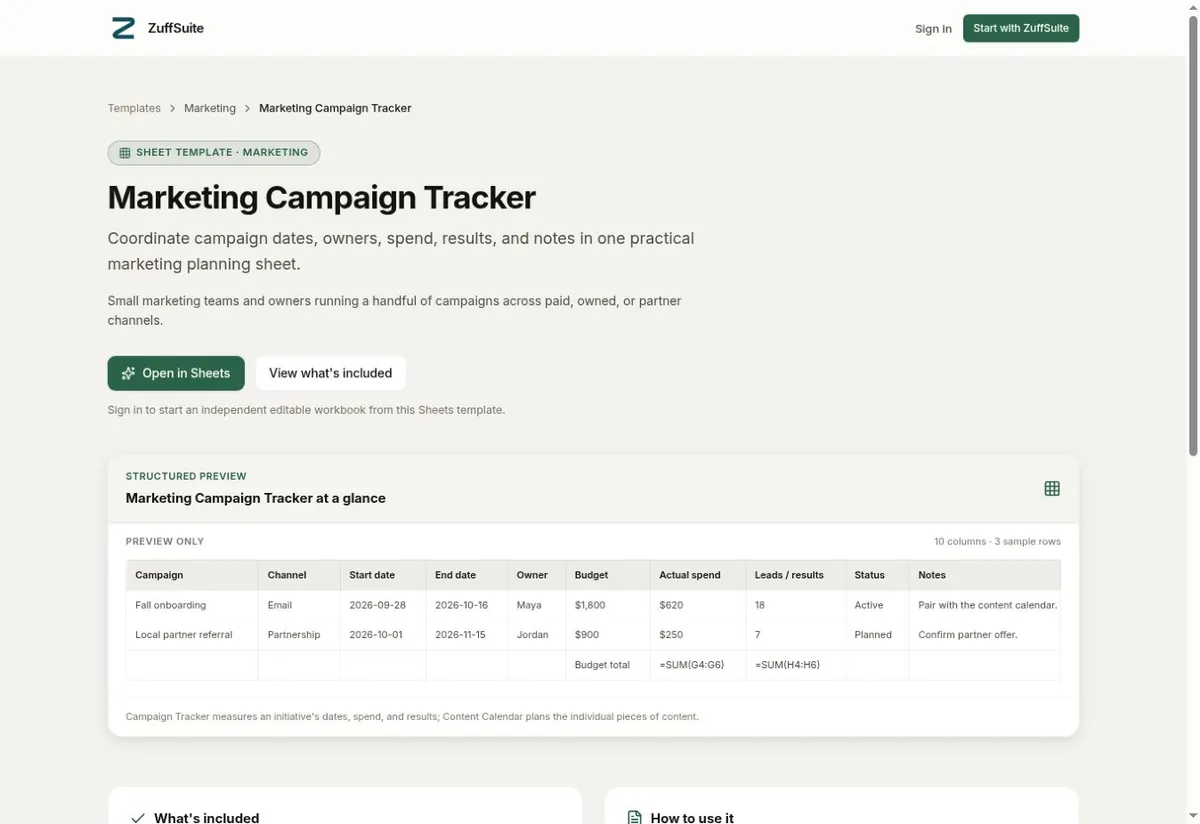
Use the direct download for a standalone file. Choose the ZuffSuite template to start an editable workbook after sign-in. Its page distinguishes a campaign tracker from a Content Calendar, which organizes individual content pieces. ZuffSuite Sheets supports formula cells, including the template's totals; the template page does not claim a live Google Analytics or advertising-platform connection.
For a small set of business measures, the KPI Dashboard template organizes targets, current and prior results, and variance. It is a separate view, not an automatic campaign report.
Common Marketing Tracking Mistakes
- Tracking every available metric. Keep the measures that inform the campaign goal; extra numbers can hide the result you need to review.
- Mixing reporting periods. Compare the same number of days, and note when a campaign started or ended partway through a period.
- Comparing unlike objectives. Brand awareness, sign-ups, and sales need different primary results. Do not rank them on cost per lead alone.
- Using planned budget as if it were actual spend. Record the amount spent from the source system, and keep one-time production or setup costs visible.
- Treating every conversion as a sale. A click, form submission, qualified lead, and completed purchase are different outcomes; name the one in the row.
- Assuming attribution is complete. Analytics platforms use defined attribution methods and may not see every path, offline conversation, or later purchase.
- Letting the tracker go stale. Set a weekly or monthly review that matches campaign pace, then enter the decision and owner while the context is fresh.
For website links, add relevant campaign parameters such as utm_source, utm_medium, and utm_campaign so Analytics can identify campaign traffic. Use consistent names and store the tagged URL in your row. UTM tags label links; they do not fill the spreadsheet automatically.
Frequently Asked Questions
How do you track marketing campaigns in Excel?
Use one row per campaign and period. Enter goal, dates, channel, budget, spend, and results; calculate click rate and cost per lead, then note the next action.
What metrics should I track for a marketing campaign?
Choose the objective and one primary outcome. Add supporting measures such as reach, clicks, leads, spend, and attributed revenue only when definitions and periods match.
Can I use Google Sheets to track marketing campaigns?
Yes. Upload the .xlsx file to Google Drive and open it in Sheets, or create the same columns from scratch. Check formulas, dates, and dropdowns after import.
How often should I update a marketing tracker?
Match the cadence to campaign pace: review active paid campaigns weekly and slower content or partnerships monthly. Keep comparison periods consistent.
How can a small business measure marketing performance?
Connect a goal to an observable result, such as qualified inquiries or bookings. Record cost and period, then decide whether to continue or change. State how attributed revenue was measured.
What is the difference between a campaign tracker and a content calendar?
A campaign tracker summarizes an initiative's goal, budget, results, and status. A content calendar schedules the individual assets, owners, and publishing dates that may support that campaign. A team can use both and connect them with the same campaign name.
Start Tracking Campaigns with a Clear Next Step
Choose one goal, keep your definitions consistent, and write down what you will change after the next review. Download the free campaign tracker to start with a tested workbook, or explore the ZuffSuite Marketing Campaign Tracker template if you want an editable copy inside ZuffSuite after signing in.
Keep exploring
More guides for your work
Freelancer invoicing guide Oct 16, 2026
How to Invoice a Client as a Freelancer: Steps, Example & Email Template
A practical freelance invoicing workflow, from agreeing on the scope to sending the invoice, tracking payment, and following up without making the conversation awkward.
Read the guide
Freelance template Oct 7, 2026
Freelance Project Brief Template: Scope, Deliverables, and Open Questions
Copy a practical one-page freelance project brief, see it filled in, and learn how to clarify scope, client inputs, approvals, and open questions before you begin.
Read the guide
Freelance guide Oct 7, 2026
Weekly Client Update Template for Freelancers
A practical weekly client update template, five messages for real project situations, and a simple routine for sending clear client updates without rewriting the same email every Friday.
Read the guideA workspace for what comes next
Give your next project one clear home.
Keep notes, documents, tasks, and presentation work together in a personal workspace. Share something when you choose.